

Quick answer: “intrinsic gas too low” means the gas limit on your transaction is smaller than the minimum gas the network charges before any smart contract code even runs: 21,000 for a plain transfer, plus more for every byte of data. The node rejects the transaction before broadcasting it, so no fee is charged. To fix it, remove any custom gas limit and let your wallet re-estimate, or raise the limit above the “minimum needed” number shown in the error.
You’ll see this error in MetaMask, Rabby, ethers.js, viem, Hardhat or Foundry on Ethereum and on EVM chains such as Core (chain ID 1116). This guide explains what “intrinsic gas” is, the usual causes, and how to fix each one. It also covers a close relative of the error that has appeared since the 2025 Prague upgrade.
What “intrinsic gas” actually means
Every EVM transaction has a fixed up-front cost that depends only on what the transaction is, not on what it does when it runs. Clients such as go-ethereum (geth) call this the intrinsic gas. Before a node accepts a transaction into its mempool, it checks that the gas limit covers this amount. If it doesn’t, the node returns error code -32000 with the message intrinsic gas too low.
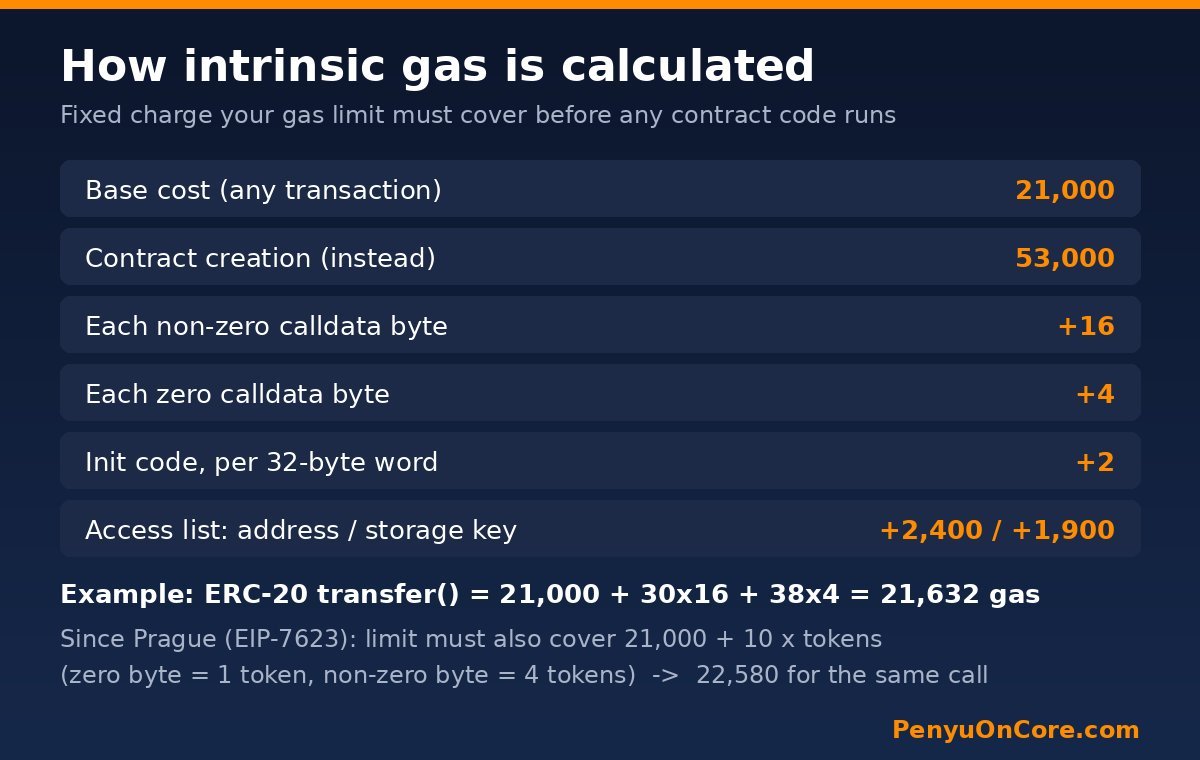
The intrinsic cost is built from a few fixed parameters. These come from geth’s protocol parameters, and the same values appear in Core’s own client, core-chain:
| Component | Gas cost | Defined in |
|---|---|---|
| Base cost of any transaction | 21,000 | Original protocol |
| Contract creation (instead of 21,000) | 53,000 | Homestead |
| Each zero byte of calldata | 4 | Original protocol |
| Each non-zero byte of calldata | 16 | EIP-2028 |
| Each 32-byte word of contract init code | 2 | EIP-3860 |
| Each access-list address / storage key | 2,400 / 1,900 | EIP-2930 |
A simple coin transfer with no data needs exactly 21,000 gas. Ethereum’s own gas documentation uses 21,000 as its example, and Core’s public RPC returned 0x5208 (21,000) when we called eth_estimateGas for a plain CORE transfer on 15 November 2026. Anything that carries calldata, such as a token transfer, a swap or an approval, needs more than 21,000 before it even starts executing.
A worked example on Core
To check the numbers, we signed test transactions from a brand-new, unfunded throwaway address and sent them to Core’s public RPC (https://rpc.coredao.org) on 15 November 2026. Nothing was broadcast or spent:
- A plain transfer with a 20,000 gas limit was rejected with
intrinsic gas too low: gas 20000, minimum needed 21000. - An ERC-20
transfer()call with a 21,000 gas limit was rejected withintrinsic gas too low: gas 21000, minimum needed 21632. Its 68 bytes of calldata contained 30 non-zero bytes (30 × 16 = 480) and 38 zero bytes (38 × 4 = 152), which adds 632 to the 21,000 base.
The key detail: the error tells you the exact minimum. Look for the “minimum needed” or “want” number in the full error text.
The related error: “insufficient gas for floor data gas cost”
When we raised that same token transfer to 21,700 gas, it passed the intrinsic check. It then failed with a different message: insufficient gas for floor data gas cost: gas 21700, minimum needed 22580. This comes from EIP-7623, part of the Prague upgrade. It sets a minimum price for calldata of 21,000 + 10 gas per “token”, where each zero byte counts as 1 token and each non-zero byte counts as 4. Per the EIP, a transaction’s gas limit must cover whichever is higher: the intrinsic cost or this floor.
Core’s mainnet config in the core-chain repository activates Prague at the same timestamp as its Hermes upgrade (25 November 2025, 08:00 UTC), so this floor applies on Core too. The fix is the same as for the intrinsic error, which is why both are covered here.
Common causes
1. A manually lowered or reused gas limit
This is the most common cause. Someone types 21,000 into the gas limit field because “that’s what a transfer costs”, then uses it for a token transfer, swap or approval. Those transactions carry calldata, so 21,000 is never enough.
2. A dApp-suggested limit that doesn’t fit after editing fees
When a dApp suggests a gas limit, MetaMask keeps that value even if you edit the fee settings. The reply in GitHub issue #32666, where users hit “intrinsic gas too low” on Arbitrum, described this as expected behaviour. If the dApp’s number is too low, your edits to the fee won’t fix it.
3. Extra data on a “simple” transfer
If you add hex data (a memo or message) to a native coin transfer, every byte adds gas on top of the base cost. A 21,000 limit is only enough for transfers with no data at all.
4. Hardcoded limits in scripts and bots
For developers, the usual culprit is a fixed gasLimit in code or config. That value worked once and breaks when the calldata grows, for example with longer arrays, bigger payloads or contract deployments, which start at 53,000.
5. Chain-specific gas models
On some Layer 2s, the gas limit also has to cover the L1 data cost. Arbitrum’s troubleshooting docs say this error there usually means the limit doesn’t cover the L1 part of the fee. On Core, the standard geth rules above apply.
How to fix “intrinsic gas too low” in MetaMask
- Reject the stuck confirmation and start again. The transaction was never broadcast, so there’s nothing to cancel on-chain and nothing was charged.
- Don’t type a custom limit. In current MetaMask versions, the fee row has a pencil (edit) icon. Choose a preset such as Market and leave the gas limit as MetaMask estimates it. MetaMask’s gas settings guide describes these options. Menu names can vary between versions.
- If you must edit it, open Advanced and set the gas limit comfortably above the “minimum needed” figure from the error. You only pay for gas actually used, but a higher limit does raise the maximum fee your balance has to cover.
- Check your balance. A higher limit raises the maximum fee. If the balance can’t cover it, you’ll get our insufficient funds for gas error instead. On Core, see how to get CORE for gas fees.
- Try the dApp’s flow again after refreshing the page. If the dApp keeps suggesting a too-low limit, report it to the dApp team.
Raising the gas limit only fixes intrinsic or floor errors. If the error changes to execution reverted, the problem is in the contract logic itself. See our guide to the execution reverted error.
How developers should fix it
- Estimate, don’t hardcode. Remove fixed
gasLimitvalues and let the library calleth_estimateGas. Both ethers.js and viem do this automatically when you leave the gas field out. Make sure your RPC endpoint runs an up-to-date client so its estimates include the EIP-7623 floor. - Add a small buffer to estimates if state can change between estimation and sending, but never go below the estimate.
- Check tool configs. In Hardhat, check the
gasfield in your network config. In Foundry, check any--gas-limitflag passed tocast sendor scripts. - Read the full error. Geth-based nodes, including Core’s, include “have/want” or “gas/minimum needed” values. They tell you exactly how short you are.
FAQ
Did I lose gas fees because of this error?
No. The node rejects the transaction before it enters the mempool, so it’s never mined and no fee is paid. That’s different from an “out of gas” failure, where the transaction is mined and the gas is used up.
Is 21,000 gas enough to send a token?
No. 21,000 covers only a native coin transfer (ETH, CORE and so on) with no data. Token transfers carry calldata, and they also run contract code, so they need more.
Why does the error appear even with a high gas price?
Because the check is about the gas limit (units), not the gas price (gwei). Raising max fee or priority fee won’t help. Only a higher limit will.
How do I check a transaction’s gas limit on Core?
Look it up on Core Scan. Our Core Scan guide shows where to find the gas limit and gas used, which you can compare with a similar successful transaction.
Disclaimer: This article is for general educational purposes only and is not financial or investment advice. Always double-check transaction details before signing, and only use wallets and dApps you trust.