
Quick answer: Redbubble pays artists once a month. Your earnings from orders that shipped during one calendar month are processed at the start of the next month, and Redbubble says the money should reach your PayPal or bank account by the 15th. You only get paid if your balance after fees is at least $10 / £10 / €10 (lowered from $20 on July 1, 2026) and your payment details are valid.
That sounds simple, but a lot of artists still get caught out by it. A sale made on the 30th might not be paid until six weeks later. Account fees can push a balance under the threshold. A PayPal setting can leave your money sitting unclaimed. This guide explains how the Redbubble payout schedule works in 2026, what comes out of your earnings first, and what to check when a payment is late. Everything here comes from Redbubble’s own help center as of November 2026.
How the Redbubble pay cycle works
Redbubble’s “When do I get paid?” page describes a single monthly pay run:
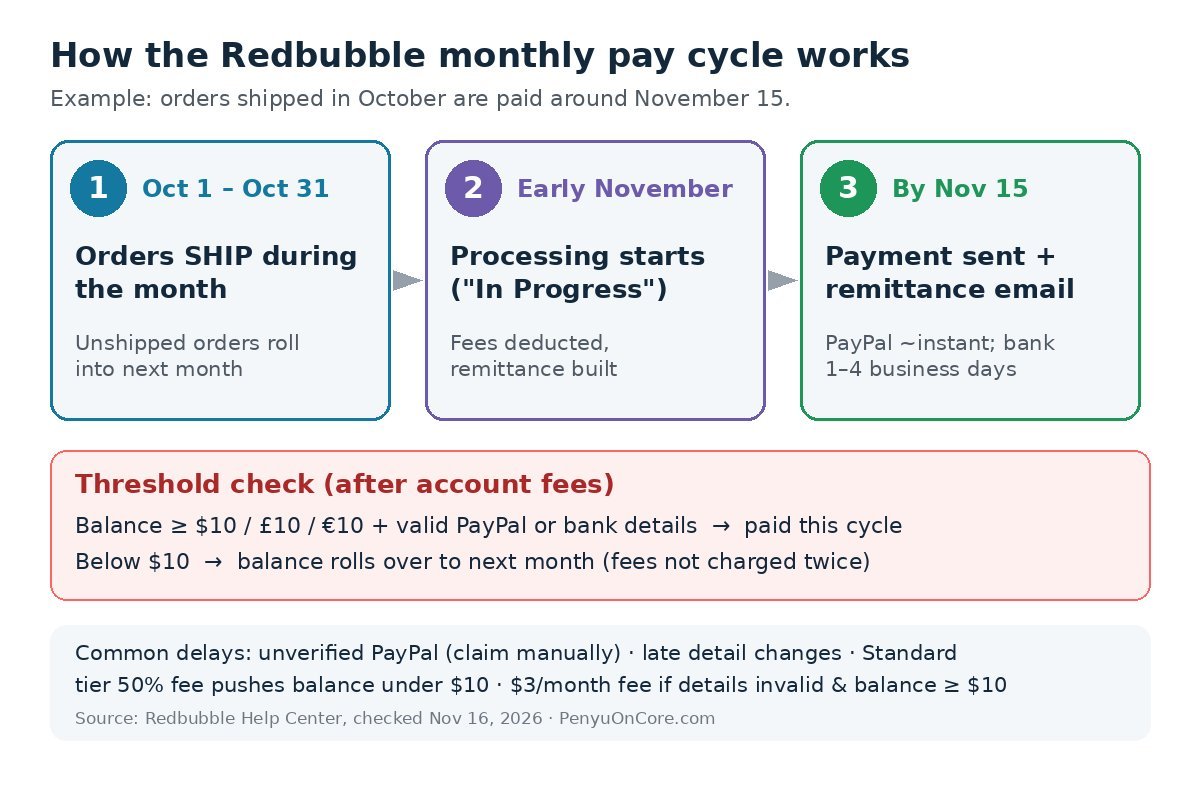
- The payment period is a calendar month of shipped orders. What counts is when an order ships, not when the customer places it. Orders that haven’t shipped by the end of the month move into the next month’s cycle, and orders canceled before shipping aren’t paid at all.
- Processing starts at the beginning of the next month. Redbubble calculates your earnings, deducts any account fees, and builds your remittance. Your Payment History page shows “In Progress” during this step. Redbubble’s processing-times article notes that “In Progress” does not mean the money has been sent yet.
- Payments go out on the 15th. Redbubble starts sending payments on the 15th and emails you a remittance with the details. It says you should see the money by the 15th, depending on your payment method.
Example: a sticker order placed on October 29 that ships on October 31 falls into the October period, so it’s processed in early November and paid around November 15. If the same order didn’t ship until November 1, it would wait for the mid-December payment instead.
How long each payment method takes
Redbubble only pays artists by PayPal or bank transfer, and it doesn’t support Payoneer. The currency you pick when you set up your account decides which options you get, and Redbubble’s PayPal setup guide warns that the currency can’t be changed later. Its payment-details help page lists the options for each currency:
| Payout currency | PayPal | Bank transfer | Bank lead time after release |
|---|---|---|---|
| US dollars (USD) | Yes | Yes (ACH) | 1–3 business days |
| British pounds (GBP) | Yes | Yes (BACS) | 2–4 business days |
| Australian dollars (AUD) | Yes | Yes (EFT) | 1–2 business days |
| Euros (EUR) | Yes | No | PayPal only |
| Canadian dollars (CAD) | Yes | No | PayPal only |
Redbubble describes PayPal payments as “nearly instantaneous” when your account is set up correctly. Banks generally don’t process payments on weekends or public holidays, so a 15th that falls on a Saturday can mean a bank deposit arrives a few days later.
The $10 payment threshold (and why you might not reach it)
According to Redbubble’s payment threshold page, the minimum payout dropped from $20 / £20 / €20 to $10 / £10 / €10 starting July 1, 2026. The threshold is measured on orders shipped in the previous month after account fees are taken off. If you come in under it, your balance rolls over and keeps building until a later month gets you over the line.
Two details are worth knowing:
- Rolled-over earnings aren’t charged twice. Redbubble says it only charges fees on new earnings each period, not on the balance carried forward.
- Multiple shops can’t be combined. Each account has to reach the threshold on its own, and Redbubble limits how often bank details can be reused across accounts.
What comes out before you’re paid: account fees
Your payout is your artist margin, the markup you add on top of Redbubble’s base price. The default markup is 10%. Redbubble’s payment calculation guide gives this example: a Classic T-shirt shipping to the US has a $20 base price, so a 20% markup earns you $4 before fees. On top of that, every artist is placed in an account tier, and the tier decides the monthly fee:
- Standard: 50% platform fee on monthly gross earnings.
- Premium: 20% platform fee.
- Pro (invite-only, top 1% of artists): no platform fee.
Standard and Premium artists also pay a 50% excess markup fee on earnings from any product with a markup above 20%. Combined fees are capped at $150 / £150 / €150 per payment period, and anything above the cap is credited back. Fees only apply in months when you make sales, and they’re never charged out of pocket. The tier you hold at the time of the pay run sets the rate for the whole month.
On a Standard account, a 50% fee can easily turn a $15 month into a balance under $10. That’s one of the most common reasons a payout doesn’t come, even when sales show up in your dashboard.
If you’re comparing Redbubble with selling your own files directly, our guide to Etsy fees for digital downloads walks through a very different fee model.
The $3 Unpayable Artist Account Fee
This one is newer and easy to miss. Redbubble charges an Unpayable Artist Account Fee of $3 / £3 / €3 per month when your balance is $10 / £10 / €10 or more and your payment details are invalid or incomplete. It’s taken from your balance every month until you fix your details. Once you add a valid PayPal account or a UK, Australian or US bank account, the fee stops and you’re paid in the next monthly pay run. If you have an old shop with money sitting in it, log in and check your payment details.
Redbubble payment late? Check these first
- Did the orders ship last month? Unshipped orders move to the next cycle.
- Did your balance clear $10 after fees? Check Account Balance on your Payment History page and the Earnings Details page.
- Is PayPal verified and the payment claimed? Redbubble’s failed PayPal payment guide says an unverified PayPal account means claiming the payment manually. Look under Summary > Pending in PayPal and click Approve. Unclaimed payments go back to your Redbubble balance after 30 days.
- Is your PayPal account limited? PayPal rejects payments to restricted accounts, and Redbubble marks your account unpayable. Update your details before month-end so the payment is retried in the next cycle.
- Did you change details too late? Changes need to be made before the end of the month to count for the next pay run.
- Is the account suspended? Suspended accounts have their balance frozen under the User Agreement.
For a contrast with platforms that pay faster, see our Gumroad payout schedule and Patreon payout schedule guides.
Taxes: Redbubble doesn’t send a 1099
Redbubble doesn’t issue tax forms to independent artists. Instead it points you to your Sales History, which you can download as a CSV. That doesn’t make the income tax-free. In the US, the IRS says payment apps and marketplaces must issue a Form 1099-K when you receive over $20,000 across more than 200 transactions. They may still send one for less, and income has to be reported either way. In the UK, HMRC’s trading allowance covers up to £1,000 of gross trading income a year, though you still need to keep records. Our Form 1099-K explainer for creators covers the US reporting rules in more detail.
FAQ
What day does Redbubble pay?
Payments start going out on the 15th of each month, and Redbubble says you should see the money by the 15th. Bank transfers can take 1–4 business days depending on the country.
What is Redbubble’s minimum payout?
$10, £10 or €10 after account fees, since July 1, 2026. Before that it was $20, £20 or €20.
Can I get paid through Payoneer?
No. Redbubble only pays artists by PayPal or bank transfer, and bank transfer is only available for USD, GBP and AUD payouts.
Why does my payment say “In Progress”?
Redbubble is still calculating that month’s payments. Your money hasn’t been sent yet. You’ll get a remittance email when it is.
This article is for general information only and isn’t tax, legal or financial advice. Redbubble’s fees, thresholds and payout policies can change, so check the linked help-center pages or a qualified tax professional before you make decisions.