
Short answer: To auto-roll T-bills in TreasuryDirect, choose “Schedule Reinvestment” when you buy the bill in BuyDirect, or later go to ManageDirect > Manage My Securities and schedule reinvestments for a bill you already hold. Each roll buys another bill of the same term, and you can line up as much as two years of rolls. You have to do this at least four business days before the bill matures.
People call it “auto-roll”, but TreasuryDirect calls it a reinvestment. If you search the site for “auto-roll” you won’t find the setting. This guide explains where the option is, how many rolls each bill term allows, what happens to the leftover cash on each cycle, and the common reasons a scheduled roll gets cancelled. Every rule below comes from TreasuryDirect’s own help pages, checked on 15 November 2026.
What “auto-roll” means in TreasuryDirect
TreasuryDirect describes a reinvestment as using the proceeds of a maturing bill to buy another bill of the same term. A maturing 52-week bill can only go into another 52-week bill, and a 13-week bill only into another 13-week bill. You can’t use a reinvestment to move from a 4-week bill to a 26-week bill. For that, you let the bill mature and place a new order.
If you don’t schedule anything, the bill is simply redeemed. TreasuryDirect says the principal goes into your designated bank account on the day the bill matures, unless you told it to send the money to your Certificate of Indebtedness (C of I).
Reinvestment is available for bills, notes, bonds and FRNs, but not for TIPS. Bills are the only type that can roll more than once. Notes, bonds and FRNs can be scheduled for a single reinvestment.
How to auto-roll a T-bill: step by step
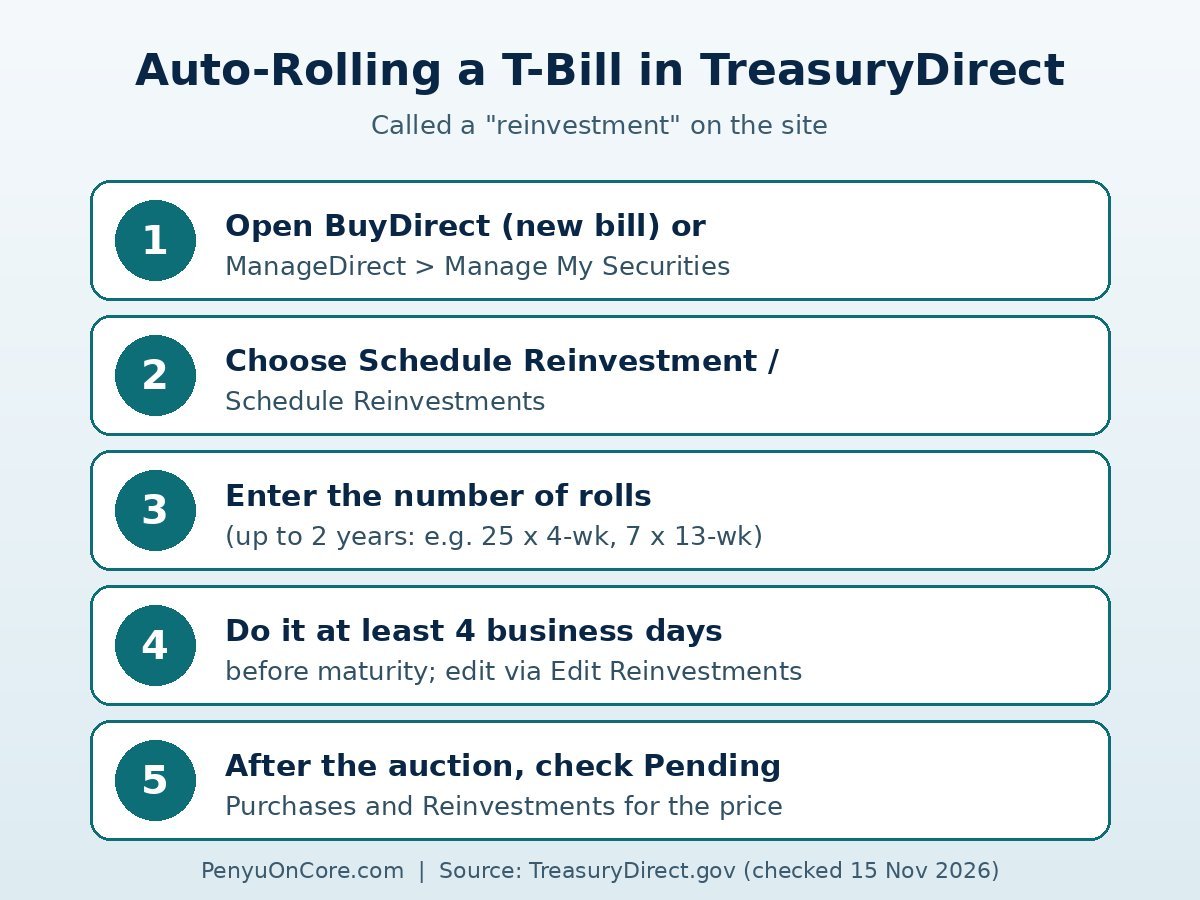
Option 1: When you buy the bill
- Log in to TreasuryDirect and open BuyDirect.
- Choose Bills as the security type and select the term and auction you want. TreasuryDirect sells bills in $100 increments, with a $100 minimum.
- Pick your source of funds, which is your bank account or C of I.
- Under Schedule Reinvestment, choose Yes and enter how many times you want the bill to roll. According to the TreasuryDirect user guide, the page shows the maximum number of reinvestments allowed for that term.
- Review and submit. A review page appears first, then a confirmation page.
Option 2: For a bill you already own
- Log in and go to ManageDirect.
- Open Manage My Securities. Some of TreasuryDirect’s own guides call the link “Schedule Reinvestments”.
- Select the bill and enter the number of reinvestments.
- Submit it no later than four business days before the bill matures.
TreasuryDirect’s older user guide says this option only applies to a security that has no reinvestments scheduled yet. If one is already set up, use Edit Reinvestments to change the count.
Maximum number of rolls for each bill term
Bills can be scheduled for reinvestment for up to two years in total. The official limits are:
| Bill term | Max scheduled reinvestments |
|---|---|
| 4-week | 25 |
| 6-week | 16 |
| 8-week | 10 |
| 13-week | 7 |
| 17-week | 6 |
| 26-week | 3 |
| 52-week | 1 |
Once the last scheduled roll matures, the money is paid to the payment destination you chose for that final maturity, unless you add more reinvestments before the deadline.
Deadlines: the four-business-day rule
The cut-off catches people out. TreasuryDirect says you can schedule a reinvestment, or edit or cancel one, up to four business days before the original bill matures. Its main reinvestment page also says the option closes four business days before the relevant auction. And the user guide adds that you can’t schedule, edit or cancel a reinvestment during a closed book period, or once noncompetitive bids are no longer accepted for the replacement security, whichever comes first.
The wording differs from page to page, so the safe habit is to set or change your rolls at least a week before maturity, not on the last possible day. Weekends and federal holidays don’t count as business days.
What happens to the money on each roll
Bills are sold at a discount and pay face value at maturity, so the maturing bill normally pays more than the new bill costs. The TreasuryDirect user guide says that if you paid for the original bill from your bank, your primary bank account is credited with any refund or debited for any extra payment due on the reinvestment. If you paid from your C of I, the C of I is credited or debited instead.
An illustrative example with hypothetical numbers: a $1,000 bill matures and the replacement $1,000 bill costs $990 at auction. The new bill is funded from the maturing proceeds and roughly the $10 difference is returned to you. The principal keeps rolling and the discount is paid out each cycle. It is not added to the next bill.
Sometimes the new security costs more than the maturing one pays out. TreasuryDirect says this can happen because of accrued interest or other factors, or because you asked it to withhold estimated taxes. In that case, make sure the difference is in your bank account or C of I before the issue date. If the money isn’t there, TreasuryDirect cancels the reinvestment and deposits the maturing proceeds instead.
You can see the auction price of an upcoming roll under ManageDirect > Pending Purchases and Reinvestments once the auction for the new security has taken place.
Why a scheduled roll might not happen
- No matching bill is being issued. TreasuryDirect cancels the reinvestment and deposits the money into your bank account or C of I.
- You didn’t have funds to cover a shortfall by the issue date (see above).
- You transferred the bill. A partial transfer cancels all reinvestments for that security. A full transfer keeps them only if the bill moves to another TreasuryDirect account with the same SSN/EIN, or to your minor linked account. A move to a brokerage account isn’t one of those exceptions. If that’s your plan, see our guide on transferring T-bills from TreasuryDirect to a brokerage.
- The bill is in Legacy Treasury Direct. Legacy securities can’t be reinvested. They must first be moved into a TreasuryDirect account using FS Form 5179, which Treasury must receive at least 10 business days before maturity.
Other rules worth knowing
The C of I change from March 2026
TreasuryDirect says that beginning March 1, 2026, the C of I can no longer be selected as a payment destination, and you can’t move bank money into it through BuyDirect. If your C of I was already set as a payment destination, those payments keep going there, and you can still spend or redeem an existing C of I balance. The C of I pays no interest, so check where your roll refunds actually go.
The 45-day hold
If a reinvestment uses new money on top of the maturing proceeds, you must hold the new security for 45 calendar days before selling or transferring it. A roll fully funded by the maturing bill isn’t subject to this hold.
The reinvestment doesn’t count toward the auction limit
The $10 million noncompetitive limit per auction applies only to new purchases. A reinvestment landing in the same auction doesn’t count against it.
Taxes
T-bill interest is subject to federal tax but exempt from state and local tax. Rolling doesn’t change that, because each maturing bill still earns its own discount. Our guide to the TreasuryDirect 1099 explains where to download your tax form. If you’re weighing alternatives, see SGOV vs a high-yield savings account, an ETF that holds short-term Treasury bills.
Is auto-rolling right for you?
Rolling saves you from placing a new order every few weeks and keeps your cash in the same bill term. The trade-off is that you accept whatever rate each future auction sets, and the term is fixed. If you might need the money on a particular date, set the number of rolls so the last bill matures before then. Or cancel the remaining rolls before the deadline.
FAQ
Can I auto-roll a T-bill into a different term?
No. A bill can only be reinvested into another bill with the same term. To switch terms, let it mature and buy the new term separately.
Can I auto-roll T-bills forever?
Not in one go. Bills can be scheduled for up to two years of reinvestments, for example 25 rolls of a 4-week bill or 7 of a 13-week bill. Before the last roll matures, you can schedule more as long as you’re inside the deadline.
How do I cancel an auto-roll?
Go to ManageDirect > Manage My Securities > Edit Reinvestments, and do it at least four business days before the bill matures (or before the next auction, depending on the TreasuryDirect page). After that, the roll goes ahead.
Can I auto-roll TIPS in TreasuryDirect?
No. TreasuryDirect doesn’t allow reinvestment of TIPS.
Where does the leftover discount go?
It goes to your primary bank account if the original bill was bought from your bank, or to your C of I if it was bought with C of I funds.
Disclaimer: This article is for general information and education only and is not financial, tax or investment advice. TreasuryDirect rules and menus can change, so confirm the details on TreasuryDirect.gov or with a qualified professional before acting.