
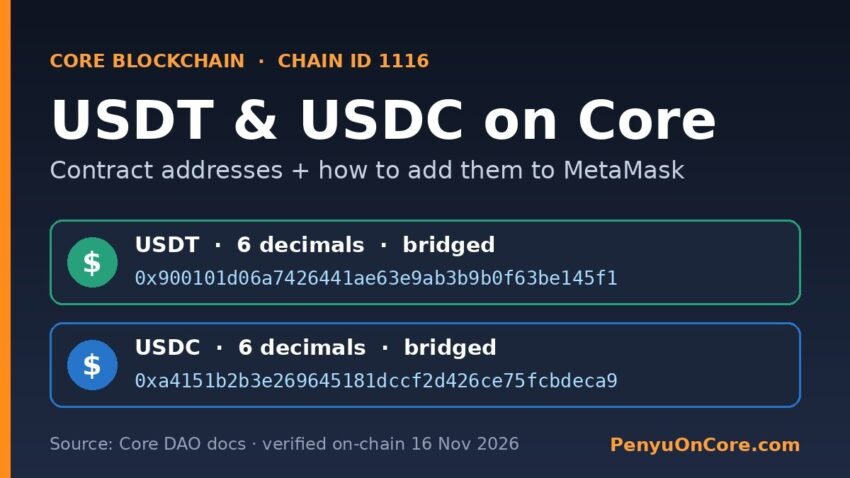
Quick answer: USDT and USDC on Core are bridged tokens, not coins issued directly by Tether or Circle. Core’s official documentation lists the contracts as USDT 0x900101d06a7426441ae63e9ab3b9b0f63be145f1 and USDC 0xa4151b2b3e269645181dccf2d426ce75fcbdeca9, both with 6 decimals. To see them in MetaMask, switch to the Core network (chain ID 1116), open the custom token import screen and paste the address.
Stablecoins on Core trip people up for two reasons. MetaMask doesn’t always show them automatically, and copy-paste address lists from random websites aren’t always right. This guide shows where the official addresses come from, how to check them yourself in under a minute, and how to import them safely.
Are USDT and USDC on Core “real” Tether and Circle tokens?
Not in the sense most people mean. Core’s Core Bridge Resources page says the Core Bridge is powered by LayerZero. It has two parts: LayerZero contracts on Core, and bridge or token contracts on Core and on each connected chain. The USDT and USDC contracts on Core appear in that bridge token list, next to bridged assets like WETH and WBTC.
You can also check the issuers’ own lists. When we looked on 16 November 2026, Core was not on Tether’s supported protocols page. It was also missing from Circle’s USDC contract addresses page. In practice, the tokens you hold on Core are bridged versions of USDT and USDC. Their value depends on the bridge as well as on the issuer.
Why that matters
- Different risks. A bridged stablecoin depends on the bridge contracts working properly, not only on Tether or Circle.
- Exchange deposits. Only send USDT or USDC “on Core” to an exchange if its deposit page lists Core as a supported network for that token. If it doesn’t, the deposit may not be credited.
- Same wallet address, different chains. Your 0x address is the same on Ethereum and Core. Your USDT on Ethereum (Tether’s contract
0xdac17f…1ec7) and your USDT on Core are still separate tokens on separate networks.
Official Core stablecoin contract addresses
We took the addresses below from Core’s documentation. On 16 November 2026, we also called each contract’s name(), symbol(), decimals() and totalSupply() functions on Core’s public RPC (rpc.coredao.org) to confirm them. Supply figures change all the time, so treat them as a snapshot.
| Token | Contract on Core (chain ID 1116) | Decimals | On-chain name | Total supply (16 Nov 2026) |
|---|---|---|---|---|
| USDT | 0x900101d06a7426441ae63e9ab3b9b0f63be145f1 | 6 | Tether USD | ≈ 559,240 USDT |
| USDC | 0xa4151b2b3e269645181dccf2d426ce75fcbdeca9 | 6 | USD Coin | ≈ 148,802 USDC |
| WCORE | 0x40375c92d9faf44d2f9db9bd9ba41a3317a2404f | 18 | Wrapped CORE | ≈ 5.63 million WCORE |
We added WCORE because DEX routes often swap stablecoins through it. To learn what it does and why it exists, see our explainer on what WCORE is.
How to add USDT or USDC on Core to MetaMask
MetaMask’s help center article on displaying tokens describes two ways tokens show up: automatic token detection, or adding them yourself by search or contract address. If your Core stablecoins don’t appear on their own, add them manually.
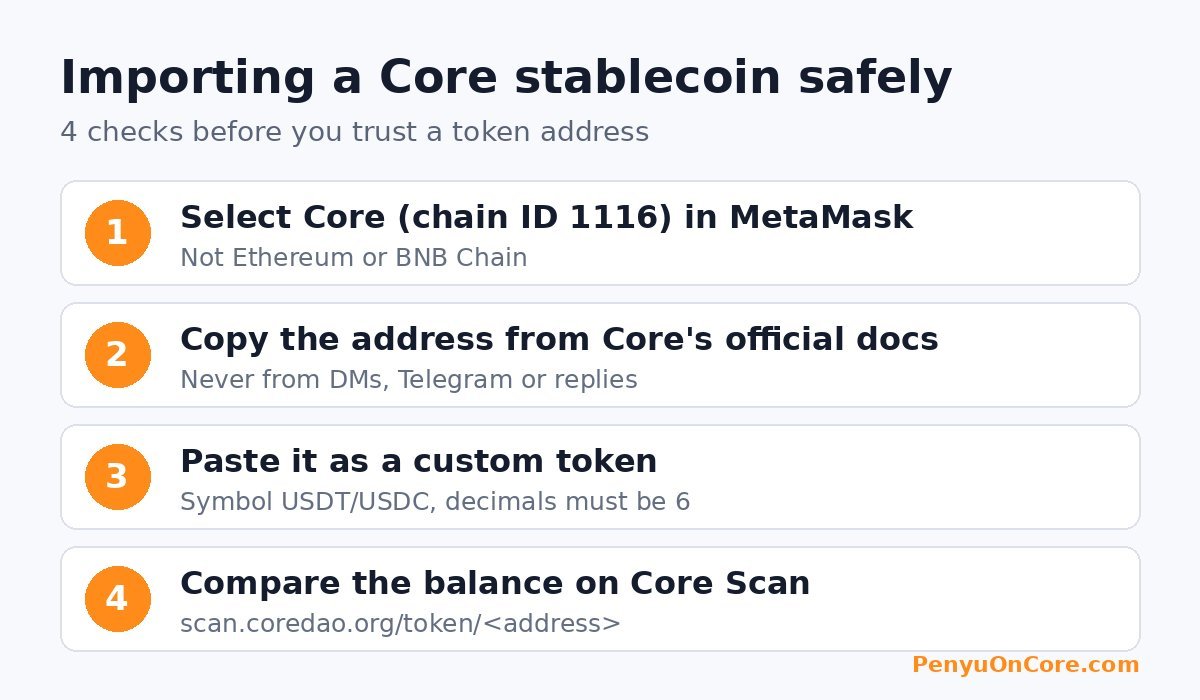
Step 1: Add and select the Core network
Core’s wallet setup guide lists these mainnet settings: network name Core Blockchain, RPC https://rpc.coredao.org/, chain ID 1116 (0x45c), currency symbol CORE, and explorer https://scan.coredao.org/. For a full step-by-step walkthrough, see our guide on adding Core to MetaMask. Before you go on, make sure Core is the selected network.
Step 2: Open the custom token screen
MetaMask’s menus change between versions. Its help center currently says to open the three-dot menu on the tokens list, choose Manage tokens (older versions say Import tokens), and then pick Add custom token or the Custom token tab.
Step 3: Paste the contract address
Copy the address straight from Core’s docs or from the token page on Core Scan. MetaMask should fill in the symbol and decimals itself. For both USDT and USDC on Core, the decimals should read 6. If you see a different symbol, or the decimals aren’t 6, stop: you probably copied the wrong address.
Step 4: Import and compare with the explorer
Click Next and then Import. Then search your wallet address on Core Scan and check that the token balance there matches MetaMask.
How to verify a Core token address yourself
Never take a contract address from a DM, a Telegram group or a reply under a social media post. Some honest third-party guides even get addresses wrong. When we checked one third-party Core setup guide, its listed WCORE address had no contract code at all on Core mainnet. Any tokens sent to an address like that would be stuck. You can check any address in a few ways:
- Compare with the official source. Core’s docs are the best reference for bridged tokens. Check every character, not just the first and last few.
- Open the token page on Core Scan. Go to
scan.coredao.org/token/<address>. A real token has a page showing its name, decimals, holders and transfers. - Read the contract. Developers can call
symbol()anddecimals()with any Core RPC. Ethers.js or a plain JSON-RPCeth_callworks. Ifeth_getCodereturns0x, nothing is deployed at that address. - Watch out for lookalikes. Anyone can deploy a token called “USDT”. Token name and symbol prove nothing. Only the contract address counts.
Common problems and fixes
“I received USDT but MetaMask shows nothing”
First, make sure MetaMask is on Core and not Ethereum or BNB Chain. Next, import the token with the address above. If the balance is still zero, look up the transaction hash on Core Scan. If the hash isn’t there, the sender may have used another network, so check that network’s explorer.
“I can’t send my USDT on Core”
Every token transfer on Core is paid for in CORE, the network’s native gas token. If your CORE balance is zero, the transaction will fail no matter how much USDT you hold. Our guide to getting CORE for gas fees covers the options.
“The balance looks wrong by a huge factor”
This usually means the token was added with the wrong decimals setting. Remove the token from MetaMask, then import it again from the contract address so the decimals are read from the chain.
“How do I move stablecoins to or from Core?”
Use a bridge that supports the exact token and route, and do a small test transfer first. Our step-by-step guide to bridging to Core explains the process. Always check the destination token address before you swap or deposit.
FAQ
What is the USDT contract address on Core?
Core’s documentation lists 0x900101d06a7426441ae63e9ab3b9b0f63be145f1. On-chain it reports the name “Tether USD”, the symbol USDT and 6 decimals.
What is the USDC contract address on Core?
Core’s documentation lists 0xa4151b2b3e269645181dccf2d426ce75fcbdeca9. On-chain it reports the name “USD Coin”, the symbol USDC and 6 decimals.
Is USDT on Core issued by Tether?
No. Core was not on Tether’s supported protocols page when we checked on 16 November 2026. The USDT contract on Core is listed among Core Bridge (LayerZero) token contracts.
Can I send USDT on Core to my Ethereum USDT deposit address?
Only if the receiving platform explicitly supports USDT on Core. Your address may look the same on both chains, but the tokens live on different networks. A platform that doesn’t watch Core won’t credit a Core deposit.
Do I need CORE to move stablecoins on Core?
Yes. Gas on Core is paid in CORE, so keep a small CORE balance in the same wallet.
Disclaimer: This article is for general information only and is not financial, investment or legal advice. Bridged stablecoins carry smart contract and bridge risks. Contract details and token support can change, so always check official sources before moving funds.