
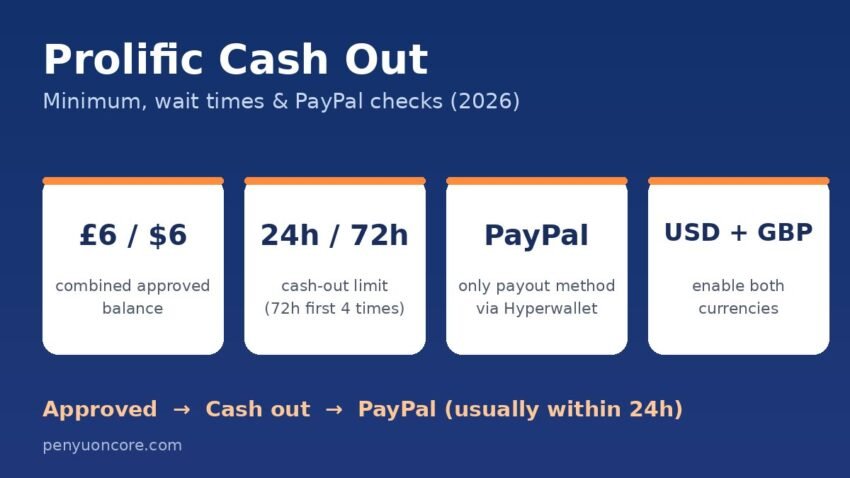
If you take paid studies on Prolific, the Prolific cash out rules decide when your rewards actually reach you. In short, you can cash out to PayPal once your approved balance across GBP and USD reaches £6 or $6 combined, and Prolific says the money usually lands in PayPal within 24 hours. New accounts, and anyone who has just changed their PayPal details, have to wait 72 hours between cash outs until they have made four of them.
This guide covers the minimum, the 24-hour and 72-hour limits, the PayPal settings that cause most failed or returned payments, and what Prolific’s own error codes mean. Everything here comes from Prolific’s participant help centre, checked in November 2026. Rules can change, so check the linked pages before you rely on them.
Prolific Cash Out Rules at a Glance
| Rule | What Prolific says | Notes |
|---|---|---|
| Minimum | £6/$6 combined approved balance | GBP and USD count together, e.g. $4 + £3.50 |
| Payout method | PayPal only, processed by Hyperwallet | No direct bank transfers |
| Frequency | Once every 24 hours, resetting at midnight UTC | 72 hours for your first four cash outs or after a PayPal change |
| Arrival time | Usually within 24 hours | Can be slower around weekends, bank holidays or larger payments |
| Prolific fee | None for cashing out | PayPal may charge if currency conversion is needed |
| Pending rewards | Not included in a cash out | Auto-approved after 22 days if the researcher doesn’t review |
How the £6/$6 Minimum Works
Prolific researchers pay in either US dollars or British pounds, and you keep separate balances for each. According to the When can I cash out? page, the minimum is reached when your combined approved balances hit £6/$6. You can get there with £6 or $6 in one currency, or a mix of both.
Two details catch people out:
- Only approved money counts. Anything under “Waiting for approval” is left out. A researcher has to approve your submission first. If they don’t review it within 22 days, Prolific approves it automatically. A rejected submission never moves to your available balance.
- Both currencies go out together. When you cash out, Prolific sends your USD and GBP balances to PayPal in their original currencies. PayPal then handles any conversion.
Your total is shown in USD if you have a US address, and in GBP everywhere else.
How to Cash Out on Prolific, Step by Step
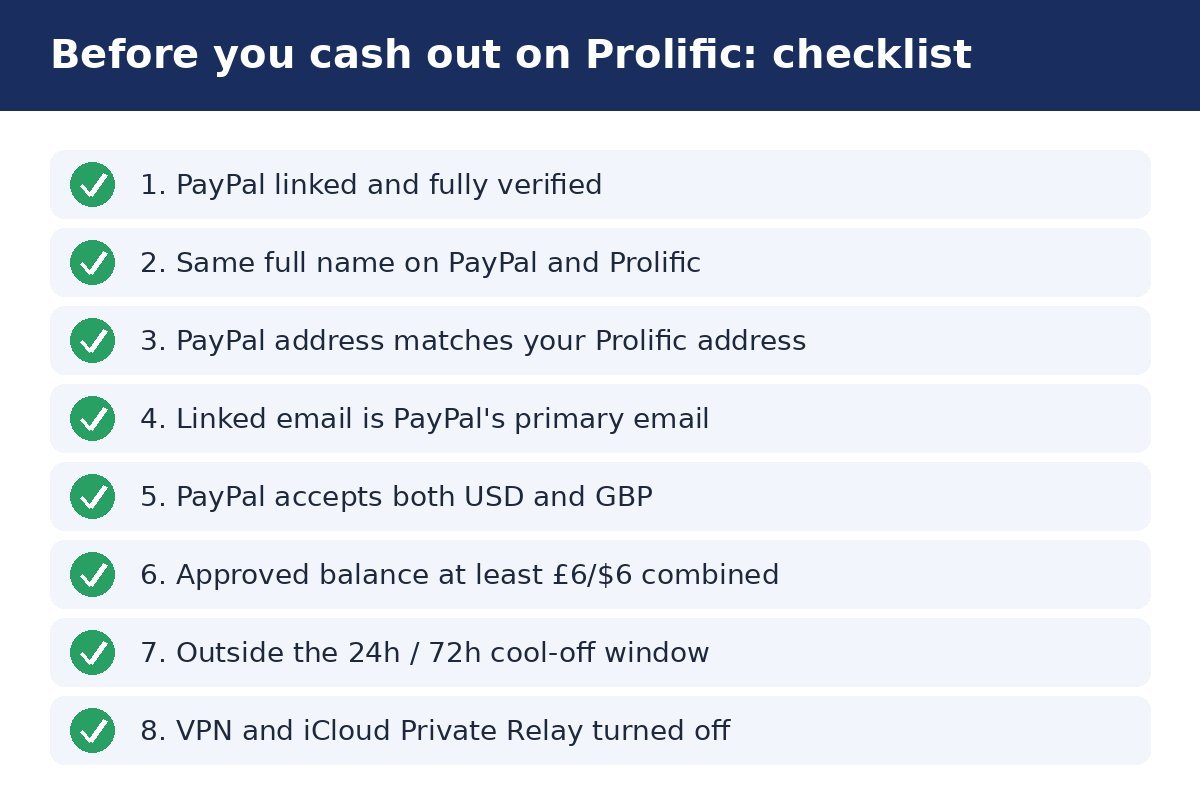
- Link PayPal first. Click your initials, open Account, find Payment Methods → PayPal account, click Link, enter your Prolific password and log in to PayPal. Prolific’s linking guide says your PayPal must be fully verified, in the same full name, set up for both GBP and USD, and registered to an address that matches your Prolific address.
- Open the Balance tab in the top-right corner and check your approved GBP and USD balances.
- Click Cash out and confirm the PayPal address in the pop-up. Prolific advises checking this every time.
- Watch the notifications. You’ll see “Cash out processing” and then “Cash out successful,” and the amount is taken off your balance.
- Check both PayPal currency wallets. If the amount looks low, the rest is probably sitting in your other currency balance.
The 24-Hour and 72-Hour Cash Out Limits
Normally you can cash out once a day, with the limit resetting at midnight UTC. That’s 7 p.m. Eastern Time in winter (8 p.m. in summer) and midnight in the UK in winter. A 72-hour cool-off applies instead if:
- you have made fewer than four cash outs on Prolific, or
- you recently added or updated your PayPal address. Every update resets the 72 hours, even switching back to an old address.
Prolific’s cash-out troubleshooting page says these waits are security measures and support cannot shorten or lift them. It also says that when Prolific moved to Hyperwallet in 2024, every account was reset to the 72-hour cool-off. So even long-time users needed four new cash outs before getting daily cash outs back. If you still see the 72-hour limit more than 24 hours after your fourth cash out, Prolific suggests contacting support through the chat icon.
Why Your Cash Out Button Is Greyed Out
Prolific lists the usual causes:
- Your approved balance is below £6/$6.
- You’ve already cashed out within the current 24-hour or 72-hour window.
- Your PayPal setup doesn’t match. Your PayPal isn’t fully verified, the name or residential address differs from Prolific, the linked email isn’t PayPal’s primary email, or PayPal isn’t accepting both USD and GBP.
If the button works but the PayPal window never opens, try turning off ad or pop-up blockers, or use another browser or device. After changing anything in PayPal, re-link it to Prolific so the update syncs. Keep in mind that re-linking starts a new 72-hour wait.
Error PEC-U-0001
Prolific says this usually means it detected that you are outside your listed country of residence. That can happen because you’re travelling, because your country details are out of date, or because a VPN or Apple’s iCloud Private Relay is hiding your real location. If you’re abroad, you can’t cash out until you’re home.
Error PEC-PPL-1200
This means PayPal couldn’t be linked. Prolific says the most common cause is iCloud Private Relay, so turn it off, disable any VPN or proxy, and try linking again.
Cash Out Not Arrived or Returned?
Prolific’s missing payment guide points to three causes, in this order:
- Currency settings. In PayPal, go to Settings → Payment preferences → Manage currencies and make sure USD and GBP are both enabled.
- Unclaimed funds. If PayPal isn’t set up for both currencies, or you have manual claiming turned on, the payment waits under Summary → Pending until you accept it. You have 30 days. After that it goes back to Prolific, and Prolific says it adds it to your balance within 5 days of receiving it. You can’t cash out again while a payment is pending.
- PayPal limitations. If your PayPal account is restricted, only PayPal can fix it.
Never click “refuse” on a Prolific payment. The currency guide warns that refusing blocks future payments in that currency and temporarily disables cash outs. Also, whenever PayPal returns a payment, Hyperwallet turns off cash outs for a while until the cause is fixed. If more than 30 days have passed and the money still hasn’t appeared, contact Prolific support.
PayPal Rules for US and UK Participants
Prolific pays only through PayPal, and its PayPal FAQ says it can’t send direct bank transfers. US residents must use a US-based PayPal account, which Prolific says is required by tax rules. For non-US residents, the PayPal country must match either your country of residence or your country of birth. Each Prolific account needs its own PayPal account in your name only. If one PayPal is linked to two Prolific accounts, both accounts are put on hold.
Your Prolific email and PayPal email don’t have to match. Your full name, country of residence and date of birth do. If you change your name or move, update PayPal and then re-link it. Prolific itself charges no cash-out fee. This setup is a lot simpler than platforms with holding periods, like the Fiverr clearance period or the 45-day wait in our Adobe Stock contributor payout guide.
Do You Pay Tax on Prolific Earnings?
Prolific says participants are independent contractors, not employees. Paying any tax due is up to you. You can download your full history from the bottom of the Submissions page with “Download full submission history.”
- US: The IRS Gig Economy Tax Center says gig income must be reported even if no 1099 is issued. Prolific’s digital platform reporting page says it doesn’t issue 1099s itself and that your cash outs will be included on PayPal’s Form 1099-K. Our guide to Form 1099-K for creators explains how that form works.
- UK: HMRC’s trading allowance gives up to £1,000 a year of tax-free trading income, and that limit applies to your trading income from all sources combined. Prolific also says it now collects details such as your NI number or other tax ID and reports earnings quarterly to tax authorities under digital platform reporting rules.
Disclaimer: This article is general information, not tax or financial advice. Paid studies are occasional side income, not a dependable wage. Check your own situation with HMRC, the IRS or a qualified adviser.
FAQ
What is the minimum cash out on Prolific?
£6 or $6 in approved balances, with GBP and USD counted together.
Can I cash out Prolific to my bank account?
Not directly. Prolific pays only to PayPal, and you can then move the money from PayPal to your bank.
Why do I have to wait 72 hours to cash out?
You’ve made fewer than four cash outs, or you recently changed your PayPal details. It’s a security rule that support can’t lift.
Can I withdraw a balance under £6/$6 when closing my account?
Yes. According to Prolific’s account closure page, support can remove the minimum so you can withdraw a smaller balance before closing. If your account is on hold, you can still cash out approved funds.
Does Prolific take a fee when I cash out?
No. PayPal may charge for currency conversion.