
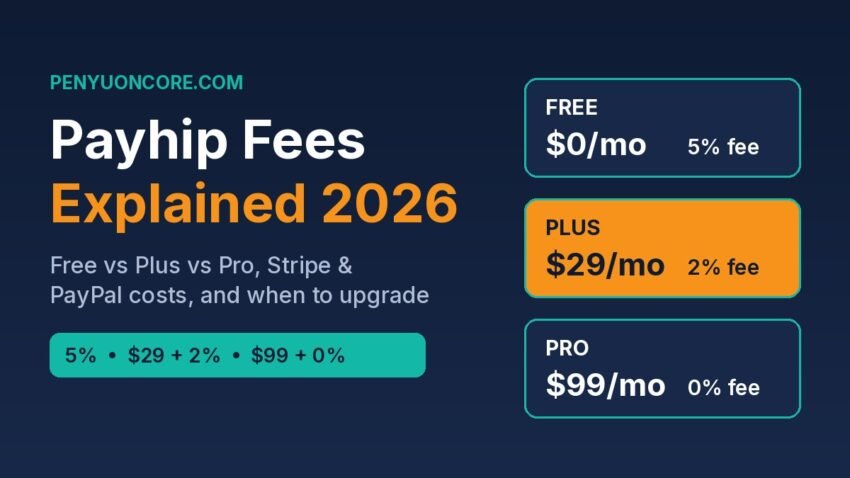
Short answer: Payhip has three plans: Free Forever ($0 a month + a 5% Payhip fee per sale), Plus ($29 a month + 2%), and Pro ($99 a month + 0%). Every plan includes the same features. Stripe or PayPal also charge their own processing fees, whichever plan you’re on. On Payhip’s fees alone, Plus starts to cost less than Free once you sell about $967 a month, and Pro costs less than Plus from about $3,500 a month.
This guide explains what each fee is, works through real examples for US and UK sellers, and shows how to decide when an upgrade is worth it. All fees below were checked on Payhip’s, Stripe’s and Gumroad’s official pages on November 12, 2026. Platforms change their pricing, so check the linked pages before you decide.
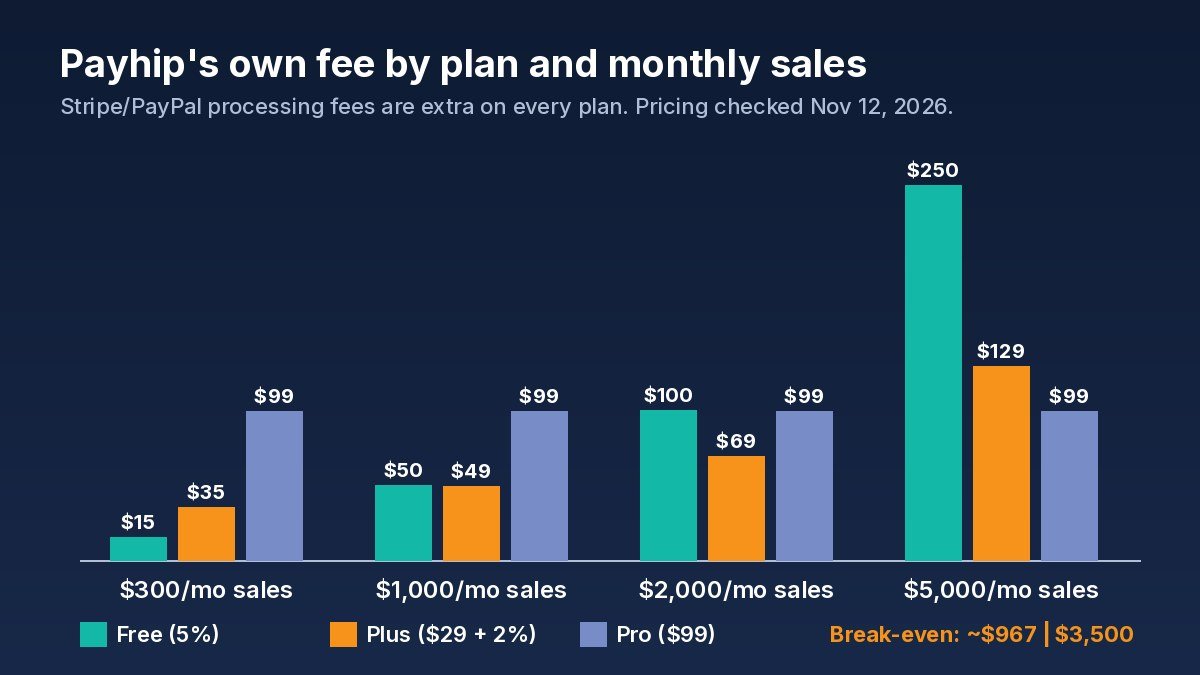
Payhip’s own fee on each plan at four monthly sales levels. Payment processing fees come on top.
Payhip Plans and Fees at a Glance
Payhip’s pricing page and its Billing and Upgrading help article (last updated November 4, 2026) list the plans this way:
| Plan | Monthly price | Payhip fee per sale | Features |
|---|---|---|---|
| Free Forever | $0 | 5% | All features, unlimited products and revenue |
| Plus | $29 | 2% | Same as Free |
| Pro | $99 | 0% | Same as Free |
The plans differ only in price. You don’t unlock courses, memberships or coupons by paying more. All three plans include them. You also don’t pay anything until you make a sale on the Free plan. That makes Payhip a low-risk way to test a first digital product.
The Two Layers of Fees on Every Payhip Sale
1. Payhip’s transaction fee
This is the 5%, 2% or 0% from your plan. When VAT applies, Payhip’s own EU and UK VAT help article shows the percentage worked out on your price before VAT, not on the VAT itself.
2. Payment processing fees (Stripe or PayPal)
Payhip doesn’t process payments itself. You connect your own Stripe or PayPal account, and Payhip’s payments help article says the money goes straight to that account. The processor then charges its standard rate:
- Stripe, US: 2.9% + 30¢ per successful domestic card payment. Stripe lists an extra 1.5% for international cards (Stripe US pricing).
- Stripe, UK: 1.5% + 20p for standard UK cards, 2.8% + 20p for premium UK cards, 2.5% + 20p for EEA cards, and 3.15% + 20p for other international cards (Stripe UK pricing).
- PayPal: Payhip’s PayPal help article quotes 2.99% plus a fixed fee for card payments, plus 1.5% on international commercial transactions. Rates vary by country, so check PayPal’s fee page for your region.
Upgrading to Pro removes Payhip’s fee, not the processing fee. For cheap products, the fixed 30¢ or 20p part of the processing fee can matter more than the plan you choose.
Worked Examples: What You Actually Keep
US seller: a $15 digital planner on the Free plan
Say a US buyer pays by card through Stripe. Sales tax is left out to keep it simple.
- Payhip fee: 5% of $15 = $0.75
- Stripe fee: 2.9% of $15 + $0.30 = $0.74 (rounded)
- You keep about $13.52, or roughly 90% of the price.
For comparison, Gumroad’s fee page lists 10% + 50¢ per direct sale plus 2.9% + 30¢ card processing. On the same $15 sale, that leaves about $12.27. Gumroad charges no monthly fee either. It also takes a flat 30% on sales that come through its Discover marketplace.
UK seller: a £10 template sold to a UK buyer, VAT included in the price
Payhip collects UK VAT on digital sales by default. If you choose to include VAT in your price, the buyer pays £10 and Payhip’s VAT article shows the maths like this:
- Price before 20% VAT: £10 ÷ 1.20 = £8.33
- VAT collected and paid by Payhip: £1.67
- Payhip fee (Free plan): 5% of £8.33 = £0.42
- Stripe fee (standard UK card): 1.5% of £10 + 20p = £0.35
- You keep about £7.57.
VAT is not a Payhip fee. It’s tax the buyer owes, and Payhip pays it to the tax authority for you. But if you include VAT in your price, it comes out of your share, so set UK and EU prices with that in mind. If you sell on more than one platform, our Etsy digital downloads fees guide walks through the same kind of maths for Etsy.
When Should You Upgrade to Plus or Pro?
Because the plans only differ by monthly price and percentage, you can work out the break-even points exactly:
- Free → Plus: Plus saves 3% of sales and costs $29. $29 ÷ 0.03 = $966.67 a month.
- Plus → Pro: Pro saves another 2% and costs $70 more. $70 ÷ 0.02 = $3,500 a month.
Here is Payhip’s own fee at different monthly sales levels. Processing fees are the same on every plan, so they’re left out.
| Monthly sales | Free (5%) | Plus ($29 + 2%) | Pro ($99) | Cheapest |
|---|---|---|---|---|
| $300 | $15 | $35 | $99 | Free |
| $1,000 | $50 | $49 | $99 | Plus (just) |
| $2,000 | $100 | $69 | $99 | Plus |
| $5,000 | $250 | $129 | $99 | Pro |
Use a typical month, not your best one. A launch can bring in $1,500 and then the next two months only $150 each. In that case, Plus would cost you more over the quarter than staying on Free. A simple rule: upgrade once your three-month average is clearly above the break-even point. Payhip says you can switch back to Free at any time. The paid plan stays active until the end of the billing cycle.
A monthly plan is a fixed cost, so treat it like any other business bill. If your income from products is still uneven, keep a cash buffer first. Our guide on how much emergency fund you need can help you size one.
Other Costs and Rules Worth Knowing
- Sales tax and VAT handling: Payhip’s tax page says it collects and pays digital EU/UK VAT. Since July 1, 2026, it also handles US sales tax as a marketplace facilitator and Canadian GST/HST and PST, at no extra charge. Its US sales tax article notes you may still have to file “zero dollar” state returns in some cases, and you still handle Quebec QST yourself. Ask a tax professional about your own situation.
- Refunds: You refund buyers from your Stripe or PayPal account (Payhip refund guide). Stripe’s pricing FAQ says the original processing fee is not returned on a refund. Payhip’s help article doesn’t say whether its own fee is returned, so ask Payhip support if that matters to you.
- Chargebacks: Stripe charges a dispute fee of $15 in the US and £20 in the UK for each dispute you receive. Clear product descriptions and fast support help you avoid them.
- Payout timing: Payhip doesn’t hold your money. How fast it reaches your bank depends on Stripe’s or PayPal’s payout schedule. Stripe pays out daily by default after a first-payment review period, according to Payhip’s Stripe help article.
- Marketplace traffic: Payhip’s own guide says its marketplace needs at least $10 in sales and team approval, with no extra fee. Don’t count on it for traffic. Most sellers bring their own buyers, for example from short videos. Our short-form video side hustle guide covers that skill.
Is Payhip a Good Fit?
Payhip suits you if you sell ebooks, templates, presets, printables or small courses to an audience you already have, and want low starting costs with VAT and sales tax handled for you. It suits you less if you want a platform to bring you buyers, because Etsy-style search traffic is not what Payhip offers. Be realistic: a store costs nothing to open, but sales depend on your product, your pricing and how you reach buyers. No plan choice changes that.
FAQ
Does Payhip charge a monthly fee?
Not on the Free Forever plan. Plus is $29 a month and Pro is $99 a month, according to Payhip’s pricing page as of November 2026.
Do I still pay Stripe or PayPal fees on Payhip Pro?
Yes. Pro removes Payhip’s own fee, but Payhip’s pricing FAQ confirms Stripe and PayPal still charge their standard rates on every plan.
Is Payhip cheaper than Gumroad?
On published direct-sale fees, yes. Payhip Free takes 5% and Gumroad takes 10% + 50¢, with card processing on top of both. Gumroad’s fee drops to 5% + 50¢ once your paid sales pass $20,000 in a calendar month.
Do paid plans unlock more features?
No. Payhip says all three plans include the same features, unlimited products and unlimited revenue.
Can I downgrade later?
Yes. Switch to Free Forever under Account > Settings > Billing & Invoices. The paid plan runs until the end of your billing cycle.
Bottom Line
Start on Payhip’s Free plan. Upgrade to Plus only when you’re steadily selling more than about $967 a month, and move to Pro above about $3,500. Whatever plan you’re on, budget for Stripe or PayPal fees, and price UK and EU products with VAT in mind.
Disclaimer: This article is for general information only. It is not tax, legal or financial advice. Fees and tax rules change, so confirm current terms on the official pages linked below before you choose a plan.
Sources
- Payhip: Pricing
- Payhip Help: Billing and Upgrading
- Payhip Help: Digital EU VAT & UK VAT
- Payhip Help: US Sales Tax
- Payhip: Sales Tax & VAT
- Payhip Help: Connect Your Stripe Account
- Payhip Help: Connect Your PayPal Account
- Payhip Help: Resolve Payment Issues as a Seller
- Payhip Help: How Do I Refund a Transaction?
- Payhip Resource Hub: What Is Payhip?
- Stripe: Pricing (US)
- Stripe: Pricing (UK)
- Gumroad Help: Gumroad’s Fees