
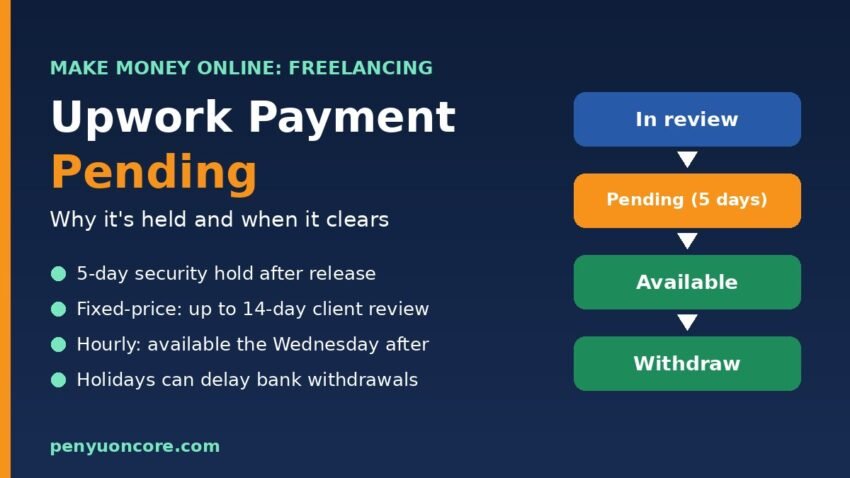
An Upwork payment pending status usually means your money is sitting in Upwork’s five-day security hold, not that something has gone wrong. Fixed-price and bonus payments become available about five days after the client releases them, while standard hourly earnings normally become available on the Wednesday about 10 days after the weekly billing period ends. If the expected date passes, the most common cause is that Upwork couldn’t charge the client’s payment method.
That timeline catches many new freelancers out, especially in December, when people pick up holiday projects and want the money before Christmas. This guide uses Upwork’s own Help Center pages (checked 27 November 2026) to explain each payment status, how long each stage lasts and what you can do when “pending” lasts longer than it should.
Why is my Upwork payment pending?
Upwork moves your earnings through a few stages, and you can see them in Manage finances > Financial overview and on your Transactions page. “Pending” is the stage after your client has approved (or the system has released) the payment, but before it’s in your Available balance.
Upwork says the five-day security hold is there to protect freelancers and clients from fraud and chargebacks. During that period, each payment is listed with the date Upwork expects it to become available, according to its weekly billing cycle guide. So the first step is simple: open the pending payment and check that date before you contact anyone.
The four statuses you’ll see
- Work in progress: the client has funded a fixed-price milestone, but you haven’t submitted the work yet.
- In review: you’ve submitted a milestone or your hours have been invoiced, and the client’s review window is open.
- Pending: the payment is approved and in the five-day security hold.
- Available: you can withdraw the money, manually or through your automatic withdrawal schedule.
How long does Upwork pending take?
It depends on the contract type. This table summarizes the standard timelines from Upwork’s Help Center:
| Payment type | Client review | Security hold | When it becomes available |
|---|---|---|---|
| Fixed-price milestone | Up to 14 days after you click Submit work | 5 days | About 5 days after approval or auto-release |
| Hourly (standard) | Monday to Friday after the billing week | Included in the 10-day wait | The following Wednesday (UTC) |
| Hourly (Top Rated, faster payouts) | Monday to Friday after the billing week | None | Friday by 11:59 p.m. UTC |
| Bonus or manual payment | None | 5 days | 5 calendar days after processing |
| Weekly (retainer-style) payment | None | 5 days | After the standard 5-day period |
Fixed-price contracts
The client funds the milestone upfront. When you finish, you have to click Submit work on the contract page, even if you’ve already sent the files in Messages or by email, because that’s what starts the 14-day review period. If the client requests changes, the review period resets when you resubmit. If the client does nothing for 14 days, the funds are released automatically. After that, the payment goes to Pending for five days.
Upwork also says fixed-price contracts don’t qualify for faster payouts, even for Top Rated freelancers.
Hourly contracts
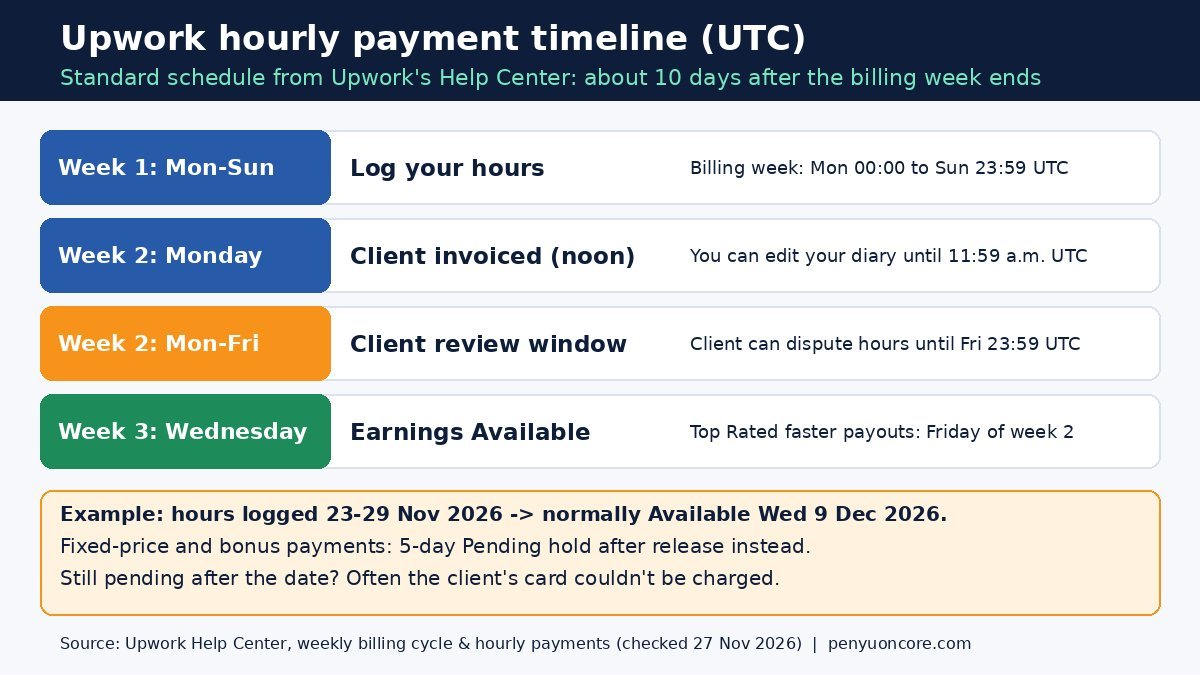
Upwork’s hourly payments guide sets out a three-week rhythm, all in UTC:
- Week 1: you log time from Monday 00:00 to Sunday 23:59 UTC.
- Week 2: the client is invoiced at noon UTC on Monday and can review your hours until Friday 23:59 UTC.
- Week 3: your earnings become available on Wednesday.
You also get a 12-hour window, from Monday 00:00 to 11:59 a.m. UTC, to make final changes to your work diary before the client is billed.
Upwork payment pending over the holidays
Upwork’s holiday payment delays page says U.S. bank holidays can delay payments to bank accounts. Its 2026 list includes Thanksgiving (Thursday 26 November) and Christmas Day (Friday 25 December). It also lists New Year’s Day as a holiday that can affect processing. PayPal, Payoneer and Direct to Wallet withdrawals are typically not affected unless Upwork says otherwise. If you’re outside the U.S., such as in the UK, your own bank holidays can add delays too.
Applying Upwork’s standard hourly schedule to the calendar gives these examples. Holidays and failed client charges can push them later:
- Hours logged 23-29 November 2026 are invoiced Monday 30 November and normally become available Wednesday 9 December.
- Hours logged 14-20 December normally become available Wednesday 30 December.
- Hours logged 21-27 December normally become available Wednesday 6 January 2027.
Available doesn’t mean it’s in your bank yet. The payment troubleshooting FAQ says Upwork processes ACH Direct to U.S. Bank withdrawals within one business day, and they should arrive in two to five business days. If you’re budgeting for holiday bills, it helps to keep a small cash buffer. Our guide on how much emergency fund you need covers this for people with irregular income.
Why is my Upwork payment still pending after the expected date?
For hourly contracts, Upwork says a late payment usually means it couldn’t charge the client’s payment method, for example because a card was declined. In that case:
- Upwork tries to collect from the client once a day for five days, and the payment stays pending.
- If the client still doesn’t pay, Upwork checks whether your work qualifies for Hourly Payment Protection. If it does, Upwork pays you directly and your contract is paused.
- If it doesn’t qualify, the status shows as unpaid and the money can’t be released until the client pays. A polite message to the client often helps.
Other things that can hold up your money once it’s available, according to Upwork’s withdrawal troubleshooting page:
- Missing tax info or withdrawal method. You need both before you can withdraw.
- A new withdrawal method. For security, a new method can’t be used for three full calendar days.
- Account restrictions. A temporary hold or suspension has to be resolved first, so check your email and Upwork notifications.
- Name mismatch. The name on your bank or PayPal account must match your verified Upwork name, according to How to get paid on Upwork.
Freelancers who also sell on other platforms will recognise the pattern. Holds like this are common, as our guides to the Fiverr clearance period and PayPal holding funds explain.
What you can do while your payment is pending
- Check the expected date on the pending item in your Transactions page. Remember it’s in UTC.
- Click Submit work on fixed-price milestones. Sending files in chat doesn’t start the 14-day clock.
- Set up your withdrawal method early. Do it at least three days before you need the money.
- Consider Instant Pay if you’re in the U.S. Upwork’s Instant Pay sends available earnings to an eligible Visa or Mastercard debit card, usually within minutes, for $2 per transfer, up to $2,999 per transfer. It can’t speed up a pending payment.
- Keep all payments on Upwork. A “client” who asks you to move payment off the platform, send money first or pay for “training” is a red flag. Our guide to task scams explains how these schemes work.
- Request a trace if a withdrawal goes missing. Upwork lets you request a free trace five business days after an ACH withdrawal, or eight business days after a Direct to Local Bank withdrawal.
FAQ
Can I withdraw a pending payment on Upwork?
No. Pending funds are in the security hold. You can withdraw them once they show in your Available balance.
Can I skip the five-day hold?
Only for hourly contracts, if you’re Top Rated or Top Rated Plus, your client’s billing method is charged successfully and the hours aren’t disputed. Fixed-price and bonus payments still have the five-day hold.
Does a pending payment mean the client can still cancel it?
The review stage is when clients can dispute hours or request a refund on a fixed-price milestone. Upwork says the security period exists to clear payments and resolve disputes, so contact Upwork support if you see an unexpected dispute.
Why do I see my money on Friday but can’t withdraw it?
Faster payouts are released by 11:59 p.m. UTC on Fridays, so depending on your time zone, the money may show up later than you expect. Upwork emails you when the payment is ready to withdraw.
This article is general information, not financial advice. Upwork’s policies can change, so check the linked Help Center pages for the latest details.