
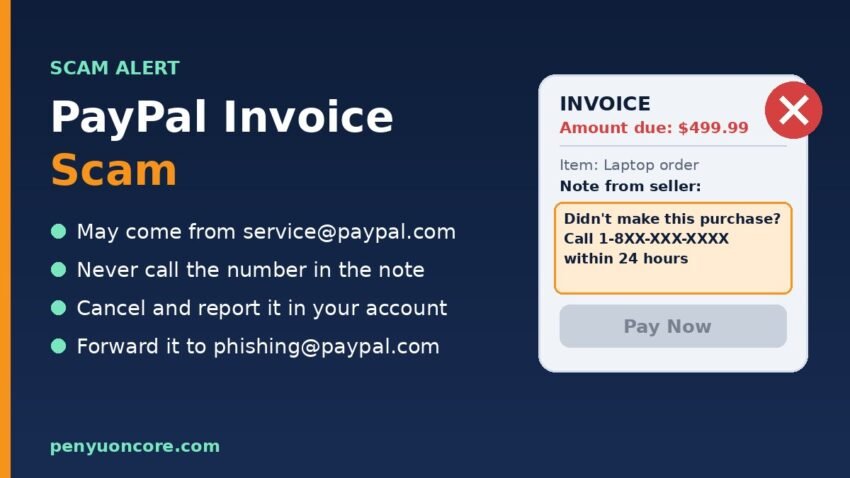
A PayPal invoice scam is a fake bill or money request, often for a laptop, crypto or an antivirus “renewal” you never bought, with a note telling you to call a phone number to cancel it. The tricky part is that many of these arrive from PayPal’s real address, service@paypal.com, because scammers send them through PayPal’s own invoicing tool. Don’t pay, don’t call the number, and don’t click anything in the email. Log in to PayPal yourself, cancel or report the request, and forward the email to phishing@paypal.com.
These emails tend to come in waves, and the holiday shopping season is one of them. On 7 November 2026, WGAL’s consumer investigator reported “dozens of new variations” of the fake invoice scam in a single week. On 17 November the U.S. Marshals Service named fake PayPal invoices among its seasonal scam warnings. With Black Friday and Cyber Monday deals filling up inboxes, a surprise “receipt” is easy to believe. Here’s how the scam works, how to spot it, and what to do, based on guidance from PayPal, the FTC and other official sources (checked 26 November 2026).
How the PayPal invoice scam works
PayPal lets any account holder send an invoice or money request to an email address. Scammers use that feature against you. As the small-business mentoring nonprofit SCORE explains, “anyone can send you a PayPal money request if they know your email”. The invoice format may be genuine, but “the instructions are the scam.”
PayPal’s help page on invoice and money request scams describes three common versions:
- A real invoice for something you never ordered. It comes through PayPal and asks you to pay for a product or service you never bought.
- A real invoice with an alarmist note. The note warns you to call a “customer service” number quickly to fix a problem with your account. That number belongs to the scammer.
- A fake email designed to look like PayPal. It isn’t from PayPal at all. It’s a phishing email with PayPal branding, links and a phone number.
The amounts are chosen to make you panic. WGAL’s examples included an email claiming “Your account has been charged $436 for a cryptocurrency purchase,” a laptop charge of nearly $1,500, and a $427 Geek Squad security plan renewal. Pennsylvania’s attorney general warned that scammers sometimes send these requests “repeatedly, making the matter appear urgent.”
What happens if you call the number
The phone call is where the money is lost. The FTC’s guide to tech support scams describes the fake invoice and renewal version of this con. If you call, the scammers ask for remote access to your computer. They may also send you to a spoofed website and ask for your bank or card details “to process the refund.” Then they claim they refunded you too much by mistake and insist you pay the difference back with gift cards, a wire transfer, a bank transfer, cryptocurrency or a payment app. There was never a refund. The money you “return” is your own.
That’s why PayPal’s guidance says never to call numbers in an invoice note, and never to send money to a cryptocurrency wallet mentioned in an invoice or money request.
How to spot a PayPal invoice scam
The sender address alone doesn’t prove much. Pennsylvania’s attorney general suggests two checks. First, if the email isn’t from service@paypal.com, ignore it. Second, “even if the invoice appears to be coming from a legitimate address, if you do not recognize the payment being requested, it is always safest to ignore it.” Here’s how a scam invoice usually compares with a real bill:
| What to check | Scam invoice | Real bill |
|---|---|---|
| Item or service | Something you never ordered (laptop, crypto, antivirus, gift cards) | Matches something you actually bought or agreed to |
| Phone number | Note tells you to call to cancel or dispute | No pressure to phone a number to stop a charge |
| Urgency | “Call within 24 hours” or “your account is compromised” | Normal payment terms |
| Greeting | Often generic. WGAL found none of its examples used the customer’s name | Sent by a business you recognize |
| Your bank or card statement | No matching charge | Any payment you made shows up |
One point causes a lot of confusion. An unpaid invoice or money request in your PayPal account is only a request. It doesn’t mean money has left your account. You only lose money if you pay it or hand your details to the scammer.
What to do if you get a PayPal invoice you don’t recognize
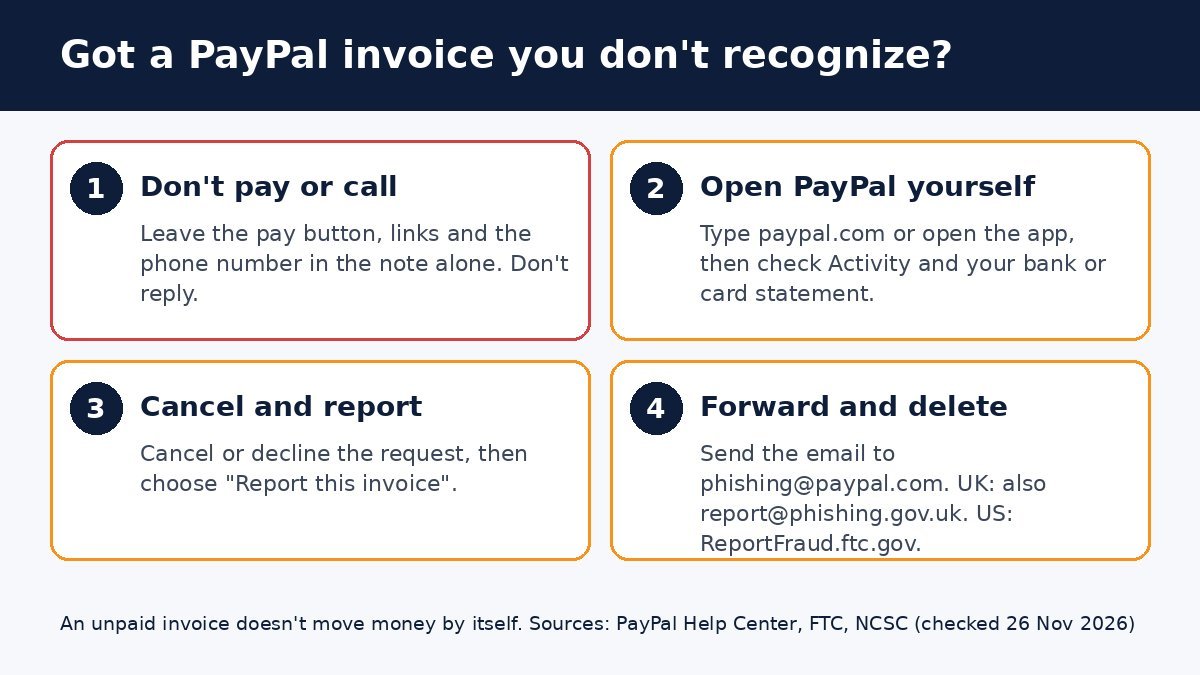
- Don’t tap anything in the email. Leave the pay button, links and phone number alone, and don’t reply.
- Open PayPal yourself. Type paypal.com into your browser or open the app. The U.S. Marshals Service gives the same advice: go directly to your bank, card or PayPal homepage, sign in and check your recent transactions.
- Cancel or decline the request. PayPal’s help article on cancelling or reporting a suspicious money request or invoice says that on the website you open Activity, select the request and choose Cancel. In the app you can tap Decline.
- Report it inside PayPal. On the PayPal website, select the invoice in your Activity and click “Report this invoice” (or “Report”), then follow the steps. PayPal asks you to report unwanted invoices and money requests by logging in to your account on its website or app.
- Forward the email and delete it. PayPal says to forward suspicious emails to phishing@paypal.com and then delete them. If nothing shows up in your PayPal Activity, the email was probably fake, so report it and delete it.
Reporting the scam in the US and UK
In the US, you can report the scam to the FTC at ReportFraud.ftc.gov. In the UK, the National Cyber Security Centre’s reporting guide says to forward suspicious emails to report@phishing.gov.uk. If you’ve lost money and live in England, Wales or Northern Ireland, report it to Report Fraud at reportfraud.police.uk or on 0300 123 2040. In Scotland, call Police Scotland on 101.
Already called the number or paid? Act fast
Being caught out isn’t unusual. The U.S. Marshals Service cites AARP findings that 4 in 5 U.S. adults have been targeted by, or have experienced, at least one common type of fraud or holiday-related scam. What matters now is acting quickly. The FTC’s tech support scam guidance recommends these steps:
- If you paid by credit or debit card, call your card company or bank right away, explain what happened and ask whether they can reverse the charge.
- If you paid with a gift card, contact the company that issued the card straight away and ask whether it can refund you. Our gift card scams guide explains why scammers love this payment method.
- If you gave them remote access, update your computer’s security software, run a scan and delete anything it flags.
- If you shared a username or password, change it right away, and on any other site where you use the same password.
If you paid through PayPal itself, contact PayPal through the Help Center in your account, never a number from the invoice. How you paid matters, and our explainer on PayPal Friends and Family covers what protection each payment type gets. Expect follow-up calls offering to “recover” your money for a fee. They’re usually the same scammers coming back for more.
Sellers and side hustlers: your name can be used too
If you sell on Etsy, run a small online shop or freelance, you may be on the other side of this scam. SCORE describes a Connecticut vintage furniture shop whose name appeared on more than 200 fake PayPal invoices. The owner suspected an old email account had been compromised because it used the same password as her PayPal account. To protect yourself, use a unique password and two-step verification on both PayPal and the email linked to it, close PayPal accounts you no longer use, and check for login alerts or email forwarding rules you didn’t set up. If a sudden account review then puts your PayPal funds on hold, that guide explains the usual reasons and next steps.
The wider holiday picture is worth keeping in mind as well. In a 24 November 2026 warning, FBI Boston said non-payment and non-delivery scams cost people more than $503 million nationwide last year, according to the FBI’s Internet Crime Complaint Center.
FAQ
Is an invoice from service@paypal.com always real?
No. The email can genuinely come from PayPal because the scammer used PayPal’s invoicing tool, but the bill itself is still fake. If you don’t recognize the payment, don’t pay it. Cancel it and report it from inside your account.
Did I lose money just by receiving the invoice?
No. An invoice or money request doesn’t take money from your account by itself. Check your PayPal Activity and your bank or card statement to confirm that no payment was made.
I clicked the link but didn’t enter anything. What now?
Close the page, don’t download anything, and log in to PayPal directly to check your account. If you entered your password anywhere, change it straight away and turn on two-step verification.
Should I call PayPal using the number in the invoice?
Never. PayPal’s guidance says not to call phone numbers in an invoice note. Use the Help Center in the PayPal app or on paypal.com instead.
Disclaimer: This article is general information, not financial, legal or security advice. Platform features and reporting steps can change, so check the linked PayPal, FTC and NCSC pages, or contact your bank, if you think you’ve been scammed.