
Short answer: “This is a deceptive request” is a MetaMask security alert. It means MetaMask’s transaction check, built with the security firm Blockaid, simulated the transaction or signature you were about to approve and found signs that it could cost you funds. It’s a warning, not a block. You can still click confirm, but you shouldn’t unless you can independently prove the site and contract are genuine.
Newer MetaMask versions often describe the same alert in different words, such as “High-risk signature”, “High-risk approval” or “Site flagged as unsafe”, and label it Warning or Malicious. This guide explains what each one means, how it differs from the full-page “Deceptive site ahead” screen, what to do if you think it’s a false positive, and what to do if you already signed.
What the “deceptive request” warning actually means
When you approve something in MetaMask, you’re either sending an on-chain transaction or signing a message. Before you confirm, MetaMask can send the request details to a checking server. An archived version of MetaMask’s security alerts guide explains that if this check finds you’re likely to lose funds, you’ll see a “This is a deceptive request” warning on the confirmation screen.
MetaMask’s current security alerts page says transactions and signature requests are sent to a MetaMask server (for EVM networks) or a Blockaid server (for non-EVM networks) and simulated. The alerts draw on on-chain analysis, known phishing domains, contract behaviour, impersonation signals and community reports. Two things matter most:
- It doesn’t stop you. MetaMask says you can still confirm even when a warning is shown.
- No warning doesn’t mean safe. MetaMask says the simulations “do not guarantee detection of all threats.”
The wording you might see in newer MetaMask versions
The exact text has changed over time. The English text strings in MetaMask’s open-source extension code currently include these alert titles. Here’s what each one is warning you about:
| Alert title | What MetaMask is telling you | Typical scam behind it |
|---|---|---|
| High-risk signature | Signing could authorise actions with your assets without your permission | Off-chain “permit” or listing signatures |
| High-risk approval | You’re giving a flagged address permission to move your assets | Unlimited token approval to a drainer |
| High-risk transfer | You’re sending assets to an address flagged by security partners | Fake “claim” or “verify wallet” transfers |
| Site flagged as unsafe | Security partners flag the site as malicious | Look-alike phishing domain |
| Risk signals detected | Some risk signals were found, so review before continuing | New or unverified contract, possible impersonation |
| Security check unavailable | The check couldn’t be completed, so continue only if you trust the site | None by itself; the check simply didn’t run |
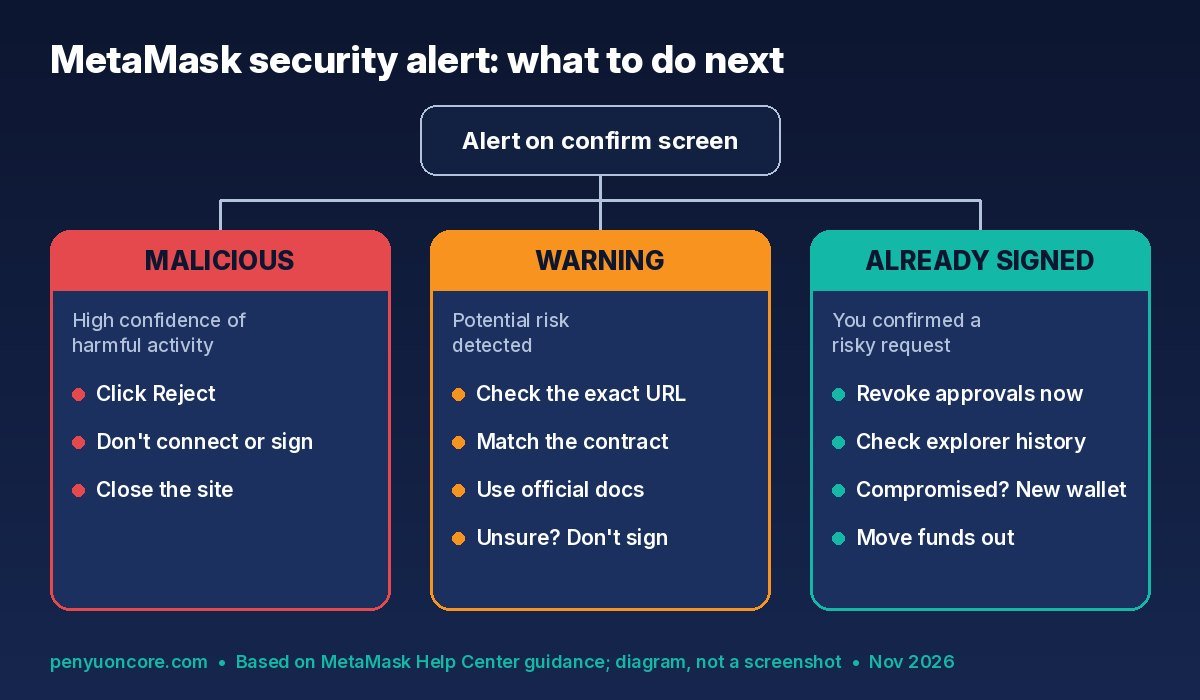
MetaMask also shows a severity level. According to its help page, Warning means a potential risk was found, while Malicious means “high confidence of harmful activity.”
“Deceptive request” vs “Deceptive site ahead”
People often mix these up, but they’re two different checks:
- Deceptive request / security alert: appears inside the MetaMask confirmation window for one specific transaction or signature.
- Deceptive site ahead: a full-page red screen that appears before you even connect. MetaMask’s guide to this warning says it appears when the site “may be a phishing scam” and recommends you don’t connect. The warning page itself lists the threats as fake versions of MetaMask, Secret Recovery Phrase or password theft, and malicious transactions. It credits sources including Ethereum Phishing Detector, SEAL, ChainPatrol and PhishFort.
What to do when you see the warning
1. If it says Malicious: reject and leave
MetaMask’s advice is clear: don’t connect your wallet, don’t sign transactions, and close the site. Click Reject or Cancel. Just rejecting a request costs nothing and moves nothing.
2. If it says Warning: verify before you do anything
- Check the exact URL. Look at every character of the domain, not just the brand name. Open the site from a bookmark or the project’s official docs, not from a DM, a search ad or a reply under a post.
- Check the contract address. Compare it with the address the project publishes in its official documentation, then look it up on a block explorer. MetaMask notes that an address can get a warning just because it’s newly deployed or not verified on an explorer.
- Read what you’re signing. Watch out for words like “Permit”, “SetApprovalForAll”, “Approve” or an unlimited spending cap when you only meant to swap, claim or log in.
- Don’t sign if you’re unsure. No airdrop or mint is worth an approval you can’t explain.
3. Why signatures are the riskiest case
Many drainers never ask you to send a transaction. MetaMask’s signature phishing guide explains that an off-chain signature, such as a Permit2 approval or a bulk NFT listing message, isn’t broadcast when you sign it. The site that collected it can use it later. A “free” signature can therefore hand over the same power as an on-chain approval. That’s why a “High-risk signature” alert deserves just as much caution as a risky transaction.
Think it’s a false positive? Report it, don’t bypass it
Legitimate sites and contracts do get flagged sometimes. MetaMask’s security alerts page lists two ways to report a false classification:
- From the alert: click See details, then Report an issue, add any context, and submit. MetaMask says this option currently works for transaction alerts only.
- Through support: for URL, token or address warnings, contact MetaMask Support with what was flagged, the network, screenshots, and official links that verify the project.
Site owners whose domain triggers “Deceptive site ahead” are told to open a case in MetaMask’s eth-phishing-detect issue tracker. MetaMask says reviews are done case by case and may take several business days.
You may come across advice to switch off the Basic Functionality toggle (Settings > Privacy). That toggle disables security alerts and other features, and MetaMask says it can’t be turned off at all for wallets created with Google, Apple or Telegram. Turning off the check doesn’t make a flagged request any safer. It only hides the warning.
Don’t rely on alerts on every network (including Core)
MetaMask’s help page lists the networks its security alerts support. At the time of writing, these include Ethereum, Arbitrum, Base, BSC, Optimism, Polygon, Linea and others, but Core isn’t on the list. If you use MetaMask on Core (see our guide on adding Core to MetaMask), the absence of a warning tells you nothing. You’ll have to do the URL and contract checks above yourself.
For extra protection on supported networks, MetaMask’s transaction simulations page describes an optional “Added protection” setting for smart accounts. It enforces the simulation result on-chain, so if a contract behaves differently than it did in the preview, the transaction reverts and you lose only the gas fee. MetaMask says this guards against “red pill” contracts that act harmless while being simulated. If you see such a revert, our “execution reverted” explainer covers how to read it.
Already confirmed it? Do this now
- Revoke approvals. If you approved tokens or NFTs, revoke the approval before it’s used. Our step-by-step guide on how to revoke token approvals walks through it. MetaMask’s guide also points to tools like revoke.cash.
- Check your history on a block explorer. Look for transfers you didn’t make.
- If funds are moving without you, treat the wallet as compromised. MetaMask’s hacked or scammed guide says to create a new wallet with a new Secret Recovery Phrase on another browser or device, move any remaining funds to it, and stop using the old one. MetaMask can’t reverse transactions.
- Beware of “recovery” offers. Anyone who DMs you promising to recover funds or asking for your recovery phrase is a second scam.
For wider wallet hygiene, such as separate hot and cold wallets and hardware wallets for savings, see our crypto security guide.
FAQ
Does “this is a deceptive request” mean my wallet is hacked?
No. It’s a warning about a request you haven’t approved yet. If you reject it, nothing happens to your funds.
Can the warning be wrong?
Yes. MetaMask provides a way to report false classifications for exactly this reason. But a false positive should be confirmed through official channels, not assumed because the site “worked yesterday.”
Does MetaMask see my recovery phrase when it runs the check?
No. MetaMask says it shares the dapp URL, the request method, the chain ID and the transaction data with its security partners, but never your Secret Recovery Phrase or private keys.
I see no warning. Is the site safe?
Not necessarily. Detection isn’t guaranteed, and some networks aren’t covered at all. Always verify the URL and contract yourself.
Disclaimer: This article is for general educational purposes only and isn’t financial, legal or security advice. Wallet features and warning wording change often, so check MetaMask’s official help centre for the latest details before acting.