
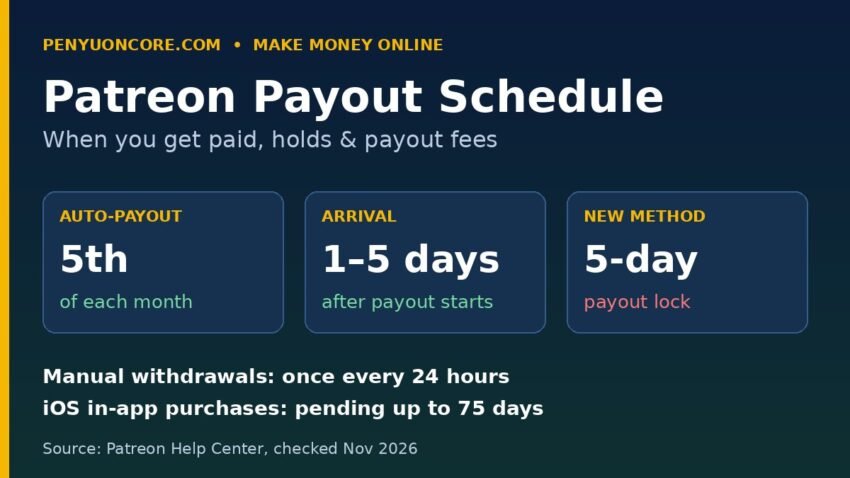
Short answer: Patreon does not have a single payday. Once your members’ payments settle, the money becomes available in your creator balance, and you can withdraw it manually (once every 24 hours) or switch on auto-withdrawal, which sends your full available balance on the 5th of each month. After a payout starts, Patreon says it typically takes 1–5 days to reach your account, although holds, pending periods and checks can make it longer.
Below are the full timeline, every hold Patreon documents, and what each payout method costs, all based on Patreon’s own Help Center pages (checked November 2026).
How the Patreon payout schedule works, step by step
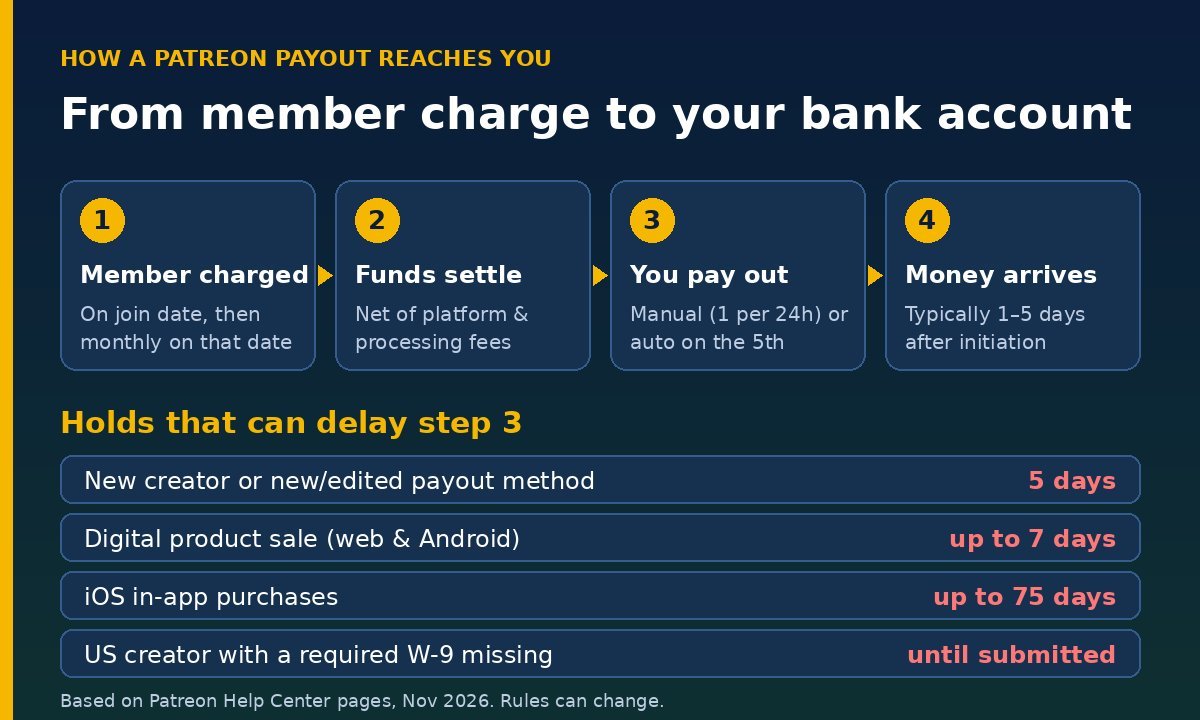
Your money moves through three stages before it reaches your bank or PayPal account:
- A member is charged. Patreon now uses subscription billing for all creators. According to Patreon’s Subscription Billing FAQ, new paid members are charged when they join and then monthly on the same date (someone who joins on April 12 is charged again on May 12). Members who joined under the old first-of-the-month model are still charged on the 1st.
- The payment settles and lands in your balance. Patreon deducts its platform fee, payment processing and any currency conversion fees first, so the balance you see is already net of those.
- You pay out. Either you click Withdraw, or auto-withdrawal fires on the 5th. A small payout transaction fee is taken at this step.
Because members are billed on different days, your balance builds up gradually through the month. Patreon’s Where is my Payout? guide adds that failed charges keep retrying automatically.
Manual payouts vs auto-withdrawal
Patreon’s Paying out your earnings page explains the options:
- Manual: withdraw all or part of your available balance from Creator studio > Payouts. You can only start one payout every 24 hours, and Patreon says it may cap monthly payouts in future if costs or patterns change.
- Automatic: once enabled, auto-withdrawal runs on the 5th of each month and sends your full available balance. It counts as your one payout for that 24-hour window. If you turn it on after the 5th, the first automatic payout is the following month’s 5th.
- Leave it: you can keep funds in your balance until you need them, but see the unclaimed funds section below before you leave money there for years.
How long does a Patreon payout take to arrive?
Patreon’s How payouts work article says a payout typically takes 1–5 days to appear in your personal account once initiated. Its general payout page uses a wider “typically within 10 days, depending on your payout method” window, and if you see a message saying a transfer may take up to 10 business days, Patreon says that means its team is running extra checks because of the volume you’ve processed.
For US creators using Stripe direct deposit, Patreon lists weekends, holidays and incorrect bank details as the two main causes of delay. It recommends a checking account; savings or virtual bank accounts carry a higher chance of payout failure. If a payout fails, the funds are typically returned to your creator balance with a “Returned” status.
Every payout hold and pending period Patreon documents
This is where most “Patreon didn’t pay me” confusion comes from. The table below summarizes the holds listed in Patreon’s Help Center.
| Situation | Hold or pending time | What it means |
|---|---|---|
| Brand-new creator | 5 days | Counted from adding your first payout method or receiving your first payment |
| Adding or editing a payout method | 5 days | Automatic lock on your balance; can block the auto-payout on the 5th |
| US creator who needs a W-9 | Until W-9 is submitted | All payouts are locked once a W-9 is required |
| Digital product sale (web or Android) | Up to 7 days | Shown as pending while the payment is confirmed |
| iOS in-app purchase (products or memberships) | Up to 75 days | Apple’s processing timeline, outside Patreon’s control |
| Ticketed Live event | 7 days after the event | For iOS tickets, whichever is later: 7 days post-event or 75 days from purchase |
| Recent manual payout | 24 hours | Only one payout can be started per 24 hours |
The payout-method trap around the 1st of the month
One detail is worth highlighting. Patreon says that if you add or edit your payout method within 5 days of the 5th (it gives “the 1st” as the example), the 5-day lock will stop that month’s auto-withdrawal. You can still withdraw manually once the lock expires, so it’s a delay rather than a lost payment. If you need to change banks, it’s best to do it in the middle of the month.
The W-9 lock for US creators
According to Patreon’s W-9 guide, creators who reach $600 in earnings in a calendar year must complete a Form W-9 (or a W-8BEN/W-8BEN-E if they’re not US persons), and creators subject to a 1099-K have payouts locked until the W-9 is submitted. If your balance suddenly can’t be withdrawn as your earnings grow, check this first. Patreon’s 1099-K page covers who actually receives the form. The logic is similar to what we described in our Gumroad 1099-K guide: the form reports gross amounts, and you report income whether or not you get one.
Patreon payout fees by method
The platform fee and processing fees are deducted before money reaches your balance. The payout fee is the only charge taken when you withdraw, and Patreon says it doesn’t appear in the fee breakdown on your earnings dashboard. These are the figures from Patreon’s Creator fees overview:
| Payout method | Who can use it | Payout fee | Minimum payout |
|---|---|---|---|
| Direct deposit (Stripe) | US creators | $0.25 per payout | None listed |
| PayPal (USD) | US and non-US creators | 1% (min $0.25, max $20) | $10 |
| Bank transfer, GBP (Payoneer) | UK creators paid in GBP | £0.50 per payout | None listed |
| PayPal, GBP | Creators paid in GBP | £1.00 per payout | None listed |
| Payoneer Wallet (USD) | Non-US creators | $1.00 per payout | $25 |
PayPal and Payoneer can add their own fees when you move money on to a bank, and Patreon applies a 2.5% currency conversion fee when a member pays in a currency different from your payout currency. If you compare Patreon with tip-style platforms, our breakdowns of Ko-fi fees and Buy Me a Coffee fees show how those platforms handle the same costs.
Does payout frequency change what you pay?
For US creators on Stripe direct deposit, the fee is a flat $0.25, so paying out weekly instead of monthly costs about $1 a month in total. For PayPal in USD, the fee is a percentage: a $400 withdrawal costs $4 (1%), whether you do it in one payout or four. Smaller split payouts only cost more once each one falls below $25, because that’s where the $0.25 minimum takes over. Above $2,000 per payout, the $20 cap means one larger payout is cheaper than several smaller ones. These are illustrations based on Patreon’s published rates.
Don’t leave money in your balance for years
Patreon’s unclaimed funds article explains that if an account has no logins for an extended period, the remaining balance can be treated as unclaimed property and sent to a state unclaimed property division. The dormancy period depends on your state of residence. For example, Patreon lists 24 months for New York, 36 months for California and Texas, and 60 months for non-US residents (whose funds go to Delaware). Logging in resets the inactive status, but regular withdrawals are the safer habit.
Practical tips for a predictable Patreon income
- Set up your payout method and W-9 before you launch, so the new-creator hold has passed before your first real payout.
- Use a checking account for US Stripe deposits to reduce failed transfers.
- Change payout details mid-month so the 5-day lock doesn’t fall on the 5th.
- Expect iOS sales to lag. Funds from in-app purchases can stay pending for up to 75 days, so treat them as next-quarter money when you plan.
- Keep a buffer. Creator income is uneven, and a cash cushion matters more for creators than for salaried workers. See our guide on how much emergency fund you need.
FAQ
What day does Patreon pay creators?
If auto-withdrawal is on, Patreon starts the payout on the 5th of each month for your full available balance. You can also withdraw manually on any day, once every 24 hours.
Why is my Patreon balance pending?
Membership payments can show as pending until they’re processed. Digital product sales on web and Android can be pending for up to 7 days, and iOS in-app purchases for up to 75 days.
Is there a minimum Patreon payout?
It depends on the method. Patreon lists a $10 minimum for PayPal in USD and $25 for Payoneer Wallet. On mobile, the minimum varies by method, currency and country.
Why did my Patreon auto-payout not happen on the 5th?
The most common reasons Patreon gives are a 5-day lock from adding or editing a payout method, a required but missing W-9, or a zero available balance (for example, because your balance covers your own memberships to other creators).
Do I pay tax on Patreon payouts?
Patreon says you should report all income to the relevant tax authorities whether or not you receive a Form 1099-K. Speak to a qualified tax professional about your own situation.
Disclaimer: This article is general information, not financial or tax advice. Patreon’s fees, holds and payout rules can change, so always confirm current details in your Patreon dashboard and the Patreon Help Center before relying on them.