
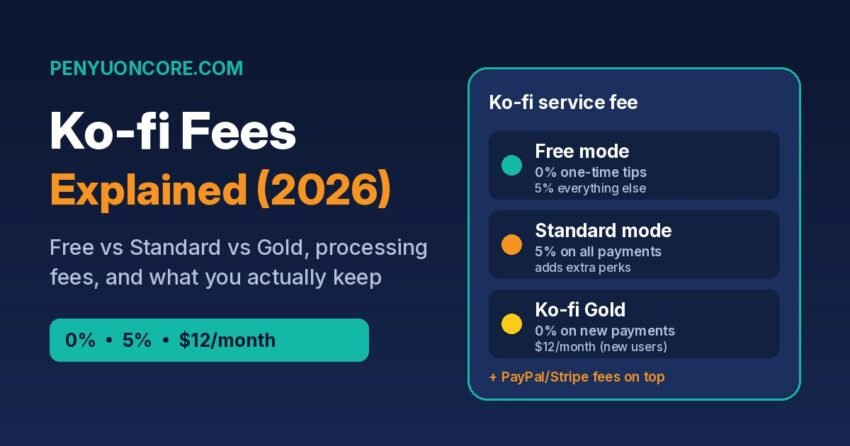
Short answer: Ko-fi charges a 5% service fee on shop sales, memberships, commissions and monthly tips. One-time tips are 0% in Ko-fi’s Free mode but 5% in Standard mode, and Ko-fi Gold ($12 a month for new users) removes the service fee on new payments. PayPal or Stripe processing fees are charged on top of all of this, whichever mode you use.
Ko-fi has changed its pricing more than once, so a lot of older guides are out of date. This one walks through the current fee setup using Ko-fi’s own help centre (checked on 13 November 2026), shows what you actually keep on a typical sale in the US and UK, and explains when Gold is worth paying for.
Ko-fi’s three fee setups at a glance
According to Ko-fi’s help article “Does Ko-fi take a fee?”, there are two modes with no monthly cost (Free and Standard), plus the paid Ko-fi Gold subscription.
| Payment type | Free mode | Standard mode | Ko-fi Gold |
|---|---|---|---|
| Monthly cost | $0 | $0 | $12/month (new users) |
| One-time tips | 0% | 5% | 0% |
| Crowdfunding goals | 0% | 5% | 0% |
| Monthly tips | 5% | 5% | 0% |
| Membership tiers | 5% | 5% | 0% (new memberships) |
| Commissions | 5% | 5% | 0% |
| Shop sales | 5% | 5% | 0% |
| Payment processing | PayPal/Stripe fees apply | PayPal/Stripe fees apply | PayPal/Stripe fees apply |
Standard mode adds perks that Free mode doesn’t have: supporter-only posts, scheduled posts, a shorter page name, swapping the “coffee” wording for something else, extra page colours and more shop storage. Ko-fi says you can switch Standard mode on or off at any time under Settings > Payment (the toggle is labelled “Get all of Ko-fi”).
The default setting catches people out
Ko-fi says new creators “now start with all of Ko-fi unlocked from day one”. That means a new page starts in Standard mode, where one-time tips carry the 5% fee. If your page is mostly tips and you don’t need supporter-only content, check that toggle first. Switching back to Free mode is the easiest fee cut on the platform.
Processing fees: the part Ko-fi doesn’t control
Ko-fi isn’t the payment processor. Supporters pay straight into your own PayPal or Stripe account, and those companies take their usual cut. Ko-fi puts this at “typically around 3% + $0.30”, but the real rate depends on your account, country and the currencies involved.
For Stripe, the published standard rates are:
- US accounts: 2.9% + 30¢ per successful domestic card transaction, with an extra 1.5% for international cards and a further charge if currency conversion is needed (Stripe US pricing).
- UK accounts: 1.5% + 20p for standard UK cards, 2.8% + 20p for premium UK cards, 2.5% + 20p for EEA cards and 3.15% + 20p for other international cards, plus 2% if currency conversion is needed (Stripe UK pricing).
PayPal’s rates vary by country and transaction type, so check the merchant fee page for your own country before comparing the two.
Currency settings matter as well. Ko-fi suggests setting your page currency to the one most of your supporters pay in, because only payments in a different currency get converted. Ko-fi supports USD, GBP, EUR and several other currencies.
What you actually keep: worked examples
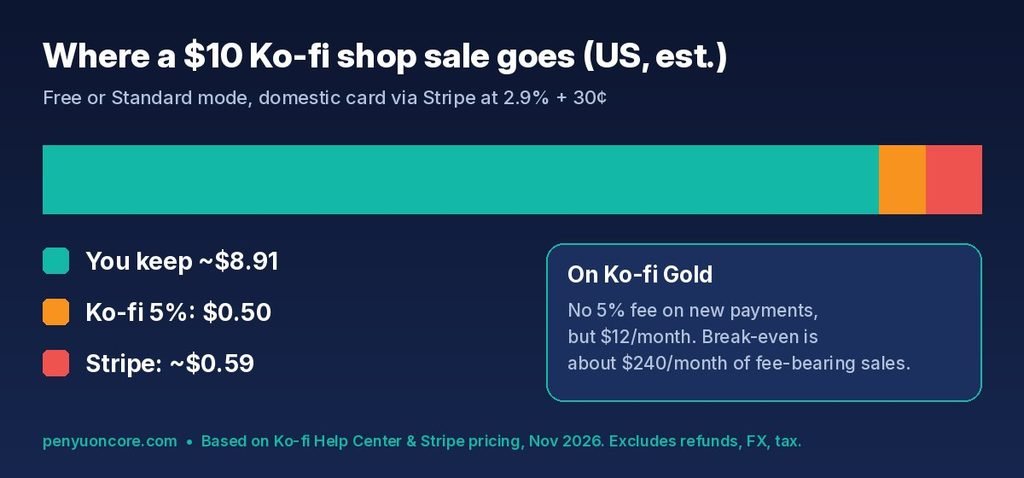
These are rough estimates that assume a standard domestic card payment through Stripe, with both fees worked out on the full payment amount. They leave out refunds, disputes, currency conversion and tax. Your Stripe or PayPal dashboard shows the exact breakdown for each payment. Stripe lists Ko-fi’s cut as an “Application Fee” and PayPal calls it a “Partner Fee”.
| Example | Ko-fi fee | Stripe fee (est.) | You keep (est.) |
|---|---|---|---|
| US: $5 one-time tip, Free mode | $0.00 | $0.45 | about $4.55 |
| US: $5 one-time tip, Standard mode | $0.25 | $0.45 | about $4.30 |
| US: $10 shop item, Free or Standard | $0.50 | $0.59 | about $8.91 |
| US: $25 membership, Free or Standard | $1.25 | $1.03 | about $22.72 |
| UK: £10 shop item, standard UK card | £0.50 | £0.35 | about £9.15 |
The fixed 30¢ (or 20p) per payment hits small payments hardest. On a $5 tip, processing takes about 9% before Ko-fi charges anything. On a $25 membership it’s about 4%. If most of your supporters pay small amounts, think about tiers or bundles that lift the average payment.
If you sell digital products, compare these numbers with other platforms before you choose one. We’ve broken down Payhip’s Free, Plus and Pro fees and Etsy’s fees for digital downloads in separate guides.
Is Ko-fi Gold worth $12 a month?
Gold replaces the percentage fee with a flat monthly price. The break-even point is simple: 5% of $240 is $12. If your fee-bearing income (shop sales, memberships, commissions, monthly tips, plus one-time tips if you’d otherwise use Standard mode) is regularly above about $240 a month, Gold costs less than the 5% fee. Below that, it costs more.
Ko-fi’s Gold help page lists a few conditions that matter before you subscribe:
- Monthly only for new users. Annual Gold plans are no longer offered to new sign-ups. Existing Gold members keep the price they already pay.
- Old Stripe memberships keep the 5% fee. Memberships started before you joined Gold still carry the 5% fee, so Gold only saves money on new memberships.
- Turn off the fee options yourself. If you’re a “Contributor” or already have “Get all of Ko-fi” switched on, you have to opt out separately after subscribing or the 5% fee keeps applying.
- Cancelling isn’t all-or-nothing. If you cancel, you keep Gold until the end of the billing period and then move to the 5% model without losing your features. Recurring tips and memberships created at 0% while you were on Gold stay at 0% until the supporter cancels.
Taxes: who sends the forms?
Ko-fi’s tax help page says Ko-fi is not the merchant of record, doesn’t process payments, and doesn’t collect or remit sales tax or VAT for you. It gives you tools to add sales tax or VAT at checkout and a CSV export of your full payment history (under Payments and orders). It also says tip income is typically subject to income tax.
United States: any 1099-K comes from PayPal or Stripe, not Ko-fi. The IRS says payment apps and online marketplaces must file a Form 1099-K when payments for goods or services go over $20,000 and more than 200 transactions in a year. They can still send one for lower amounts, and some states have lower thresholds (IRS: Understanding your Form 1099-K). Either way, you have to report the income. Our Gumroad 1099-K guide covers how the form works for creators in more detail.
United Kingdom: HMRC’s £1,000 trading allowance means you may not need to tell HMRC about gross trading income of £1,000 or less in a tax year. Above that, you need to register for Self Assessment. You also have to keep records either way (GOV.UK: tax-free allowances on trading income). Ko-fi’s CSV export is a handy starting point for those records.
Quick checklist to cut your Ko-fi fees
- Check whether Standard mode is on. If you mainly get tips and don’t need its perks, switch to Free mode.
- Set your Ko-fi currency to match most of your supporters to avoid conversion fees.
- Avoid very low prices where the fixed per-payment fee takes a big share.
- Only consider Gold if your fee-bearing income is reliably above about $240 a month, and turn off Contributor or “Get all of Ko-fi” afterwards.
- Download your payment CSV regularly so tax time is easier.
FAQ
Does Ko-fi take a cut of tips?
Not in Free mode. One-time tips and crowdfunding goals are 0%. In Standard mode, tips carry the 5% fee. PayPal or Stripe still charge their processing fee either way.
Why does my Stripe dashboard show an “Application Fee”?
That’s Ko-fi’s 5% service fee. PayPal shows the same fee as a “Partner Fee”.
Does Ko-fi Gold remove PayPal and Stripe fees?
No. Gold only removes Ko-fi’s own service fee on new payments. Processing fees still apply.
Does Ko-fi send me a 1099?
Ko-fi says it isn’t the merchant of record. US creators who meet the reporting rules get any 1099-K from PayPal or Stripe, and the income is reportable even without a form.
Disclaimer: This article is general information, not financial or tax advice. Fees and tax rules change, so check Ko-fi, your payment processor, and the IRS or HMRC (or a qualified adviser) for your own situation. Fee details were checked on 13 November 2026.