
To deploy a smart contract on Core with Foundry, set evm_version = "shanghai" in foundry.toml, point Foundry at https://rpc.coredao.org (chain ID 1116), and run forge create or forge script with both --broadcast and --legacy. Fund the deployer with a little CORE first, then verify the contract on Core Scan. The one trap worth knowing: recent Foundry releases compile for a newer EVM by default, and Core does not support every opcode in it.
This guide follows the official Core Foundry guide and Core’s Core-Foundry-Kit on GitHub. It also includes read-only checks we ran against Core mainnet on 17 November 2026 using Foundry 1.9.0. If you use Hardhat instead, see our companion guide on deploying a smart contract on Core with Hardhat.
Core network settings for Foundry
These values come from Core’s RPC endpoint list and the network section of the Core-Foundry-Kit README:
| Network | Chain ID | RPC URL | Core Scan API URL (for verification) |
|---|---|---|---|
| Core Mainnet | 1116 | https://rpc.coredao.org | https://openapi.coredao.org/api |
| Core Testnet2 | 1114 | https://rpc.test2.btcs.network | https://api.test2.btcs.network/api |
Core’s docs say the old testnet (chain ID 1115) has been decommissioned, so use Testnet2 for testing. In our checks at about 20:20 WIB (UTC+7) on 17 November 2026, the Testnet2 RPC and testnet explorer timed out from our test machine, while mainnet answered normally. Test your testnet endpoint before you plan around it.
Step 1: Install Foundry and create a project
Install Foundry with the official installer from the Foundry installation docs, then start a new project:
curl -L https://foundry.paradigm.xyz | bash
foundryup
forge --version
forge init hello-core
cd hello-core
forge init creates src/Counter.sol, script/Counter.s.sol, test/Counter.t.sol and a foundry.toml file. The examples below use the default Counter contract.
Step 2: Set the EVM version to Shanghai (the step people miss)
Core’s Foundry guide asks for Solidity 0.8.24 with the EVM version set to Shanghai. This matters more now than it used to. When we ran forge config on a fresh Foundry 1.9.0 project, the default was evm_version = "osaka", and Foundry downloaded solc 0.8.38 automatically.
To see what Core actually accepts, we compiled small test contracts and sent them to eth_estimateGas on rpc.coredao.org. This is a read-only call, so no transaction was sent. Here is what came back:
- The default
Counterestimated normally (158,018 gas) whether we compiled for Shanghai, Cancun, Prague or Osaka. It uses no newer opcodes. - Constructors using Cancun’s
TSTOREandMCOPYalso estimated without errors. - A constructor using the Osaka
CLZopcode (EIP-7939, opcode0x1e) failed on both the main and archive RPCs withinvalid opcode: opcode 0x1e not defined.
Simple contracts may deploy fine on the default settings, but you are relying on luck. Pin the version Core documents instead:
[profile.default]
src = "src"
out = "out"
libs = ["lib"]
solc_version = "0.8.24"
evm_version = "shanghai"

[rpc_endpoints]
core = "https://rpc.coredao.org"
core_testnet2 = "https://rpc.test2.btcs.network"
The [rpc_endpoints] table is a standard Foundry config option (see the Foundry config reference). It lets you write --rpc-url core instead of the full URL. With this file in place, forge build compiled with solc 0.8.24, forge test passed, and cast chain-id --rpc-url core returned 1116.
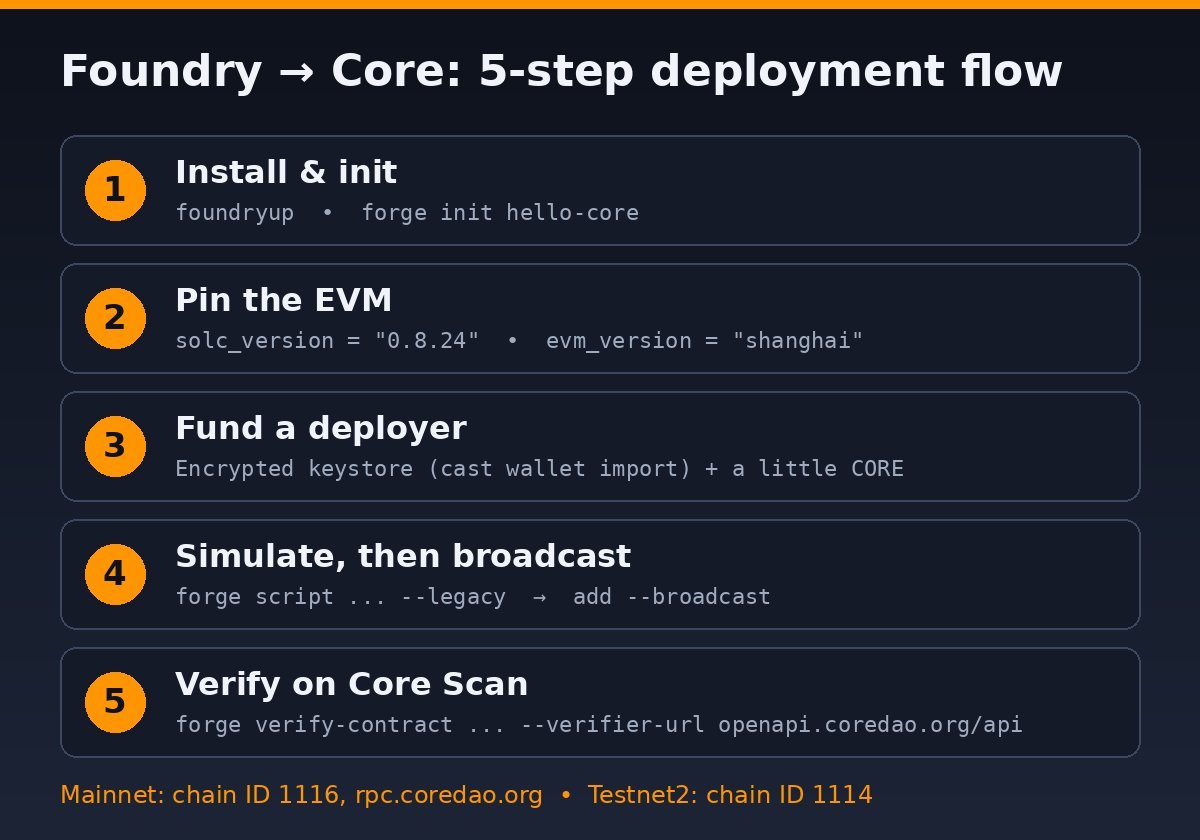
Step 3: Set up a deployer key safely
Core’s guide uses a .env file with PRIVATE_KEY. If you go that way, never commit the file. Foundry also has an encrypted keystore, which is a safer option. Per the cast wallet import docs, you can import a key under a name and then sign with --account:
cast wallet import core-deployer --interactive
# later, sign with: --account core-deployer
Use a dedicated deployer wallet holding only the CORE you need for gas. If it is empty, our guide on how to get CORE for gas fees covers the options. When we simulated against mainnet with an unfunded test key, the RPC rejected the request with insufficient funds for transfer. That is the error you will see if you skip funding.
Step 4: Deploy with forge create
For a single contract, the command from Core’s docs is:
forge create src/Counter.sol:Counter \
  --rpc-url core \
  --account core-deployer \
  --broadcast \
  --legacy
Two flags matter here:
--broadcastactually sends the transaction. The forge create reference lists it as a separate flag, and its own examples include it.--legacysends a legacy (type 0) transaction instead of EIP-1559. Core’s guide says to include it when you interact with Core.
If your constructor takes arguments, add --constructor-args arg1 arg2 at the end. When it succeeds, Foundry prints the deployer address, the Deployed to: contract address and the transaction hash.
Step 5: Or deploy with forge script
Scripts suit multi-contract deployments and repeatable releases. The script/Counter.s.sol created by forge init already deploys Counter between vm.startBroadcast() and vm.stopBroadcast(). Run it without --broadcast first to simulate:
forge script script/Counter.s.sol:CounterScript \
  --rpc-url core \
  --account core-deployer \
  --legacy
Our simulation against Core mainnet printed Estimated gas price: 60 gwei, Estimated total gas used for script: 203862 and Estimated amount required: 0.01223172 CORE, followed by SIMULATION COMPLETE. That is an estimate for this tiny example only. Your contract and network conditions will change it. When the numbers look right, add --broadcast to send the transactions.
Core’s docs add one tip: if you hit a “gas underpriced” error, or you are deploying Rev+ contracts, use --gas-estimate-multiplier with a value from 300 to 500. That flag only works with forge script, not forge create. For more on that error, see our guide on “transaction underpriced” on Core.
Step 6: Verify the contract on Core Scan
Core’s guide verifies with Foundry’s built-in command:
forge verify-contract 0xYourContractAddress Counter \
  --verifier-url https://openapi.coredao.org/api \
  --api-key $CORESCAN_API_KEY \
  --watch
For Testnet2, use https://api.test2.btcs.network/api as the verifier URL. Our full walkthrough on verifying a contract on Core Scan covers the web form, Hardhat and the API, plus common mismatch errors.
Common errors and quick fixes
invalid opcode: opcode 0x1e not defined: your bytecode uses CLZ from the Osaka EVM. Setevm_version = "shanghai", rebuild withforge build --forceand deploy again.insufficient funds for transfer: the deployer has no CORE, or not enough for the gas.- “gas underpriced”: switch to
forge scriptwith--gas-estimate-multiplier(300 to 500), as Core’s docs suggest. - Testnet RPC timeouts: check the endpoint with
cast chain-id --rpc-url core_testnet2before you deploy.
FAQ
Do I have to use the –legacy flag on Core?
Core’s official Foundry guide says to include --legacy when you interact with Core, and both of its deploy examples use it. Following that is the safest default.
What chain ID and RPC should Foundry use for Core mainnet?
Chain ID 1116 with https://rpc.coredao.org. Our cast chain-id check against that RPC returned 1116.
Why does Core need Shanghai if my contract compiles for Osaka?
Compiling only proves that solc can generate the code. The chain also has to support every opcode in it. In our test, Core rejected Osaka’s CLZ opcode, and Core’s docs recommend Shanghai.
How much CORE does a deployment cost?
It depends on your contract’s size and the gas price. Run forge script without --broadcast and Foundry will print an estimate in CORE before you spend anything.
Disclaimer: This article is for educational purposes only and is not financial, investment or security advice. Always test on a testnet first, protect your private keys, and do your own research before deploying contracts or moving funds.