
Quick answer: To verify a contract on Core Scan, open your contract address on scan.coredao.org, go to the Contract tab, click Verify and Publish, and submit the exact source code, compiler version, optimizer setting and constructor arguments you deployed with. Developers can do the same thing from the command line with the Hardhat hardhat-verify plugin or Foundry’s forge verify-contract, using a Core Scan API key and Core’s Etherscan-compatible API endpoint.
Verification proves that the bytecode on-chain really came from the source code you publish. Once a contract is verified, anyone can read the code, and Core Scan can show “Read Contract” and “Write Contract” tabs for it. This guide walks through all three official methods described in the Core DAO contract verification docs, plus the fixes for the most common “bytecode does not match” failures.
If you are new to the explorer itself, start with our beginner’s guide to using Core Scan.
Before you start: what you need
- The deployed contract address on Core mainnet (chain ID 1116) or Core Testnet2 (chain ID 1114).
- The exact source code you compiled, with the same imports and the same file structure.
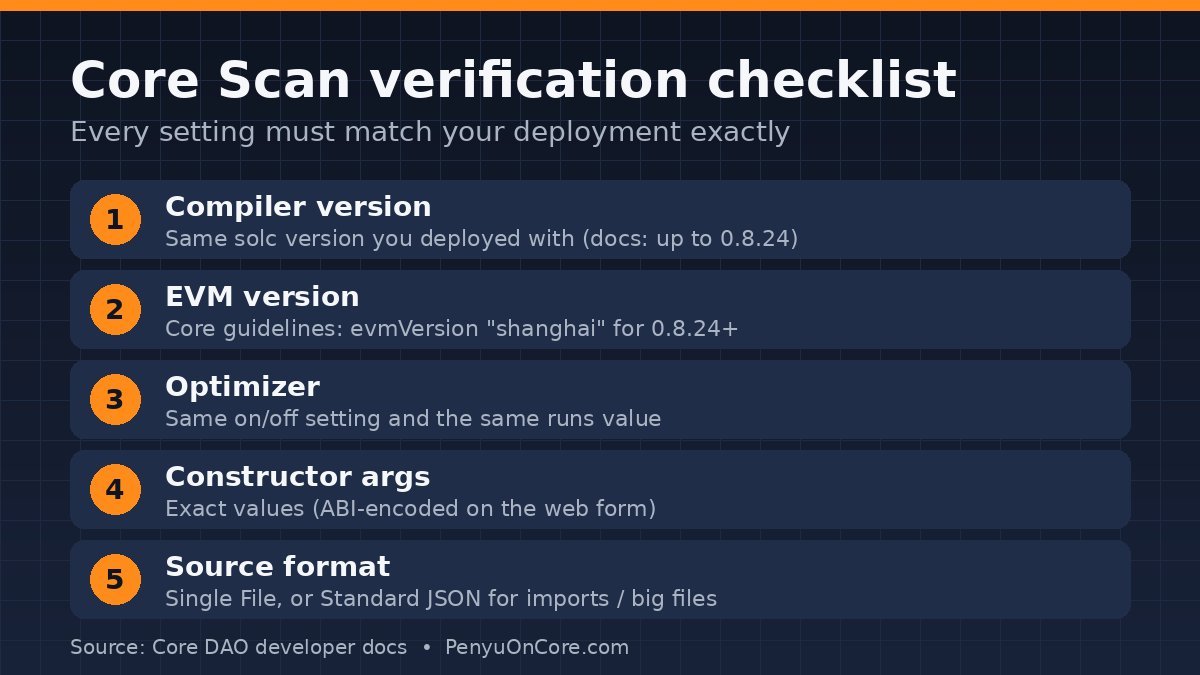
- Your compiler settings: Solidity version, EVM version, and whether the optimizer was on (and how many runs).
- Constructor arguments, if your constructor took any.
- A Core Scan API key if you plan to use Hardhat, Foundry or the API. Core’s docs say you must register on Core Scan and generate a key before making API calls.
Testing on Testnet2 first is a good habit. Our Core testnet faucet guide explains how to get test tokens for deployment gas.
The Core-specific setting most people miss: EVM version
Core’s smart contract development guidelines tell developers using Solidity 0.8.24 or later to compile with evmVersion: "shanghai" rather than the default EVM version of tools like Hardhat and Remix. The same page says Core Scan’s default EVM version for Solidity 0.8.24+ is set to Shanghai, and that contracts written for versions below 0.8.24 are unaffected.
Why this matters: recent Solidity releases target newer EVM versions by default. For example, the Solidity 0.8.30 release changed the default EVM version to Prague. If you compile with one EVM version and verify with another, the bytecode will not match and verification fails.
Note on recent upgrades: Core activated the Hermes hardfork on mainnet on November 25, 2025 (08:00 UTC), adding features such as BLS12-381 cryptography, historical block hash access and EOAs with executable code. At the time of writing, Core’s developer docs still recommend Solidity 0.8.24 with the Shanghai EVM setting and list 0.8.24 as the highest supported compiler for verification. Check the current docs before you pick a newer compiler. The rule that never changes: verify with exactly the settings you deployed with.
Method 1: Verify on the Core Scan website
This is the method Core’s docs call the most commonly used. It needs no API key.
- Go to Core Scan (mainnet) or Core Scan for Testnet2.
- Paste your contract address into the search bar.
- Open the Contract tab and click Verify and Publish.
- Fill in the contract address, the compiler type, the compiler version and the open-source license. Choose Single File for simple contracts. Choose Standard Json for contracts with external imports (for example, OpenZeppelin libraries).
- On the next page, paste the Solidity source code (or upload the Standard JSON input). If your contract has constructor parameters, enter them as ABI-encoded bytes in the Constructor Arguments field. If you compiled with the optimizer on, select Yes under Optimization.
- Click Verify and Publish.
Core’s docs note that very large single-file contracts (1,000+ lines) can run into problems, and recommend switching to the Standard JSON format in that case.
Method 2: Verify with Hardhat
Core’s docs call Hardhat verification “the most convenient way” for developers. Core is not a built-in network in the plugin, so you add it as a custom chain. The config below follows the pattern in Core’s Using Hardhat guide (Hardhat 2 with @nomicfoundation/hardhat-toolbox, which includes hardhat-verify):
// hardhat.config.js
require("@nomicfoundation/hardhat-toolbox");

module.exports = {
  solidity: {
    version: "0.8.24",
    settings: {
      evmVersion: "shanghai",
      optimizer: { enabled: true, runs: 200 },
    },
  },
  networks: {
    core_mainnet: {
      url: "https://rpc.coredao.org/",
      accounts: process.env.PRIVATE_KEY ? [process.env.PRIVATE_KEY] : [],
      chainId: 1116,
    },
    core_testnet2: {
      url: "https://rpc.test2.btcs.network",
      accounts: process.env.PRIVATE_KEY ? [process.env.PRIVATE_KEY] : [],
      chainId: 1114,
    },
  },
  etherscan: {
    apiKey: {
      core_mainnet: process.env.CORE_MAIN_SCAN_KEY,
      core_testnet2: process.env.CORE_TEST2_SCAN_KEY,
    },
    customChains: [
      {
        network: "core_mainnet",
        chainId: 1116,
        urls: {
          apiURL: "https://openapi.coredao.org/api",
          browserURL: "https://scan.coredao.org/",
        },
      },
      {
        network: "core_testnet2",
        chainId: 1114,
        urls: {
          apiURL: "https://api.test2.btcs.network/api",
          browserURL: "https://scan.test2.btcs.network/",
        },
      },
    ],
  },
};
Keep your private key and API keys in a .env file and add it to .gitignore. Core’s docs warn never to hardcode private keys. Then run:
npx hardhat verify --network core_mainnet DEPLOYED_CONTRACT_ADDRESS "Constructor argument 1"According to the hardhat-verify plugin docs, complex constructor arguments (such as arrays) can go in a JavaScript module passed with --constructor-args arguments.js. The network name in customChains must match the key you use in apiKey.
Using Hardhat 3?
Hardhat 3 configures verification differently. Its verification guide uses a verify object in the config, and networks that are not supported natively are added through chainDescriptors (chain ID, explorer name, URL and API URL). Core’s own docs still show the Hardhat 2 customChains format, so if you are on Hardhat 3, translate the same Core URLs into a chain descriptor for chain ID 1116 or 1114.
Method 3: Verify with Foundry
Core’s docs show this flow for Foundry. First set the compiler and EVM version in foundry.toml:
[profile.default]
solidity_version = "0.8.24"
evm_version = "shanghai"
Put your RPC URL, private key, CORESCAN_API_KEY and API_URL in a .env file, run source .env, and then verify:
forge verify-contract 0xContract_Address ContractName --verifier-url $API_URL --api-key $CORESCAN_API_KEY --watchUse https://openapi.coredao.org/api as API_URL for mainnet and https://api.test2.btcs.network/api for Testnet2. The GetBlock Core guide shows the same command with explicit --chain-id 1116 --verifier etherscan flags, which is useful if Foundry doesn’t detect the chain on its own.
Method 4: The Core Scan API (advanced)
Core says its API calls are compatible with the Etherscan API: you swap in the Core endpoint and your Core Scan key. The Contracts API documentation lists these limits for the verifysourcecode action:
- A valid Core Scan API key is required.
- Up to 100 submissions per day per user (subject to change).
- HTTP POST only.
- Imports must be flattened into one file for single-file submissions. Standard JSON input is also supported.
- A successful submission returns a 50-character GUID you can use with
checkverifystatus. Core’s sample code says processing takes 30–60 seconds on average.
The same page also documents a verifyproxycontract action for proxies. After it succeeds, Core Scan shows “Read/Write as Proxy” for the implementation.
Which method should you use?
| Method | API key needed? | Best for |
|---|---|---|
| Core Scan website | No | One-off contracts, Remix users |
| Hardhat (hardhat-verify) | Yes | Hardhat projects, repeat deployments |
| Foundry (forge verify-contract) | Yes | Foundry projects, scripts and CI |
| Core Scan API | Yes | Custom tooling, proxy verification |
Why Core Scan verification fails (and how to fix it)
Bytecode doesn’t match
This almost always means one of your settings differs from the deployment. Check, in this order: compiler version, EVM version (Shanghai, per Core’s guidelines), optimizer on/off and the runs value, and the exact source code. Hardhat’s troubleshooting notes add that code changed since deployment and a different build profile also cause mismatches.
Contract not found right after deploying
Hardhat’s docs say the explorer may not have indexed a brand-new contract yet, and that waiting about a minute is normally enough.
Wrong constructor arguments
Arguments must be exactly what you deployed with. On the website, they go in as ABI-encoded bytes. In Hardhat, pass them after the address or through --constructor-args.
Libraries and very large files
Core lists two known limitations: libraries aren’t supported through API verification, and very large single-file contracts may fail. Standard JSON format is the recommended workaround for big files.
Testnet1 addresses
Core Testnet (chain ID 1115) has been decommissioned. Deploy and verify on Testnet2 (1114) instead.
If your contract verifies but your transactions still fail, our guide to the “execution reverted” error explains how to read revert reasons.
FAQ
Is verifying a contract on Core Scan free?
Core’s docs don’t list a fee for verification. It is a submission to the explorer, not an on-chain transaction. You only pay gas when you deploy.
Does verification make a contract safe?
No. Verification only proves the published source matches the deployed bytecode. The code can still contain bugs or malicious logic, so verified isn’t the same as audited.
What Solidity version does Core support?
At the time of writing, Core’s docs say verification supports compiler versions up to 0.8.24 and recommend the Shanghai EVM setting for 0.8.24+. Check the guidelines page for updates after the Hermes hardfork.
Sources
- Core DAO Docs: Contract Verification
- Core DAO Docs: Guidelines for Smart Contract Development on Core
- Core DAO Docs: Using Hardhat
- Core DAO Docs: Contracts API
- Core DAO Blog: Hermes Hardfork Activation on Core Mainnet
- Hardhat: hardhat-verify plugin (Hardhat 2)
- Hardhat: Verifying smart contracts (Hardhat 3)
- Solidity 0.8.30 Release Announcement
- GetBlock Docs: Deploy a smart contract on Core
Disclaimer: This article is for educational purposes only and is not financial, investment or security advice. Smart contracts carry technical risk. Always test on a testnet, keep private keys out of your code, and do your own research.