
Quick answer: “ERC20: insufficient allowance” means a contract (or address) tried to move your tokens with transferFrom, but the token owner had not approved that spender for at least that amount. Fix it by calling approve(spender, amount) on the token contract from the owner’s address first, or by using transfer if the owner is sending their own tokens. If you see “ERC20: transfer amount exceeds balance” instead, the approval is fine but the sender’s balance is too low.
Both messages come from OpenZeppelin’s ERC-20 implementation, which most tokens on Ethereum, Base, Core and other EVM chains are built on. In OpenZeppelin Contracts v5, the same failures show up as the custom errors ERC20InsufficientAllowance and ERC20InsufficientBalance. That change is why many developers see “unknown custom error” where an old tutorial shows a readable string. This guide covers both versions, how to decode the error, and the fixes that work.
What the error actually means
The ERC-20 standard has two ways to move tokens:
transfer(to, amount)moves tokens from the caller’s own balance. No approval is needed.transferFrom(from, to, amount)lets a spender move tokens out of someone else’s balance. It only works iffromhas calledapprove(spender, amount)first.
When a DEX, staking vault, or your own contract calls transferFrom, OpenZeppelin’s internal _spendAllowance function checks allowance(owner, spender). In v4.9.6 the check is require(currentAllowance >= amount, "ERC20: insufficient allowance"). In v5.6.1 it is revert ERC20InsufficientAllowance(spender, currentAllowance, value). In both versions, an allowance of type(uint256).max counts as unlimited and is never reduced.
Note that the spender is whichever address calls transferFrom, which is usually the contract you’re interacting with, not your wallet. Approving the wrong address is the most common cause of this error.
OpenZeppelin v4 vs v5: what you’ll see
OpenZeppelin’s v5.0 changelog says the library “replaced revert strings and require statements with custom errors”. The ERC-20 errors follow ERC-6093: Custom errors for commonly-used tokens. We compiled the same token and a minimal vault against v4.9.6 and v5.6.1 and ran them with Foundry 1.9.0. These are the exact reverts we got:
| Situation | OpenZeppelin v4.x | OpenZeppelin v5.x | Selector (v5) |
|---|---|---|---|
| No or too little approval | ERC20: insufficient allowance | ERC20InsufficientAllowance(spender, allowance, needed) | 0xfb8f41b2 |
| Balance lower than amount | ERC20: transfer amount exceeds balance | ERC20InsufficientBalance(sender, balance, needed) | 0xe450d38c |
With v5 the error is more useful, because it tells you the spender address, the current allowance, and the amount needed. For example, a test with no approval failed with ERC20InsufficientAllowance(0x2e23…470b, 0, 1000000000000000000). That means an allowance of 0 against 1 token with 18 decimals. A partial approval showed 500000000000000000 (0.5 token) against the same 1e18 needed.
Also note: when the vault had an unlimited approval but the user tried to deposit 200 tokens while holding 100, the revert was the balance error, not the allowance error. The allowance check passes first, then the balance check fails. If your allowance looks right, check your balance and decimals next.
How to decode “unknown custom error” (v5 tokens)
If the contract you call doesn’t include the token’s errors in its ABI, ethers.js v6 can’t name the error. With ethers 6.17.0 against a local Anvil node, the call failed with code: CALL_EXCEPTION and shortMessage: 'execution reverted (unknown custom error)'. The node’s own message was execution reverted: custom error 0xfb8f41b2: …. The raw revert data is still in error.data, so you can decode it yourself:
With ethers.js v6
try {
  await vault.deposit(tokenAddress, amount);
} catch (e) {
  // token = new ethers.Contract(tokenAddress, tokenAbi, signer)
  const parsed = token.interface.parseError(e.data);
  console.log(parsed.name, parsed.args); // ERC20InsufficientAllowance [spender, allowance, needed]
}
Interface.parseError works with any ABI that contains the error definition. You can use the full OpenZeppelin ERC20 artifact or just the two error fragments.
With Foundry’s cast
cast decode-error 0xfb8f41b2000000...0de0b6b3a7640000
# ERC20InsufficientAllowance(address,uint256,uint256)
# 0xe7f1...0512
# 0
# 1000000000000000000 [1e18]
cast decode-error found the signature from the selector alone in our test. You can also pass --sig "ERC20InsufficientAllowance(address,uint256,uint256)" to skip the lookup. In forge test -vvv, the trace already shows the decoded error name and arguments.
For a broader walkthrough of revert reasons, see our guide to the “execution reverted” error.
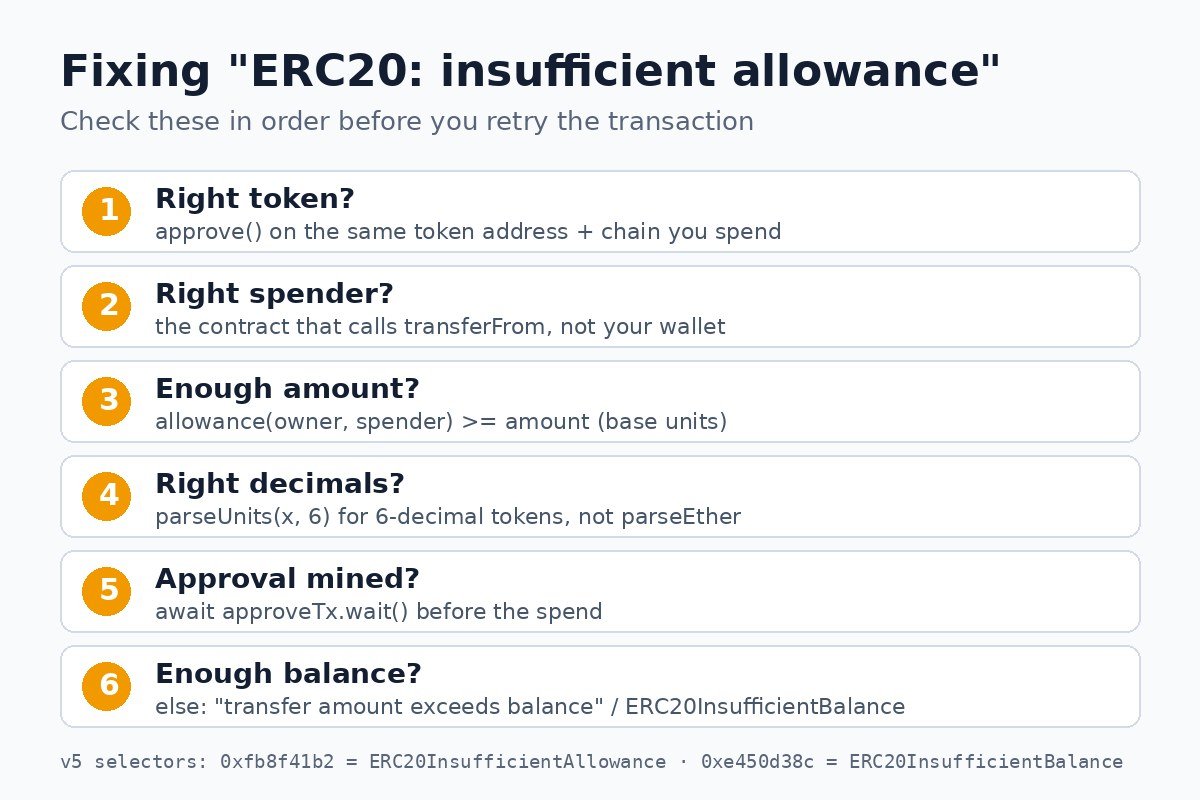
How to fix “ERC20: insufficient allowance”
1. Approve the correct spender on the correct token
Call approve on the token contract, from the owner wallet, with the contract that will call transferFrom as the spender. In ethers v6:
await (await token.approve(vaultAddress, amount)).wait();
await (await vault.deposit(tokenAddress, amount)).wait();
A common mistake is calling approve from inside your own contract (for example token.approve(address(this), x)). That sets the allowance for your contract’s own balance, not the user’s. The user must approve directly, from their wallet.
2. Use transfer when the owner is the caller
If your contract is moving tokens it already holds, call transfer(to, amount) instead of transferFrom(address(this), to, amount). No allowance is involved.
3. Approve enough, in base units
Allowances are raw integers. A token with 6 decimals needs parseUnits("100", 6), not parseEther("100"). If the amount is off by a factor of 1012, check decimals first. Also remember that every transferFrom reduces a finite allowance. An approval that worked for the first deposit may be used up by the second.
4. Wait for the approval to be mined
Sending the spend before the approval is mined fails on the old state. In scripts, await tx.wait() on the approval first. There is one more ethers v6 detail: its AbstractProvider shares identical requests made within the same 250 ms window. In our local test, retrying the exact same call right after a failed attempt and a fast Anvil approval returned the stale revert again, even though allowance() already showed the new value. Sending the same transaction with cast send succeeded. If an immediate retry fails “for no reason”, re-read the allowance and try again a moment later.
5. Watch for allowance helpers removed in v5
OpenZeppelin v5 removed the non-standard increaseAllowance and decreaseAllowance functions from ERC20, according to the changelog. Calling them on a v5 token will fail. For contract-to-contract approvals, the library’s SafeERC20 provides safeIncreaseAllowance and forceApprove. The changelog notes these were refactored “to support USDT-like tokens”.
How to fix “ERC20: transfer amount exceeds balance”
- Check
balanceOf(sender)on the same token address and chain. Bridged tokens with the same symbol often have different contracts, as with the USDT and USDC variants on Core. - Check decimals, as above.
- For fee-on-transfer or rebasing tokens, the amount that arrives can be lower than the amount sent. Code that forwards the “expected” amount can then exceed the contract’s real balance.
- In v5, read the
balanceandneededarguments ofERC20InsufficientBalance. They show exactly how far short you are.
Don’t confuse it with similar errors
“Insufficient allowance” is a token-level revert. It’s different from the node error “gas required exceeds allowance”, which is about the gas limit or your native-coin balance, and from MetaMask’s “insufficient funds for gas”. On Core, the token logic is the same as on any EVM chain. If you’re testing your own token there, our Foundry deployment guide for Core shows the setup.
A safety note on unlimited approvals
Many dApps ask for an unlimited (type(uint256).max) approval so you never hit this error again. That’s convenient, but it lets the spender move any amount of that token as long as the approval stands. Approving only what you need is the more conservative choice for wallets that hold real value. Review and remove old approvals periodically. Our guide on how to revoke token approvals walks through it.
FAQ
Why does approve succeed but transferFrom still fails?
Usually you approved a different spender (your wallet or the wrong contract), approved on a different token address or chain, or approved too few base units. In v5, the error’s first argument shows which spender the token checked.
Is “ERC20InsufficientAllowance” the same error as “ERC20: insufficient allowance”?
Yes. It’s the same check. OpenZeppelin v4 reverts with the string and v5 reverts with the ERC-6093 custom error (selector 0xfb8f41b2).
Do I need to approve before sending tokens to a friend?
No. A plain wallet send uses transfer, which doesn’t use allowances. Approvals are only needed when a contract or another address moves tokens for you.
Does an unlimited approval ever run out?
Not in OpenZeppelin’s implementation. Both v4 and v5 skip the allowance deduction when it equals type(uint256).max. Other token implementations may behave differently.
Disclaimer: This article is for educational purposes only and is not financial or investment advice. Always test on a testnet or local node before sending transactions with real funds.