
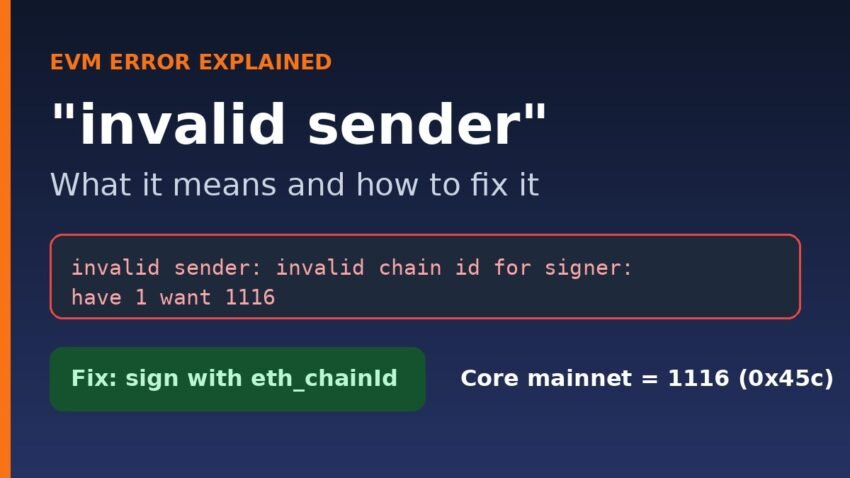
Quick answer: The invalid sender error means the node could not recover a valid “from” address from your signed transaction. In almost every case the transaction was signed for the wrong chain ID, for example chain 1 (Ethereum) or 1114 (Core testnet) instead of 1116 (Core mainnet). Re-sign it with the chain ID the RPC reports from eth_chainId and it will go through.
This guide is for developers and script users who see invalid sender when broadcasting a raw transaction to Core or any other EVM chain. We reproduced the error on Core mainnet’s public RPC and on a local Anvil node on 18 November 2026, and the exact messages are shown below.
What the invalid sender error actually means
An EVM transaction does not carry a “from” field. The node works out the sender from the signature. Since EIP-155, the chain ID is part of the data that gets signed, and for legacy transactions the signature’s v value is set to CHAIN_ID * 2 + 35 or + 36. Newer typed transactions (EIP-1559, type 2) carry the chain ID as an explicit field.
When a Geth-based node (Core’s node software is a Geth fork) validates an incoming transaction, it tries to recover the sender using its own chain ID. In go-ethereum’s txpool validation code, any failure at that step is wrapped as ErrInvalidSender, whose text is simply invalid sender. The underlying reason comes after the colon. The most common one, defined in transaction_signing.go, is invalid chain id for signer.
The full message on Core mainnet
Here is what https://rpc.coredao.org returned when we sent it a transaction signed for Ethereum mainnet:
{"code":-32000,"message":"invalid sender: invalid chain id for signer: have 1 want 1116"}Read it literally: the transaction says chain 1 (“have”), the node is chain 1116 (“want”). That one line usually tells you exactly what to fix.
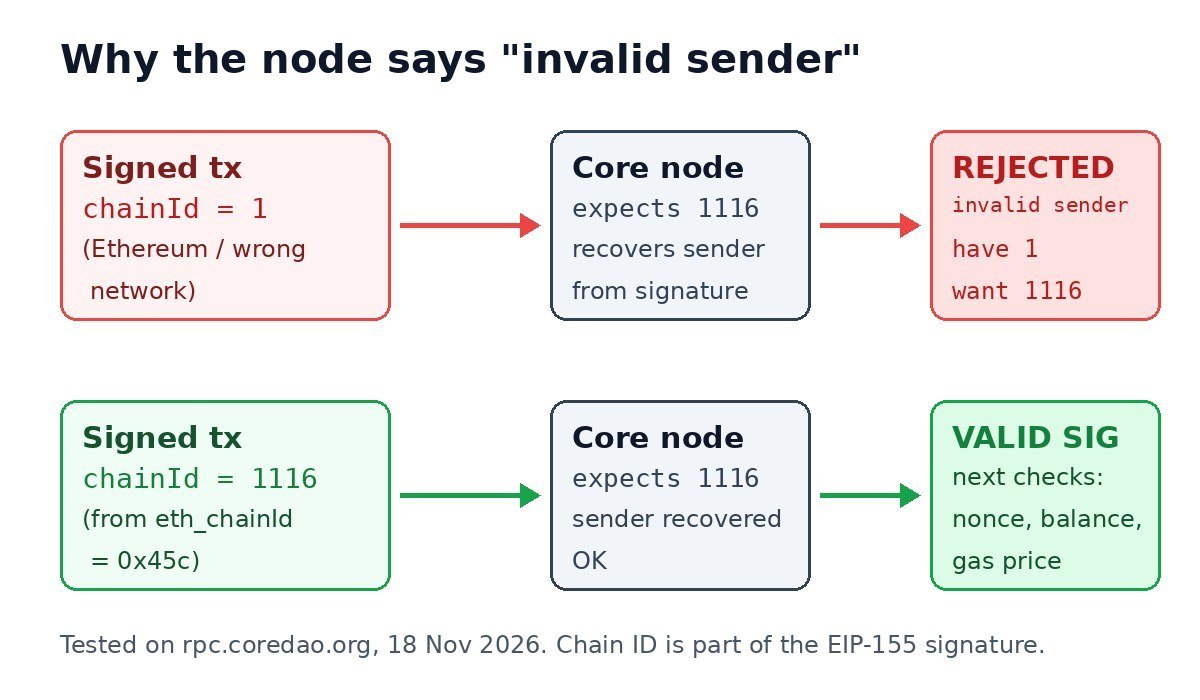
What we tested
We used ethers 6.17.0 to sign 1-wei transfers from a freshly generated, empty wallet and pushed them with eth_sendRawTransaction. Because the wallet held no CORE, nothing could ever be executed; we only wanted the node’s validation response. We also ran the same script against Anvil 1.9.0 (Foundry’s local node, chain ID 31337).
| Transaction sent | Core mainnet RPC response | Anvil 1.9.0 response |
|---|---|---|
| Legacy (type 0), chain ID 1 | invalid sender: invalid chain id for signer: have 1 want 1116 | Not rejected for chain ID (went on to a funds check) |
| Legacy (type 0), chain ID 1114 (Core testnet2) | invalid sender: invalid chain id for signer: have 1114 want 1116 | Not tested |
| EIP-1559 (type 2), chain ID 1 | invalid sender: invalid chain id for signer: have 1 want 1116 | invalid chain id for signer |
| Correct chain ID, broken signature (s value altered) | invalid sender: invalid transaction v, r, s values | Not tested |
| Legacy, correct chain ID 1116, empty wallet | insufficient funds for gas * price + value (signature accepted) | Insufficient funds (with chain ID 31337) |
Two findings are worth highlighting:
- Testnet and mainnet IDs are not interchangeable. A transaction signed for Core testnet2 (1114) fails on mainnet the same way an Ethereum one does. The Core wallet configuration docs list 1116 for mainnet and 1114 for testnet2.
- Local nodes can hide the bug. On Anvil, a funded dev account sent a legacy transaction signed with chain ID 1116, and Anvil accepted it and returned a hash, even though Anvil runs on 31337. Typed (type 2) transactions with the wrong ID were rejected. So a script that “works locally” can still fail with invalid sender the first time it hits a real network.
Common causes of “invalid sender”
1. Hard-coded or wrong chain ID
The most frequent cause. A config file still says chainId: 1, a testnet value was copied to production, or a hex/decimal mix-up crept in (0x45c is 1116; the string “1116” read as hex is something else entirely).
2. Offline signing with the wrong network
Hardware wallets, cold signers and custody tools often sign offline. If the signing tool thinks it is on another network, the raw transaction it produces is only valid there.
3. Broken or hand-built signatures
If you assemble v, r and s yourself, or a library serialises them incorrectly, the node returns invalid sender: invalid transaction v, r, s values. We triggered this on Core by altering the s value of an otherwise valid transaction.
4. Private chain misconfiguration
On self-run Geth networks, the genesis chainId, the node’s network ID and the wallet’s saved chain ID can drift apart. Answers on Ethereum Stack Exchange describe exactly this setup producing invalid sender.
How to fix the invalid sender error
- Ask the node for its chain ID. This is a read-only call and needs no key:
With Foundry you can runcurl -s -X POST https://rpc.coredao.org \ -H 'content-type: application/json' \ -d '{"jsonrpc":"2.0","id":1,"method":"eth_chainId","params":[]}' # {"jsonrpc":"2.0","id":1,"result":"0x45c"} -> 1116cast chain-id --rpc-url https://rpc.coredao.org. - Compare it with the “have” number in the error. If they differ, your signer is using the wrong network.
- Let the library fill in the chain ID. In our test, an ethers v6 wallet connected to the Core RPC populated
chainId: 1116automatically. Remove any hard-coded value unless you really need offline signing. - Fix hard-coded values in config. In Hardhat, set
chainId: 1116for your Core network entry; in Foundry, pass--chain 1116or rely on the RPC. Our guide to deploying on Core with Hardhat shows a working network config. - Re-sign and resend. A signed transaction cannot be edited; a new signature is required.
- If the chain ID is correct and you see
invalid transaction v, r, s values, look at how the signature is built or serialised rather than at the network.
Wallet users who hit this after adding a network manually should check the network entry in their wallet settings. Our guide to adding Core to MetaMask lists the official values.
Why ethers may show “could not coalesce error” instead
When we broadcast the wrong-chain transaction through ethers v6’s broadcastTransaction(), ethers did not show the friendly message. It threw UNKNOWN_ERROR: could not coalesce error, with the node’s real text, invalid sender: invalid chain id for signer: have 1 want 1116, nested inside the error object. If you see that wrapper, read error.error.message. We explain the wrapper in detail in our could not coalesce error guide.
Invalid sender vs similar errors
- only replay-protected (EIP-155) transactions allowed over RPC: the transaction had no chain ID at all (pre-EIP-155 signing). See our explainer.
- insufficient funds for gas * price + value: the signature and chain ID were fine; the account simply cannot pay. Seeing this instead of invalid sender after your fix is actually progress.
- nonce too low / nonce too high: also signature-valid, but the transaction’s position in the account’s sequence is wrong.
FAQ
Does “invalid sender” mean my wallet is hacked?
No. It is a validation rejection. The transaction never entered the mempool, so nothing was sent and no fee was charged.
What chain ID should I use for Core?
1116 (hex 0x45c) for Core mainnet and 1114 for Core testnet2, per Core’s documentation. Always confirm with eth_chainId on the RPC you actually use.
Can I change the chain ID of an already signed transaction?
No. The chain ID is covered by the signature, so changing it invalidates the signature. Sign a new transaction.
Why did my script work on Anvil but fail on mainnet?
In our test, Anvil accepted a legacy transaction signed for a different chain ID, while Core mainnet rejected it. Test against a real testnet before going live.
This article is for educational purposes only and is not financial advice. Always double-check network settings before signing transactions that move real funds.