
Short answer: Spring (formerly Teespring) shut its stores on October 28, 2026, but money you already earned is still payable. Your Spring payout after shutdown is requested through the new Spring Account Center, where you sign in with a one-time email code and can withdraw once your available balance reaches $25. As of November 2026, payouts from the Account Center go to PayPal only.
If you sold merch on Spring, this guide explains where your balance went, how to claim it, what happens to orders that were still being printed, and what to do if you used Payoneer. Every rule below comes from Amaze (Spring’s parent company) and Spring’s own help pages, linked throughout, so you can check them yourself.
What happened to Spring (Teespring)?
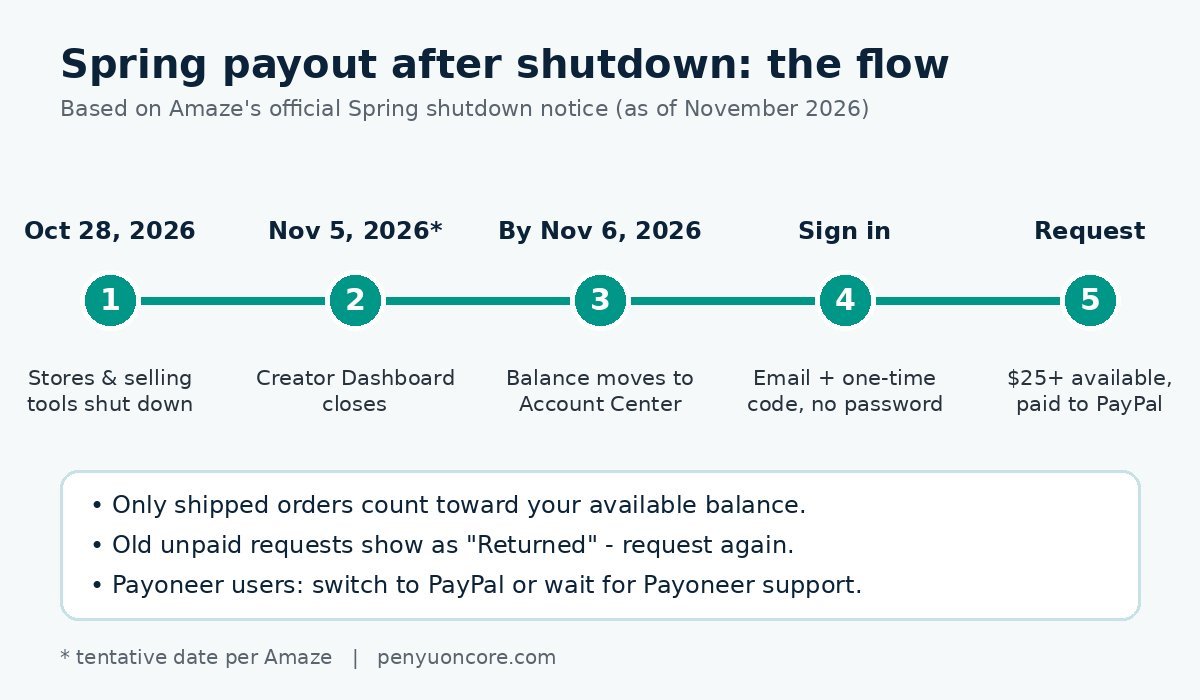
According to Amaze’s official Spring shutdown notice, Spring closed in stages:
- New product creation was switched off first. Existing listings stayed live for a while.
- October 28, 2026: Spring stores and selling tools shut down. Stores stopped receiving traffic and taking new orders, and storefront and listing tools were disabled.
- November 5, 2026 (marked tentative): the old Creator Dashboard was scheduled to close.
- By 8:00 PM ET on Friday, November 6, 2026: payout balances and payout history were expected to finish moving to the Spring Account Center.
Amaze offers a separate platform, Amaze Commerce, as its successor. Products, designs and store URLs do not move over automatically, though the notice says a limited group of invited creators got free store migration. Moving your store is up to you. Getting paid for sales you already made is a separate process, and that’s what this guide covers.
How to get your Spring payout after shutdown: step by step
Amaze says your existing balance and payout history move to the Spring Account Center automatically. You don’t need to apply or opt in. To claim it:
- Go to the Account Center. The official address is account.teespring.com, and Amaze’s shutdown page links to it. Type the address yourself rather than clicking links in unexpected emails.
- Enter your email. Use the email address linked to your Spring account. The sign-in page refers to it as the email on your Amaze account. If you sold under an old or work address, use that one.
- Enter the one-time code. There is no password. Check your inbox (and spam folder) for the code and enter it.
- Review your balance and history. Once you’re in, you can see your remaining payout balance and past payouts.
- Complete tax information if asked. Amaze says you may be asked to provide or resubmit tax details, such as your Social Security Number or another taxpayer identification number, before a payout is released.
- Add or confirm PayPal and request the payout. You can do this once your available balance is at least $25.
Watch out for phishing
The Account Center sign-in page lists three things Spring will never ask you for: a password (the app doesn’t use one), payment or card details, and your domain’s authorisation code (Spring gives you that code and never asks for it back). Any email or site asking for those in Spring’s name is a red flag. If you’ve been targeted by other payout or wallet scams, our guide to address poisoning scams covers the same “look-alike” tactics from the crypto side.
Spring payout rules at a glance (as of November 2026)
| Rule | What the official pages say |
|---|---|
| Where to request | Spring Account Center (account.teespring.com), now that the Creator Dashboard has closed |
| Minimum payout | $25 available balance |
| Which earnings count | Only fulfilled (shipped) orders reach your available balance |
| Payout method | PayPal only in the Account Center for now; Payoneer support is pending |
| Old unpaid requests | Shown as “Returned”; the amount goes back into your balance and needs a new request |
| Refunds and chargebacks | Deducted from your balance, or from a later payout if they happen after you’ve been paid |
| Tax details | You may need to provide or resubmit an SSN or other taxpayer ID |
Is there still a monthly payout schedule?
Before the shutdown, Spring’s Payouts help page (last updated June 5, 2026) said payouts were processed monthly. Requests made before the 21st were included in that month’s payout, requests from the 22nd onward went into the next month’s, and PayPal payments typically arrived within 24 to 48 hours after processing.
The shutdown notice doesn’t say whether that monthly cycle still applies in the Account Center. It only says you can request a payout once your balance reaches $25. Since the help page was written before the shutdown, treat the Amaze notice as the current source where the two differ. In practice, request your eligible balance as soon as you can instead of waiting for a particular date, and check the payout status in the Account Center afterwards.
What if you already requested a payout before the shutdown?
If you sent a payout request from the old dashboard and it was never paid, Amaze says it will appear in your Account Center history with the status Returned. The unpaid amount goes back into your available balance, and you need to submit a new request from the Account Center. The money isn’t lost, but it won’t arrive until you request it again.
Orders still being printed when stores closed
Orders placed before October 28, 2026 are still being processed and fulfilled as normal, according to Amaze, and the earnings from them remain payable. Because only shipped orders count toward your available balance, money from late-October orders may show up a bit later than the rest. Spring’s FAQ says orders are produced and given tracking within 10 business days of the order date, so it’s worth checking back after your last orders have shipped, especially if that’s what gets you over the $25 minimum.
Used Payoneer? Your two options
The Account Center supports PayPal payouts only for now. If you were paid through Payoneer, Amaze says you can either:
- Switch to PayPal: add a PayPal account in the Account Center and request a payout once your balance is eligible, or
- Wait for Payoneer support: your balance stays in the Account Center, and Amaze says it will email Payoneer users when Payoneer payouts are available.
The old help page described bank transfer as “only available to select users or by special arrangement”, and the Spring FAQ said bank accounts can’t be connected. The shutdown notice doesn’t list bank transfer as an option.
Taxes on your final Spring earnings
Spring’s help page says creators are responsible for reporting and paying income tax on their earnings. A few official reference points:
- US: Spring’s FAQ still mentions a $600 figure from 2023 for its 1099 prompts. The IRS’s 1099-MISC and 1099-NEC instructions say the reporting threshold for many payments rose to $2,000 for tax years beginning after 2025. Whether or not you get a form, the income is still taxable. Keep your Account Center payout history for your records.
- UK: HMRC’s trading allowance lets you earn up to £1,000 a year in gross trading income tax-free. Above that, you may need to register for Self Assessment.
If you sold on several print-on-demand sites, it helps to keep everything in one spreadsheet. See how payouts work on TeePublic, Redbubble and Fourthwall if you’re moving your designs to one of them.
Quick checklist
- Sign in at account.teespring.com with your Spring account email and the one-time code.
- Check your available balance against the pending amount from late orders.
- Re-request any payout marked “Returned”.
- Add PayPal, or decide to wait for Payoneer support.
- Provide tax details if prompted.
- Save a copy of your payout history.
- If you bought a custom domain through Spring, start the transfer from the Account Center before it expires.
FAQ
Can I still get paid from Spring after it shut down?
Yes. Amaze says eligible balances are paid through the Spring Account Center until all eligible funds have been paid out. Orders placed before October 28, 2026 still earn you money once they ship.
What is the minimum Spring payout?
$25 of available balance, as of November 2026. Only shipped orders count toward it.
Why does my old payout request say “Returned”?
It means the request was made through the old dashboard and never sent. The amount has gone back into your available balance, so submit a new request from the Account Center.
Can I get my Spring balance by Payoneer or bank transfer?
Not right now. The Account Center pays to PayPal only. Payoneer users can switch to PayPal or wait for Amaze’s email saying Payoneer support is live.
Does the Spring Account Center have a password?
No. You sign in with a one-time code sent to your email. Spring says it will never ask you for a password, card details or your domain authorisation code.
Note: Platform terms and payout processes change. Amaze marks some shutdown dates as tentative. Everything here reflects Amaze’s and Spring’s official pages as of November 2026, so check the official notice for the latest. This article is general information, not financial or tax advice.