
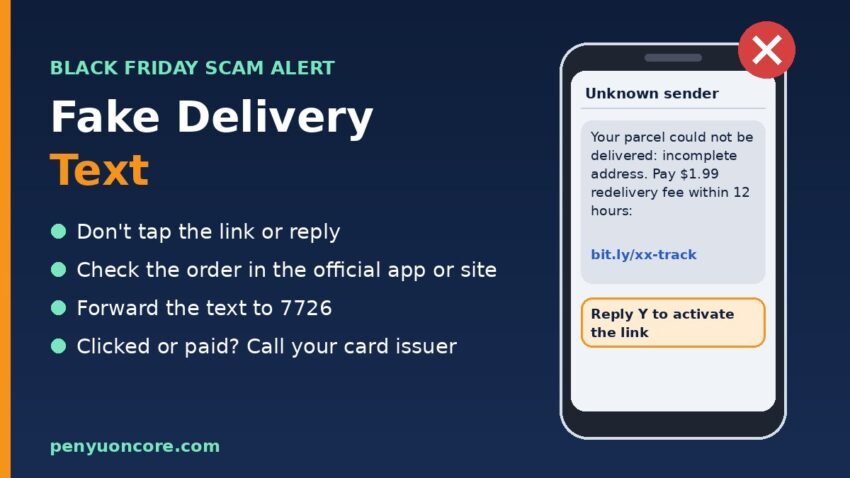
A fake delivery text is a scam message that pretends to come from USPS, Royal Mail, Evri, FedEx or another carrier and says your parcel is stuck because of a missed delivery, an “incomplete address” or an unpaid redelivery fee. The link leads to a look-alike site built to steal your card details or personal information, or to get you to install a fake tracking app. Don’t tap the link or reply. Check your order in the retailer’s or carrier’s official app or website yourself, then forward the text to 7726 and delete it.
The timing isn’t an accident. Black Friday falls on 27 November this year and Cyber Monday on 30 November, so millions of people are waiting for parcels at once. On 26 November 2026, Fox News’ CyberGuy warned that the holiday delivery rush “is already underway” and that fake delivery alerts arrive “when you’re expecting a package.” The same day, UK regulator Ofcom put missed parcel delivery texts at the top of its list of festive scams. Below: red flags, safe tracking, and what to do if you clicked, based on FTC, USPS, Royal Mail and NCSC guidance (checked 27 November 2026).
Why fake delivery text scams surge at Black Friday
According to the FTC’s Data Spotlight on the top text scams of 2024, messages about package deliveries, “usually from someone pretending to be from the U.S. Postal Service, were the most reported text scam” that year. People reported $470 million in losses to text scams overall in 2024, more than five times the 2020 figure. The FTC notes most fraud is never reported.
Scammers don’t need to know what you ordered. They blast the same message to huge lists of numbers and count on people expecting a parcel. In the UK, the National Cyber Security Centre (NCSC) says this type of scam “is even more prevalent” around the festive period.
What the scammers are after
- Your card details. The FTC says many people reported paying a small “redelivery fee” that “turned out to be a trick to get their credit card or even Social Security number.”
- Personal data and logins. The U.S. Postal Inspection Service (USPIS) lists usernames, passwords, Social Security numbers, dates of birth, card numbers and PINs as targets.
- Your phone itself. The NCSC warns that some UK texts link to fake “tracking apps” that are really malware. Once installed, they can steal banking details and passwords and send the same scam text to your contacts.
How to spot a fake delivery text
The single most useful fact: genuine carriers mostly text you only when tracking was set up first. USPIS says USPS “will not send customers text messages or e-mails without a customer first requesting the service with a tracking number, and it will NOT contain a link.” It also says USPS doesn’t charge for its tracking services. Royal Mail says it only contacts you by email or text if the sender asked for tracking updates. It won’t ask for bank details or passwords, and it won’t ask you to pay for an underpaid item by text or email. Instead, it leaves a grey “Fee to Pay” card.
| What to check | Fake delivery text | Genuine update |
|---|---|---|
| Did you ask for it? | Arrives out of the blue, often from an unknown number or email address | Linked to an order or a tracking request you made |
| Payment | Asks for a small redelivery, address-update or “customs” fee by card | USPS doesn’t charge for tracking. Royal Mail leaves a grey card for underpaid post |
| Link | Shortened or odd web address that isn’t the carrier’s real site | USPS tracking texts contain no link |
| Urgency | “Update within 12 hours” or “parcel will be returned” | No countdown or threats |
| Instructions | “Reply Y to activate the link” or “install our tracking app” | Never asks you to reply to unlock a link |
The “reply Y” trick
Many scam texts now end with something like “Reply Y, then exit and reopen this message.” Malwarebytes explains that iMessage disables links in messages from unknown senders, but replying or adding the sender to your contacts turns those links back on. Replying also confirms your number is live, so don’t reply at all, not even “STOP.”
How to check a real delivery safely
If you’re expecting a parcel, go to the delivery information yourself instead of using the link.
- Open the retailer’s order page. The FTC advises checking “the online retail site or account you ordered your item from” for shipping and tracking information.
- Or use the carrier’s official site or app. Type the address yourself (for example usps.com or royalmail.com) and enter the tracking number from your order confirmation. The NCSC’s guidance lists official tracking pages for UK carriers including DHL, DPD, Evri, FedEx, Royal Mail, UPS and Yodel. Only download carrier apps from an official app store.
- Compare. If the retailer or carrier shows no problem, the text is fake.
- Report and delete. See the reporting steps below.
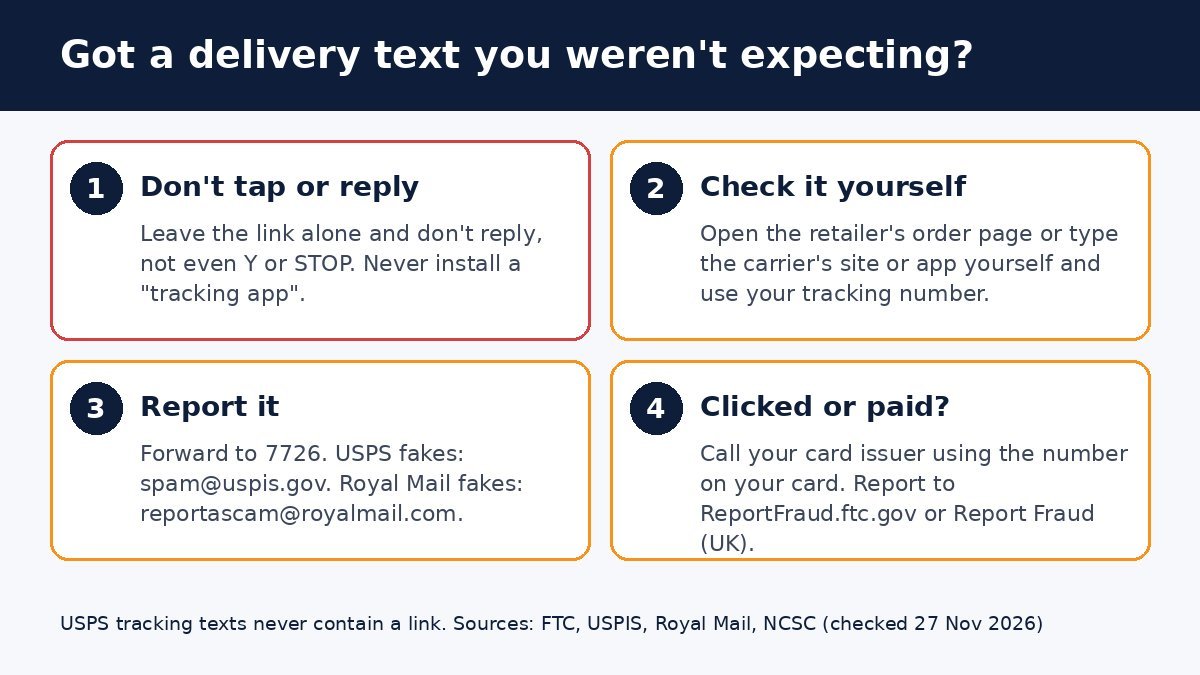
How to report a fake delivery text in the US and UK
- Both countries: forward the text to 7726 (it spells SPAM). The FTC says this helps your wireless provider block similar messages, and the NCSC describes 7726 as a free reporting scheme run by UK phone providers. You can also use the “Report junk” option in Apple Messages or Google Messages.
- US, USPS look-alikes: email spam@uspis.gov. USPIS asks you to paste the text of the message (without clicking the link), attach a screenshot showing the sender’s number and date, and say whether you clicked, paid or shared information.
- US, any scam: report it at ReportFraud.ftc.gov.
- UK, Royal Mail look-alikes: screenshot the text and send it to reportascam@royalmail.com, as well as forwarding it to 7726.
- UK, if you lost money: report it to Report Fraud (reportfraud.police.uk or 0300 123 2040), which replaced Action Fraud in December 2025 for England, Wales and Northern Ireland. In Scotland, call Police Scotland on 101.
Already clicked or paid? What to do next
What to do depends on how far you got. Act quickly.
You tapped the link but didn’t enter anything
Close the page and don’t download anything it offers. USPIS still says that if you’ve “interacted with the URL provided (even if you did not click ‘submit’),” you should let your bank or card provider know.
You entered card details or paid a “redelivery fee”
- Call your card issuer straight away, using the number on the back of your card or in your banking app. Never use a number from the text. Ask them to block the card, send a replacement and review recent charges.
- Don’t share any one-time passcodes. A follow-up text or call asking you to “confirm” a code is a common next step for scammers.
- Dispute any charges you don’t recognize. If you’re in the UK and unsure whether to use a chargeback or Section 75 for a card payment, our guide to chargeback vs Section 75 explains the difference.
- Report it to the FTC (US) or Report Fraud (UK).
You gave personal information such as your Social Security number
In the US, go to the FTC’s IdentityTheft.gov for a recovery plan, and consider freezing your credit with the three credit bureaus. Change any password you typed into the fake site, starting with your email account, and turn on two-step verification.
You installed an app the text sent you to
The NCSC’s advice is blunt. Don’t log into any accounts, and factory reset the phone as soon as you can. Don’t back up the phone first, because the backup would contain the malware too. Then change passwords for any accounts you used while the app was installed.
Other holiday scams that work the same way
Toll payment texts, fake “suspicious purchase” alerts and phony job offers joined delivery scams in the FTC’s top five text scams for 2024. They all use urgency plus a link or number the scammer controls. A text offering easy money for rating apps may be a task scam, and a surprise bill for a laptop you never bought is often a PayPal invoice scam.
The rule that protects you from all of them: never use the contact details in an unexpected message. As the FTC puts it, if you think a message might be real, “contact the company using a phone number or website you know is real.”
FAQ
Does USPS send texts about delivery problems?
Only if you signed up for tracking with a tracking number, and even then USPIS says the text will not contain a link. An unexpected USPS text with a link asking you to update your address or pay a fee is a scam.
Does Royal Mail text you to pay a redelivery or postage fee?
Royal Mail says it doesn’t ask for payment for underpaid items by text or email. It leaves a grey “Fee to Pay” card instead. It may send customs fee notifications when the sender has provided your contact details. If you’re not sure, check on royalmail.com directly rather than through the link.
I replied “STOP” to a fake delivery text. Is that a problem?
It probably cost you nothing, but it may confirm your number is active and bring more scam texts. Don’t reply again. Report it to 7726 and delete it.
Disclaimer: This article is general information, not financial, legal or security advice. Carrier policies and reporting channels can change, so check the linked FTC, USPIS, Royal Mail and NCSC pages, or contact your bank, if you think you’ve been scammed.