
If Uber Instant Pay not working is the reason you are staring at your Driver app after a long shift, you are not alone – cash-out complaints come up on driver forums every week, and they matter most on busy holiday weekends when you want your earnings now. The good news is that most failures have a short list of causes, and Uber’s own help pages explain what each one means.
Quick answer: Uber Instant Pay usually fails because of your card (not eligible for fast funds, or a name mismatch), a recent account change that triggers a security wait of up to 7 days, an account review, or a bank that is slow to post the transfer. If a cash-out does not go through, Uber says the money goes back into your app balance or to your weekly direct deposit – it is not lost.
How Uber Instant Pay is supposed to work
According to Uber’s Instant Pay setup page, US drivers and couriers can cash out available earnings to a debit card or bank account up to 6 times a day (once a day in NYC). You need at least $1 available, each cash-out costs $1.75 (free in NYC), and the limits are $3,000 per cash-out and $6,000 per week. Uber’s Instant Pay product page also lists $1.75 per cash-out and says most Visa, Mastercard and Discover debit cards are accepted.
The fee is worth checking in your own app. Several gig-income sites, including GigMoneyHub, noted that Uber’s driver page showed $1.25 earlier this autumn before the $1.75 figure appeared, and drivers on r/UberEatsDrivers reported different fees in different areas. Treat the amount shown in your Wallet before you confirm as the final word.
Why Uber Instant Pay is not working: the common causes
1. Your debit card cannot accept fast funds
Uber says not every debit card can receive instant transfers, and banks can switch off fast-funds acceptance at any time. Prepaid cards and some online-bank cards are frequent trouble spots. The name on the card must also match the name on your Uber account.
2. You recently changed account or payment details
Uber’s page on losing access to Instant Pay states that after you update account information, you may need to wait up to 7 days before using Instant Pay again. This is a security hold, and it is the most common reason drivers see messages about a new card “being verified”.
3. Your account is under review or was just reactivated
Uber runs periodic security checks, and a flagged account can temporarily lose Instant Pay. If your account was recently reactivated, it can take up to 24 hours for the option to return. Trips under review can also be held back from the balance you can cash out.
4. You are not eligible right now
Per Uber, you are not eligible if your account is inactive, you have wage garnishments, you are a taxi partner, or you recently started renting or leasing through Uber’s vehicle financing program. If you recently stopped renting, it can take up to 2 weeks for Instant Pay to update. New delivery people need to upload a profile photo and driver’s license or state ID first.
5. The bank is slow, or the transfer failed
Most banks post Instant Pay within minutes, but Uber notes some take 2-3 days. Its cash-out not processed page says some banks can take 3-5 business days, and failed cash-outs return to your app balance. If a bank rejects the payment, Uber routes it to your bank account on file, usually within 1-3 business days.
6. A temporary app or system outage
Sometimes the problem is on Uber’s side. In recent driver threads, many people reported “processing payment” messages at the same time, which points to a wider issue rather than your account. In those cases waiting, then retrying later, is usually the only option.
Quick diagnosis table
| What you see | Likely cause | What to do |
|---|---|---|
| Cash Out button missing or greyed out | Security review, inactive account, or less than $1 available | Check balance; wait 24 hours after reactivation; contact Support in the app |
| “Verifying your new card” message | Recent account or payment change | Wait up to 7 days; confirm the change was made by you |
| Stuck on “processing” | Bank delay or Uber outage | Check driver Inbox; allow 2-3 days (up to 3-5 business days at some banks) |
| Cash-out failed notice | Card cannot accept fast funds or name mismatch | Money returns to the app; try a different eligible debit card |
| Instant Pay gone entirely | Vehicle financing, garnishment, or taxi partner status | Use weekly direct deposit; ask Support if none apply |
How to fix Uber Instant Pay not working, step by step
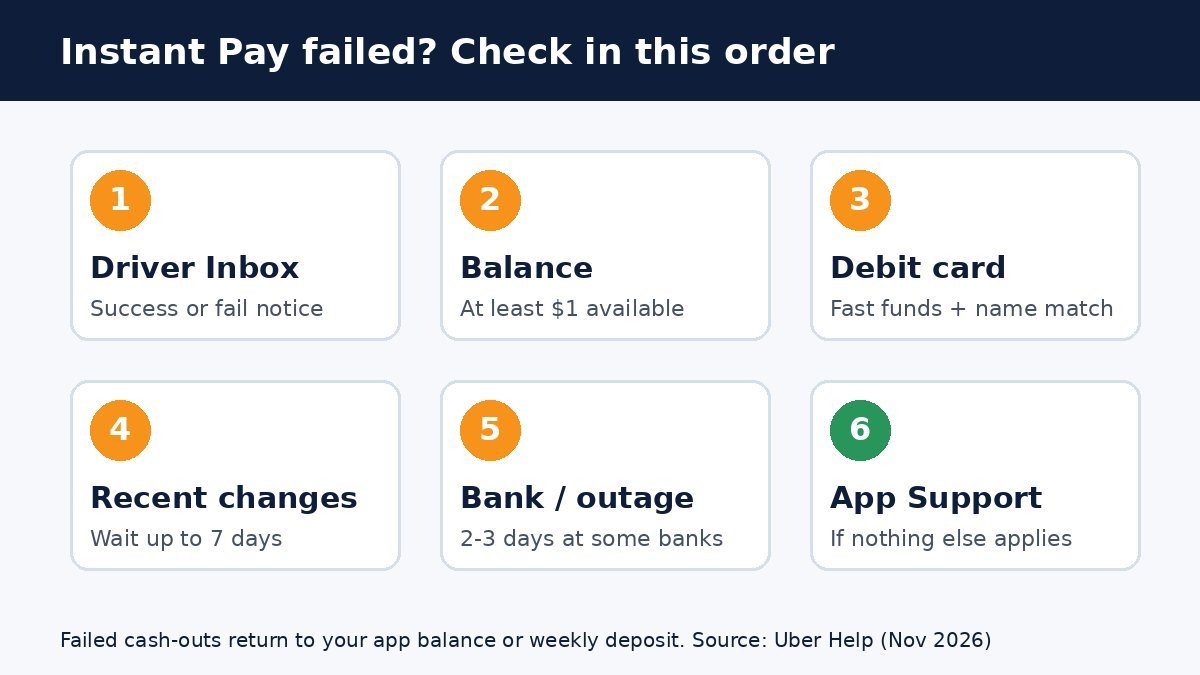
- Check your driver Inbox first. Uber says it sends a notification there whether each cash-out succeeds or fails.
- Confirm your available balance. Trips still processing or under review are not cash-out ready, and you need at least $1.
- Review your payment method. In the Driver app, go to Menu, Wallet, then Payment Methods. Make sure the debit card is in your own name and matches your Uber account name.
- Try a different debit card. If your card cannot take fast funds, a mainstream Visa, Mastercard or Discover debit card from another bank may work. Note that adding a new card can itself trigger the security wait.
- Do not keep changing details. Each update can restart the waiting period of up to 7 days.
- Contact Support through the app. If none of the reasons above apply, Uber directs you to reach out via the help section of the Driver app.
Backup options while Instant Pay is down
Weekly direct deposit. Uber’s earnings deposit schedule runs on a weekly cycle from 4:00 AM Monday to 3:59 AM the following Monday. Earnings are processed Wednesday evening and deposited Thursday, though some banks post it Friday evening. Anything you have not cashed out by 4 AM local time on Monday goes into this deposit automatically.
Uber Pro Card. Uber says the Pro Card, issued through its partner Branch, offers free automatic payouts after each completed trip with no annual fee or credit check. Approval is not guaranteed, the card takes 8-12 business days to arrive, and you must turn off automatic payouts to use other cash-out options. Compare it with your current bank before switching.
If you drive for several apps over the holidays, it helps to know how others handle pay as well – see our guides on whether Amazon Flex is worth it and how the tax-free tips rule applies to DoorDash earnings.
Watch out for fake “Uber Support” payout scams
Cash-out problems make drivers a target. Uber’s account safety page warns about unexpected calls or texts claiming to be Uber Support, fake login links, and requests to add gift cards or cash out to questionable cards. Uber says it will never ask for your password, login codes or Social Security number by email, text or call.
A pattern described by drivers sharing scam reports is a fake rep who “fixes” your pay problem by walking you through adding a new payout card – which actually belongs to the scammer. Never change payout details because someone contacted you, and only seek help inside the official app. The same caution applies to other payment apps; our guide to a Cash App payment that failed covers similar red flags.
FAQ
Is my money lost if Uber Instant Pay fails?
No. Uber says a failed cash-out returns to your app balance so you can try again or wait for the weekly direct deposit.
Why does Uber say it is verifying my new card when I did not change anything?
Uber’s security checks can flag an account, and any recent account update can trigger a wait of up to 7 days. If you truly made no changes, review your account for unfamiliar payment methods and contact Support in the app, since unexpected changes can be a sign of account compromise.
Can I cash out more than 6 times a day?
No. Uber’s limit is 6 cash-outs a day in most areas and one a day in NYC, with a $3,000 per cash-out and $6,000 weekly cap.
Do I still owe tax on earnings I cash out instantly?
Yes. How you are paid does not change the fact that the income is taxable self-employment income. Our explainer on the 1099-NEC threshold for 2026 covers how reporting forms are changing.
Disclaimer: This article is general information, not financial or tax advice. Uber’s fees, limits and eligibility rules can change and may vary by market; always check the Driver app and Uber’s help center for the current terms.