
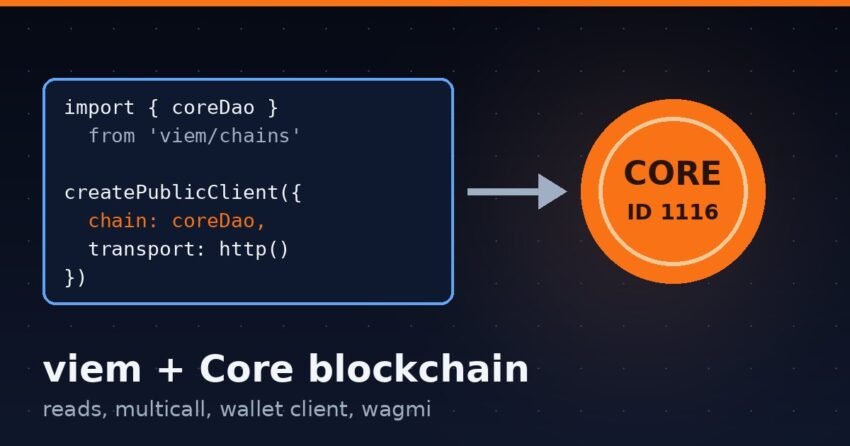
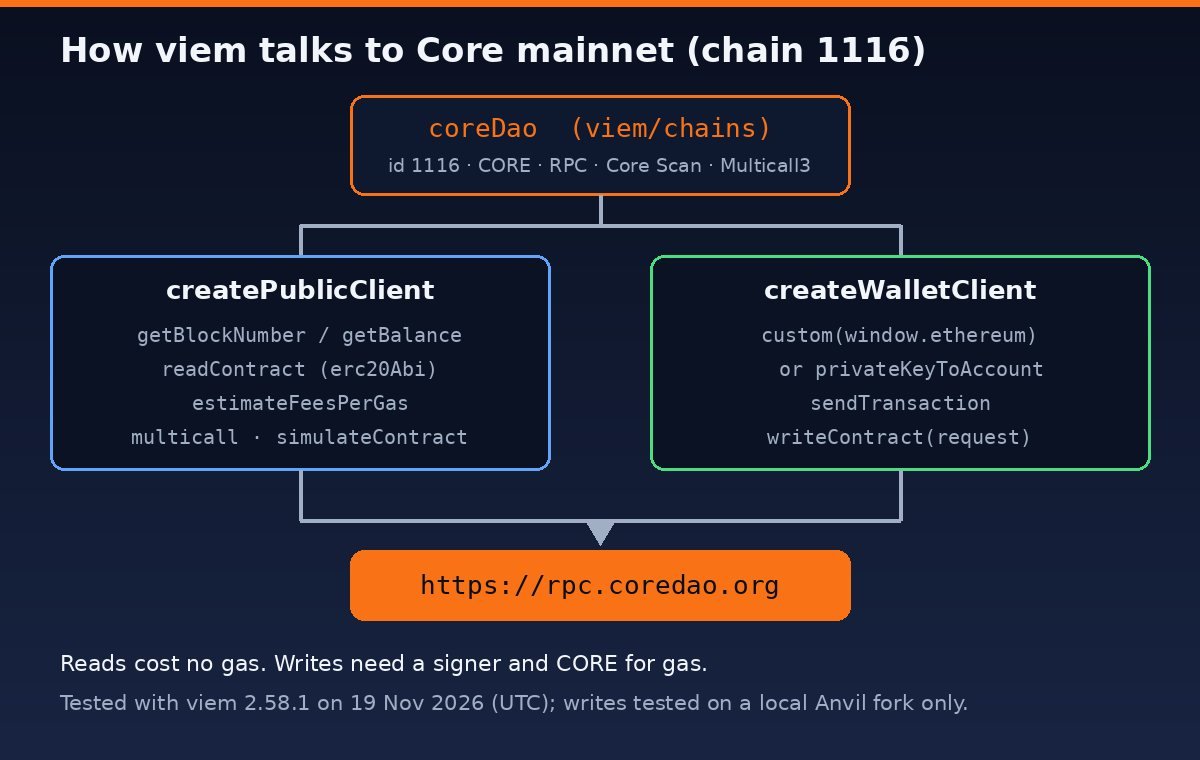
Short answer: To use viem with Core, import the built-in coreDao chain from viem/chains and pass it to createPublicClient (for reads) or createWalletClient (for transactions). It already contains chain ID 1116, the RPC https://rpc.coredao.org, Core Scan as the explorer, and the Multicall3 address. You don’t need defineChain unless you want a different RPC.
This guide shows how to use viem with Core blockchain step by step. Every code sample was run on 19 November 2026 (21:22–21:25 UTC) with viem 2.58.1 on Node.js 24 against Core’s public mainnet RPC. The wallet examples ran against a local Anvil fork, so no real transaction was sent and no real key was used.
What viem includes for Core
viem 2.58.1 ships three Core chain objects. We printed them straight from the installed package. You can read the same data in the coreDao.ts source file on GitHub.
| Export | Chain ID | Default RPC | Explorer | Multicall3 |
|---|---|---|---|---|
coreDao |
1116 (mainnet) | https://rpc.coredao.org | scan.coredao.org | 0xcA11…CA11, blockCreated 6,988,931 |
coreTestnet2 |
1114 (testnet) | https://rpc.test2.btcs.network | scan.test2.btcs.network | 0x3CB2…5e56, blockCreated 3,838,600 |
coreTestnet1 |
1115 (old testnet) | https://rpc.test.btcs.network | scan.test.btcs.network | 0xCcdd…7569, blockCreated 29,350,509 |
Two things to know. First, the native currency in coreDao is CORE with 18 decimals, and testnet is false. Second, Core’s network docs say testnet 1115 is decommissioned. Use coreTestnet2 (chain 1114) for testing. You can get tCORE2 from our Core testnet faucet guide.
The blockCreated value for Core’s Multicall3 has changed between viem releases. Version 2.53.1 listed 11,907,934, while 2.58.1 lists 6,988,931. So check your installed version if you make historical multicall reads.
Step 1: Install viem
mkdir core-viem && cd core-viem
npm init -y
npm i viem
node -e "console.log(require('viem/package.json').version)"   # 2.58.1 in our test
Save the scripts below as .mjs files so top-level await works.
Step 2: Read Core mainnet with a public client
import { createPublicClient, http, formatEther, formatGwei } from 'viem'
import { coreDao } from 'viem/chains'

const client = createPublicClient({ chain: coreDao, transport: http() })

console.log(await client.getChainId())        // 1116
console.log(await client.getBlockNumber())    // 40603070n (at test time)

const block = await client.getBlock()
console.log(block.gasLimit, block.baseFeePerGas) // 50000000n 0n

const WCORE = '0x191E94fa59739e188dcE837F7f6978d84727AD01'
const wei = await client.getBalance({ address: WCORE })
console.log(formatEther(wei))                 // 443431.86... CORE
http() with no URL uses the chain’s default RPC, which is https://rpc.coredao.org. Block numbers and balances come back as bigint, so format them with formatEther or formatUnits before you show them to users. The numbers in the comments are what we saw at test time. Yours will be different.
Read an ERC-20 token (Core USDT)
viem exports a ready-made erc20Abi, so you don’t have to paste an ABI. Here is the USDT contract on Core. Our USDT and USDC on Core guide explains how to check the address yourself.
import { erc20Abi, formatUnits } from 'viem'

const USDT = '0x900101d06A7426441Ae63e9AB3B9b0F63Be145F1'

const [symbol, decimals, supply] = await Promise.all(
  ['symbol', 'decimals', 'totalSupply'].map((functionName) =>
    client.readContract({ address: USDT, abi: erc20Abi, functionName })
  )
)
console.log(symbol, decimals, formatUnits(supply, decimals))
// USDT 6 558628.005254
Note the 6 decimals. If you use parseEther on a USDT amount, you will be off by a factor of 1012. Use parseUnits(amount, 6) instead.
Gas price and EIP-1559 fees
console.log(formatGwei(await client.getGasPrice()))   // 60
console.log(await client.estimateFeesPerGas())
// { maxFeePerGas: 60000000000n, maxPriorityFeePerGas: 60000000000n }
console.log(await client.estimateFeesPerGas({ type: 'legacy' }))
// { gasPrice: 72000000000n }
This shows how Core behaves. The latest block reported baseFeePerGas: 0n, so viem’s EIP-1559 estimate is just the priority fee: 60 gwei for both values. In legacy mode, viem multiplies the node’s gas price by its default safety factor of 1.2, which gives 72 gwei. These are snapshots, not constants. Fetch them at send time. See the estimateFeesPerGas docs for the options.
Batch reads with multicall
Because coreDao includes contracts.multicall3, client.multicall() works with no extra setup:
const results = await client.multicall({
  contracts: [
    { address: USDT,  abi: erc20Abi, functionName: 'symbol' },
    { address: USDT,  abi: erc20Abi, functionName: 'decimals' },
    { address: WCORE, abi: erc20Abi, functionName: 'symbol' },
    { address: '0x0000000000000000000000000000000000000001', abi: erc20Abi, functionName: 'symbol' },
  ],
})
// [ 'USDT', 6, 'WCORE', failure: 'returned no data ("0x")' ]
The last call failed on purpose. It points at an address with no token. Because allowFailure defaults to true, the batch still returned the other three results. Our Multicall3 on Core guide covers bytecode checks and batch limits.
Step 3: Send transactions with a wallet client
A wallet client signs and sends. In a browser dapp, you pass the user’s wallet as a custom transport. The wallet does the signing, and your code never sees a private key:
import 'viem/window'
import { createWalletClient, custom, parseEther } from 'viem'
import { coreDao } from 'viem/chains'

const wallet = createWalletClient({ chain: coreDao, transport: custom(window.ethereum) })
const [account] = await wallet.requestAddresses()
await wallet.switchChain({ id: coreDao.id })   // asks the wallet to switch to Core
const hash = await wallet.sendTransaction({ account, to: '0x…', value: parseEther('0.01') })
For scripts and backends, use a local account. Load the key from an environment variable, and never hard-code it or commit it. We tested this pattern on a local Anvil fork of Core mainnet (anvil --fork-url https://rpc.coredao.org) with Anvil’s public test key:
import { createPublicClient, createWalletClient, http, parseEther } from 'viem'
import { privateKeyToAccount } from 'viem/accounts'
import { coreDao } from 'viem/chains'

const account   = privateKeyToAccount(process.env.PRIVATE_KEY)
const transport = http('http://127.0.0.1:8545')   // local fork; use the real RPC only when you mean it

const publicClient = createPublicClient({ chain: coreDao, transport })
const wallet       = createWalletClient({ account, chain: coreDao, transport })

const hash = await wallet.sendTransaction({
  to: '0x000000000000000000000000000000000000dEaD',
  value: parseEther('0.01'),
})
const receipt = await publicClient.waitForTransactionReceipt({ hash })
console.log(receipt.status, receipt.type)   // success eip1559 (on the fork)
viem sent an EIP-1559 (type 2) transaction because Core blocks include a baseFeePerGas field. On the fork, the fees were Anvil’s own defaults. On mainnet they would come from the estimate shown above.
Simulate before you write
For contract writes, call simulateContract first. It runs an eth_call, so it is read-only and costs nothing. Revert reasons show up before anything is signed:
const { request } = await publicClient.simulateContract({
  account, address: USDT, abi: erc20Abi,
  functionName: 'transfer', args: [to, parseUnits('1', 6)],
})
const hash = await wallet.writeContract(request)
When we simulated a USDT transfer from an account with no USDT against the real Core RPC, viem threw ContractFunctionExecutionError with the reason ERC20: transfer amount exceeds balance.
Custom RPC or defineChain fallback
To use another endpoint, keep coreDao and pass the URL to http(), for example http('https://rpc.ankr.com/core'). Core’s RPC list includes Ankr, 1RPC and dRPC endpoints. You only need defineChain if your viem version is too old to include Core, or if you want a different default RPC baked in:
import { defineChain } from 'viem'

export const core = defineChain({
  id: 1116,
  name: 'Core',
  nativeCurrency: { name: 'Core', symbol: 'CORE', decimals: 18 },
  rpcUrls: { default: { http: ['https://rpc.coredao.org'] } },
  blockExplorers: { default: { name: 'Core Scan', url: 'https://scan.coredao.org' } },
  contracts: { multicall3: { address: '0xcA11bde05977b3631167028862bE2a173976CA11', blockCreated: 6988931 } },
})
Using Core in wagmi
wagmi’s wagmi/chains entry point re-exports viem/chains (we checked wagmi 3.7.11). So the same coreDao object works in createConfig:
import { createConfig, http } from 'wagmi'
import { coreDao } from 'wagmi/chains'

export const config = createConfig({
  chains: [coreDao],
  transports: { [coreDao.id]: http() },
})
Common errors with viem on Core
- “The current chain of the wallet (id: 1116) does not match the target chain for the transaction (id: 1 – Ethereum).” We reproduced this by giving a wallet client the
mainnetchain while it was pointed at Core. UsecoreDao, or callswitchChainin browser wallets. - “The total cost (gas * gas fee + value) of executing this transaction exceeds the balance of the account.” The account doesn’t have enough CORE for the value plus gas.
- “returned no data (“0x”)” means there is no contract at that address on this chain. Check the address on Core Scan and confirm you aren’t using a testnet address on mainnet.
- “HTTP request failed” / “The request took too long to respond” means the RPC is down or slow. During our test,
rpc.test2.btcs.networkreturned a Cloudflare 522 error, so we could not run the testnet examples. Retry later, or pass a fallback list with viem’sfallback([http(a), http(b)])transport. - ChainDoesNotSupportContract (multicall3) appears when you multicall at a
blockNumberbefore the chain’sblockCreated. Make those historical reads one by one instead.
FAQ
What is the viem chain name for Core?
It’s coreDao for mainnet (chain ID 1116) and coreTestnet2 for the current testnet (1114). Import both from viem/chains.
Does viem support Core testnet?
Yes. coreTestnet2 uses https://rpc.test2.btcs.network and includes a Multicall3 address. coreTestnet1 (1115) is still exported, but Core has decommissioned that network.
Do I need an API key to use viem with Core?
No. In our test, the public RPC https://rpc.coredao.org answered every read with no key. Paid or third-party RPCs may give you higher rate limits.
Can I use ethers.js instead?
Yes. Core is EVM-compatible, so any EVM library works. viem simply gives you Core’s chain data and Multicall3 address built in.
Disclaimer: This article is for educational purposes only. It is not financial, investment, or security advice. Test on a testnet or local fork first, keep private keys out of source code, and review contracts before you send funds.
Sources: viem chains docs, viem Public Client, viem Wallet Client, viem simulateContract, viem coreDao.ts, Core network config, Core RPC list, wagmi createConfig, Core Scan.