
Short answer: To fork Core mainnet with Anvil, install Foundry and run anvil --fork-url https://rpc.coredao.org. Anvil starts a local node on 127.0.0.1:8545 with chain ID 1116 and a copy of live Core state. You can then impersonate any address, give yourself test CORE or tokens, and send transactions without touching the real chain or spending real gas.
A local fork is the cheapest way to test a contract against real Core contracts like USDT, a DEX router or a staking contract before you deploy. This guide walks through the setup, impersonation and Forge fork tests on Core. It also covers three gotchas we hit while testing: a “missing trie node” error on old blocks, a different gas price, and opcodes that work on the fork but fail on mainnet.
How we tested: on November 19, 2026 we ran Foundry 1.9.0 (Anvil, Cast and Forge) on a Linux machine against the public endpoint https://rpc.coredao.org and Core’s archive endpoint. Every command and result below comes from those runs. All transactions happened on the local fork; nothing was broadcast to Core mainnet.
What you need
- Foundry. Core’s Using Foundry guide installs it with
curl -L https://foundry.paradigm.xyz | bashand thenfoundryup. This gives youforge,castandanvil. If you’re new to Foundry on Core, start with our guide to deploying a smart contract on Core with Foundry. - A Core RPC URL. Core’s RPC list gives
https://rpc.coredao.orgfor mainnet (chain ID 1116),https://rpcar.coredao.orgas the archive node, and third-party endpoints from Ankr, 1RPC, dRPC and others. - No real private key. Anvil gives you ten funded test accounts. Never paste a real wallet key into a fork setup.
Step 1: Start the Core mainnet fork
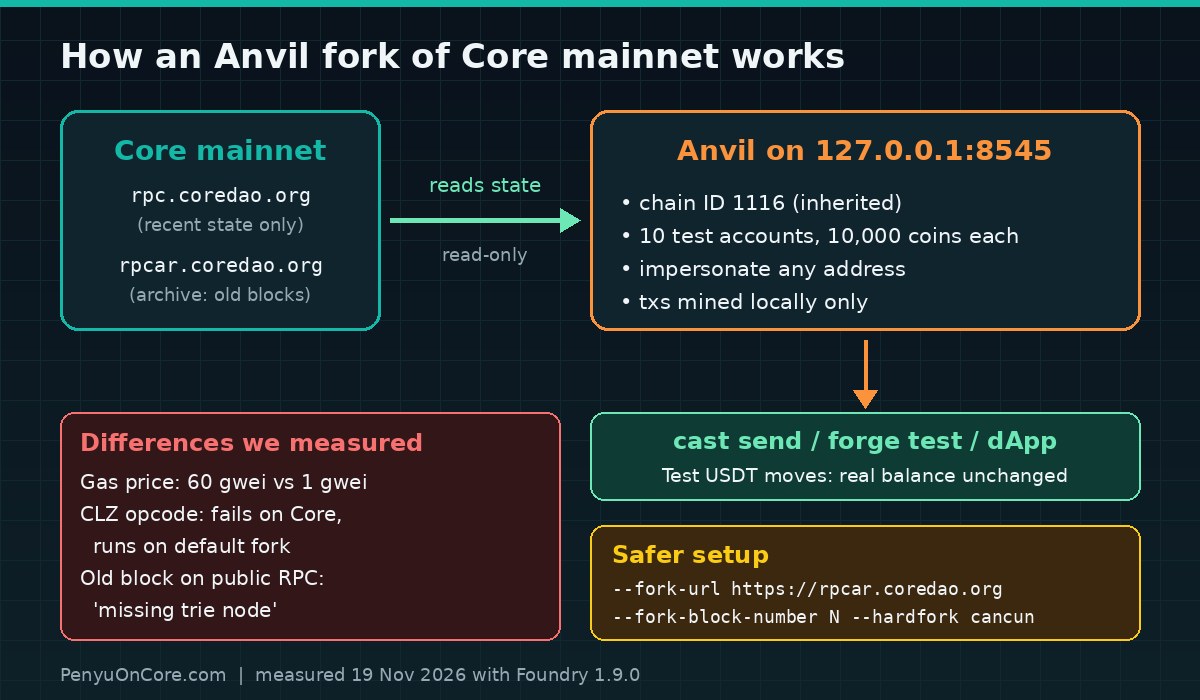
anvil --fork-url https://rpc.coredao.orgAnvil prints its test accounts and a “Fork” section. In our run it showed the endpoint, a block number in the 40.57 million range, and Chain ID: 1116. Anvil inherits the chain ID from the remote node by default, as its forking docs explain. Check it from a second terminal:
cast chain-id --rpc-url http://127.0.0.1:8545
# 1116
cast block-number --rpc-url http://127.0.0.1:8545
Each test account starts with 10,000 of the native coin. Anvil’s banner says “ETH”, but on this fork the coin plays the role of CORE.
Step 2: Read real Core contracts locally
Every contract that existed at the fork block is available locally. Anvil fetches state from the RPC when it needs it and caches it. For example, Core’s bridged USDT (address from our USDT and USDC on Core guide):
USDT=0x900101d06A7426441Ae63e9AB3B9b0F63Be145F1
cast call $USDT "symbol()(string)" --rpc-url http://127.0.0.1:8545   # "USDT"
cast call $USDT "decimals()(uint8)" --rpc-url http://127.0.0.1:8545  # 6
Step 3: Impersonate an address and move tokens
This is the main reason to use a fork. Anvil’s custom RPC methods let you send transactions as any address without its private key. Signature checks are turned off for that address, on your machine only.
HOLDER=0x...   # any address that holds USDT at the fork block
ME=0xf39Fd6e51aad88F6F4ce6aB8827279cffFb92266   # Anvil test account 0

cast rpc anvil_impersonateAccount $HOLDER --rpc-url http://127.0.0.1:8545
cast rpc anvil_setBalance $HOLDER 0x56BC75E2D63100000 --rpc-url http://127.0.0.1:8545  # 100 CORE for gas
cast send $USDT "transfer(address,uint256)" $ME 50000000 \
  --from $HOLDER --unlocked --rpc-url http://127.0.0.1:8545
cast call $USDT "balanceOf(address)(uint256)" $ME --rpc-url http://127.0.0.1:8545
cast rpc anvil_stopImpersonatingAccount $HOLDER --rpc-url http://127.0.0.1:8545
We picked a holder address from recent USDT Transfer logs. The fork mined the transfer with status 1, it used 51,402 gas, and test account 0 ended up with 50,000,000 units (50 USDT, because USDT has 6 decimals). Then we checked the same account on the real chain with cast call against rpc.coredao.org, and its USDT balance was still 0. Nothing you do on the fork reaches mainnet.
If you’d rather not impersonate one address at a time, start Anvil with --auto-impersonate to unlock every account.
Step 4: Write Forge tests against the Core fork
For repeatable tests, let Forge create the fork inside the test with the vm.createSelectFork cheatcode. This test passed for us with Forge 1.9.0 and forge-std 1.17.0:
// SPDX-License-Identifier: MIT
pragma solidity ^0.8.24;
import {Test} from "forge-std/Test.sol";

interface IERC20 {
    function balanceOf(address) external view returns (uint256);
    function transfer(address, uint256) external returns (bool);
}

contract CoreForkTest is Test {
    IERC20 constant USDT = IERC20(0x900101d06A7426441Ae63e9AB3B9b0F63Be145F1);
    address alice = makeAddr("alice");
    address bob = makeAddr("bob");

    function setUp() public {
        vm.createSelectFork("https://rpc.coredao.org");
    }

    function test_ChainId() public view {
        assertEq(block.chainid, 1116);
    }

    function test_DealUsdt() public {
        deal(address(USDT), alice, 1_000e6);
        vm.prank(alice);
        USDT.transfer(bob, 250e6);
        assertEq(USDT.balanceOf(bob), 250e6);
    }
}
Run it with forge test --match-contract CoreForkTest -vv. Both tests passed. deal() wrote the USDT balance directly into storage, so we didn’t need a holder address at all.
Watch out for one thing: Solidity rejects address literals with the wrong checksum. Our first compile failed with “This looks like an address but has an invalid checksum” because we pasted the all-lowercase address. Use the mixed-case version shown above. The Foundry fork-testing guide recommends pinning a block number for reproducible tests, which brings us to the first gotcha.
Gotcha 1: “missing trie node” when you fork an old block
We tried anvil --fork-url https://rpc.coredao.org --fork-block-number 30000000, and Anvil refused to start:
Error: failed to create genesis
- failed to get account for 0x15d3...: server returned an error response:
  error code -32000: missing trie node ... is not available, not found
The public endpoint only serves recent state. When we tested, reads 127 blocks behind the tip worked, but 128 and older returned missing trie node. Pointing the same command at the archive endpoint https://rpcar.coredao.org worked fine, and USDT’s totalSupply() could be read at block 30,000,000. So if you fork the latest block, use the normal RPC. If you pin a historical block (which you’ll do for CI), use an archive endpoint. Our missing trie node explainer covers the same error outside Anvil.
Gotcha 2: the fork is not a perfect copy of Core
A fork copies state. The EVM rules and fee settings come from Anvil, not from Core. These are the differences we measured:
| Item | Core mainnet (rpc.coredao.org) | Default Anvil 1.9.0 fork | What to do |
|---|---|---|---|
| Chain ID | 1116 | 1116 (inherited) | Use --chain-id if you want a different ID |
eth_gasPrice | 60 gwei | 1 gwei | Don’t copy gas prices from the fork into production scripts |
| Block gas limit | 50,000,000 | 50,000,000 | Nothing |
| CLZ opcode (0x1e, Osaka) | Rejected: “invalid opcode: opcode 0x1e not defined” | Executed (hardfork reported as “Bpo1”) | Start Anvil with --hardfork cancun |
The opcode mismatch matters most. Out of the box, Anvil 1.9.0 runs a newer EVM than Core, so code that uses a newer opcode can pass every local test and then fail on mainnet. With --hardfork cancun, the same CLZ call failed locally with EVM error NotActivated, which matches what mainnet does. Core’s Foundry guide also tells you to compile with EVM version Shanghai, so set your compiler and fork hardfork to match. For details on what Core supports, see our invalid opcode PUSH0 guide.
Gotcha 3: rate limits and caching
Every new account or storage slot you touch is one RPC request. Public endpoints can throttle heavy test suites. Anvil has --retries and --compute-units-per-second options for this, and it caches fork data under ~/.foundry/cache/rpc/. When we tested, that cache appeared in a core subfolder. Delete it if you need fresh data. For CI, a pinned block plus an archive or paid RPC is usually the most reliable setup.
Recommended command
anvil --fork-url https://rpcar.coredao.org \
  --fork-block-number <recent block> \
  --hardfork cancun
This gives you reproducible state, an EVM that won’t accept opcodes Core rejects, and Core’s real chain ID. When your code works on the fork, deploy to Core Testnet2 (chain ID 1114) and test there before you go to mainnet.
FAQ
Does forking Core cost any CORE?
No. Anvil only reads from the RPC, and all transactions are mined on your machine with test coins.
Can I connect MetaMask to my Core fork?
Yes, add a custom network with RPC http://127.0.0.1:8545. But since the fork uses chain ID 1116, the same ID as real Core, starting Anvil with --chain-id 31337 (we confirmed it overrides the ID) keeps you from confusing it with mainnet. Only import Anvil’s public test keys into that wallet profile.
Why does my fork fail with “missing trie node”?
You pinned a block older than the RPC keeps state for. Use https://rpcar.coredao.org or another archive endpoint.
Is a passing fork test proof that mainnet will work?
No. It’s a strong signal, but gas prices, the EVM version and other transactions can differ. Test on Testnet2 too, and check that the hardfork matches.
Disclaimer: This article is technical education, not financial or investment advice. Tool behaviour and RPC limits can change, so check the official Core and Foundry docs. Results reflect our tests on November 19, 2026.