
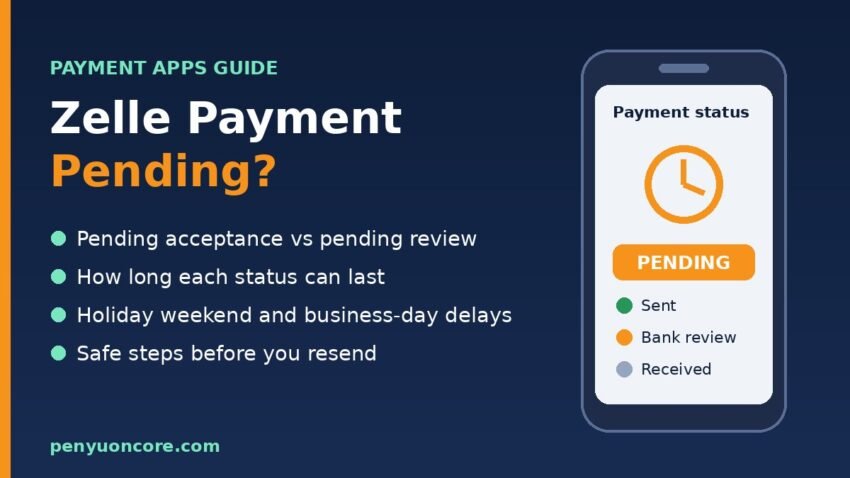
A Zelle payment pending status almost always means one of three things: the recipient hasn’t enrolled the email address or U.S. mobile number you used, your bank (or theirs) is holding the payment for a security review, or the receiving bank is posting it on a later business day. If the status says “pending acceptance,” you can usually still cancel it. If it says “pending review,” you can’t cancel it, and you should check your bank’s app messages to see if they need something from you.
Zelle says money sent to an enrolled recipient is typically available within minutes, so a payment that sits for hours feels alarming, especially over the Black Friday and Cyber Monday weekend, when people are paying sellers, splitting holiday costs and getting paid for side gigs. This guide uses the published Zelle FAQs from Zelle, Bank of America, Chase and Wells Fargo (checked 27 November 2026) to explain what each status means, how long it can last and what to do.
Why is my Zelle payment pending?
Zelle is a network, not a stand-alone bank. You use it inside your bank or credit union’s app (Zelle says it’s in over 2,400 of them), and each bank runs its own fraud checks, limits and timing rules. That’s why the same “pending” problem can look different at Chase, Bank of America or Wells Fargo. These are the common causes:
1. The recipient isn’t enrolled yet (“pending acceptance”)
If the person you paid hasn’t enrolled the exact email or U.S. mobile number you typed, the money can’t land. Bank of America says the money is deducted from your available balance and held until the recipient enrolls. If they don’t enroll within 14 days, the payment is cancelled and the money comes back to you. Wells Fargo’s Zelle FAQ describes the same 14-day window.
2. Your bank is reviewing it (“pending review”)
Banks can pause a payment to check for fraud or scams. Bank of America says that while a review is happening, the payment cannot be cancelled. Once it decides, the payment either completes automatically or fails, and the money goes back to the sender. Wells Fargo says that “in some cases, we may need to delay or block a payment for your protection.” It also sends an access code the first time you pay a new recipient, and a payment can stall if you don’t finish that step.
3. The receiving bank is slow to post it
Sometimes your app already shows “Paid” or “Sent,” but the other person can’t see the money yet. Bank of America explains that the recipient’s financial institution may delay the payment, and the recipient should contact their own bank. Chase says select transactions can take longer. Payments sent to another bank may arrive in 1 to 2 business days, and payments a Chase customer receives from another bank in 1 to 3 business days.
4. A limit, a typo or an outage
Payments can also fail or stall because you hit a daily, weekly or monthly limit, used the wrong contact details or had too little money in the account. A bank’s own systems can also cause delays. On 16 November 2026, a software bug at JPMorgan Chase delayed some Zelle payments involving other banks, even though Zelle said its network was running normally. Chase said transactions were posting normally again by about 6:30 p.m. ET that day, according to TechRepublic’s report.
Zelle payment pending statuses explained
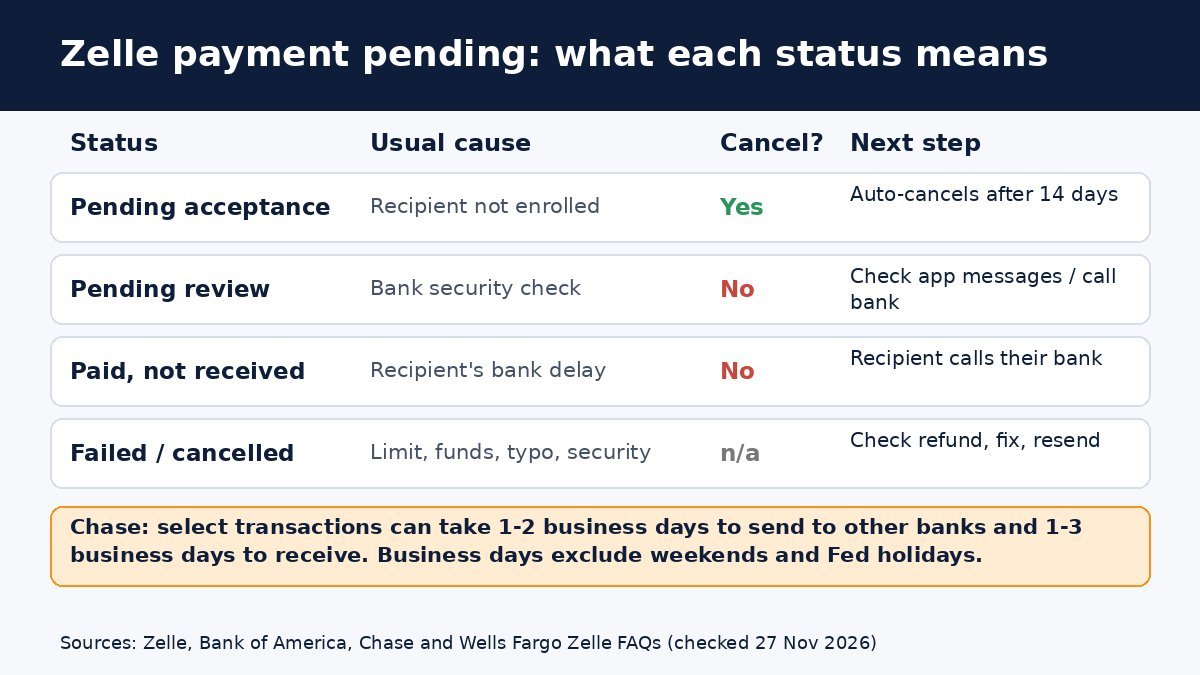
The exact label you see depends on your bank. This table uses Bank of America’s naming, plus what Zelle and other banks publish:
| Status | What it means | Can you cancel? | What to do |
|---|---|---|---|
| Pending acceptance | Recipient hasn’t enrolled the email or mobile number you used | Yes, while it’s still pending | Ask them to enroll with that exact contact, or cancel and resend to the right one. It auto-cancels after 14 days. |
| Pending review | Your bank is holding it for a security check | No | Check your app’s alerts or messages, answer any verification request, and call your bank if it doesn’t clear. |
| Paid / sent but not received | Delay at the recipient’s bank, or a wrong recipient | No | The recipient should contact their bank. Check that the name shown matches who you meant to pay. |
| Failed or cancelled | Limit exceeded, not enough funds, invalid contact or security block | Not needed | Confirm the money is back in your account, fix the cause, then send again. |
How long can a Zelle payment stay pending?
There’s no single network-wide deadline, because each bank sets its own timing. These are the published numbers:
- Recipient not enrolled: up to 14 days, then the payment is cancelled and the money comes back to you (Bank of America and Wells Fargo).
- Chase “select transactions”: the next business day between Chase customers, 1 to 2 business days when sending to another bank, and 1 to 3 business days when receiving from another bank.
- Bank security review: no published time limit. The payment completes or fails once the bank decides.
- Still missing after three days: Zelle’s own FAQ tells the recipient to check that their profile is fully enrolled and that they gave the sender the correct email or mobile number, then contact their bank.
Why holiday weekends make it feel slower
Many of these delays count business days, not calendar days. Thanksgiving Day (26 November 2026) is a Federal Reserve holiday, and Saturday and Sunday aren’t business days either. So a Chase transaction that’s held for “1 to 3 business days” on Black Friday may not arrive until Monday, 30 November (Cyber Monday) or later.
What to do when a Zelle payment is pending
- Read the exact status in your bank’s app. “Pending acceptance” and “pending review” need completely different fixes.
- Check the recipient details. Banks show the enrolled name before you send. If it doesn’t match the person you meant to pay, cancel the payment while you still can.
- Look for messages from your bank. Bank of America points customers to its Message Center during reviews. Wells Fargo may ask for an access code for new recipients.
- Don’t send the payment again yet. Zelle payments to enrolled recipients can’t be reversed, so a second payment could mean paying twice once the first one clears.
- Contact the right bank. Zelle doesn’t hold your money. If you sent it, call your bank. If you’re waiting to receive it, call yours. Use the phone number in your banking app or on your card, not one from a text or email.
Getting paid with Zelle for side income: protect yourself
Zelle is popular for informal side income like babysitting, tutoring, cleaning, local selling and holiday odd jobs. Before you rely on it, keep in mind two rules that every major bank repeats:
- No purchase protection. Chase and Bank of America both say neither they nor Zelle protect you if you pay for goods with Zelle and they never arrive or aren’t as described. Bank of America’s advice is to “treat Zelle payments like cash.”
- Only use it with people you know and trust. If you sell to strangers online, a platform with built-in buyer and seller protection is usually safer. See our guide to Facebook Marketplace scams for sellers.
Be suspicious of anyone who says your payment is “pending” and you need to pay a fee, upgrade your account or send money back to release it. Bank of America says it will never call and ask you to send money with Zelle, even to yourself, and will never call or text you asking for a security code. If you think you’ve been scammed, contact your bank right away. Zelle says qualifying imposter scams may be eligible for reimbursement. You can also report scams to the FTC at ReportFraud.ftc.gov.
Know your sending limits before a big payment
Limits vary by bank and can change. Wells Fargo, for example, publishes consumer limits of $3,500 in a rolling 24-hour period and $20,000 in a rolling 30-day period. Chase sets limits dynamically for each transaction and shows them in the app. Bank of America uses daily, weekly and monthly limits. If you need to make a large holiday payment, check your limit in the app first so the payment doesn’t fail.
Waiting on money from another app? We also cover Venmo payment pending, Cash App payment failed and why PayPal holds funds.
FAQ
Can I cancel a pending Zelle payment?
Only if the recipient hasn’t enrolled yet (“pending acceptance”). You can’t cancel a payment that’s under bank review or already sent to an enrolled recipient.
Is Zelle down if my payment is pending?
Not necessarily. During the 16 November 2026 Chase disruption, Zelle said its network was working normally. The delays came from one bank’s systems. Check your bank’s app or website for service notices.
Why does the recipient not see a payment marked “Paid”?
Their bank may still be processing it, or the payment went to a different enrolled contact. The recipient should check their enrollment and contact their own bank.
Does Zelle charge a fee to speed up a pending payment?
No. Zelle says there are typically no consumer fees, and nobody legitimate will ask you to pay to “release” a pending payment.
This article is general information, not financial or legal advice. Bank policies, limits and timings change, so check your own bank’s Zelle terms or contact them about your payment.