

A Shopify payout on hold usually means one of three things: your account is under review and Shopify needs something from you, part of your balance has been put into a reserve, or the money is simply still inside the normal settlement window. In the US, Shopify Payments has a minimum settlement time of 3 business days, and weekends and bank holidays don’t count. So a busy Black Friday weekend can look like a hold when it isn’t one.
This guide explains how to tell which situation you’re in, what each payout status means, and what you can actually do about it before the December rush. If you need the short answer: look for a banner in your Shopify admin and an email to the store owner address. If neither exists, it’s probably normal timing.
Why Is My Shopify Payout on Hold? The Main Reasons
Shopify’s help article on payout timing says payouts can be held while an account is reviewed. Things that can trigger a review include:
- Chargeback disputes and customer complaints
- High-risk orders or fulfillment issues
- Compliance checks or possible violations of the Shopify Payments Terms of Service
- Fraud or compliance investigations by Shopify’s financial partners
- Onboarding that needs more documents or verification
- Problems with your tax identification number or business details
Shopify’s account holds page also lists unsupported business types, sanctions, creditor or legal action, and extra reviews for sellers of high-value goods such as jewelry, watches, precious metals, art and designer goods. Shopify says reviews happen “throughout the account’s lifespan,” so a hold can come after months of smooth sales.
Holds that aren’t really holds
Several common situations delay a payout without any problem with your account:
- New bank account: If you change your payout bank account or add a new one more than 24 hours after setting up Shopify Payments, payouts pause for 3-5 business days while Shopify checks the new account. This pause doesn’t apply if you switch to a Shopify Balance account.
- Schedule change: If you switch from daily to weekly payouts, for example, pending funds can wait until the next scheduled date.
- Negative balance: If refunds or chargebacks have pushed your balance below zero, payouts wait until new sales cover the gap.
- Incomplete setup: If you haven’t added a bank account, nothing can be paid out.
Normal Shopify Payout Timing (and Why Black Friday Feels Slow)
For US stores, Shopify lists a minimum settlement time of 3 business days and no minimum payout amount. Settlement time is the gap between the moment a customer’s payment is captured and the moment those funds can be paid out. Your real settlement time can be longer depending on your risk level and the payment method. ACH direct debit payments, for example, can take up to 4 business days to settle.
Two rules matter a lot this weekend:
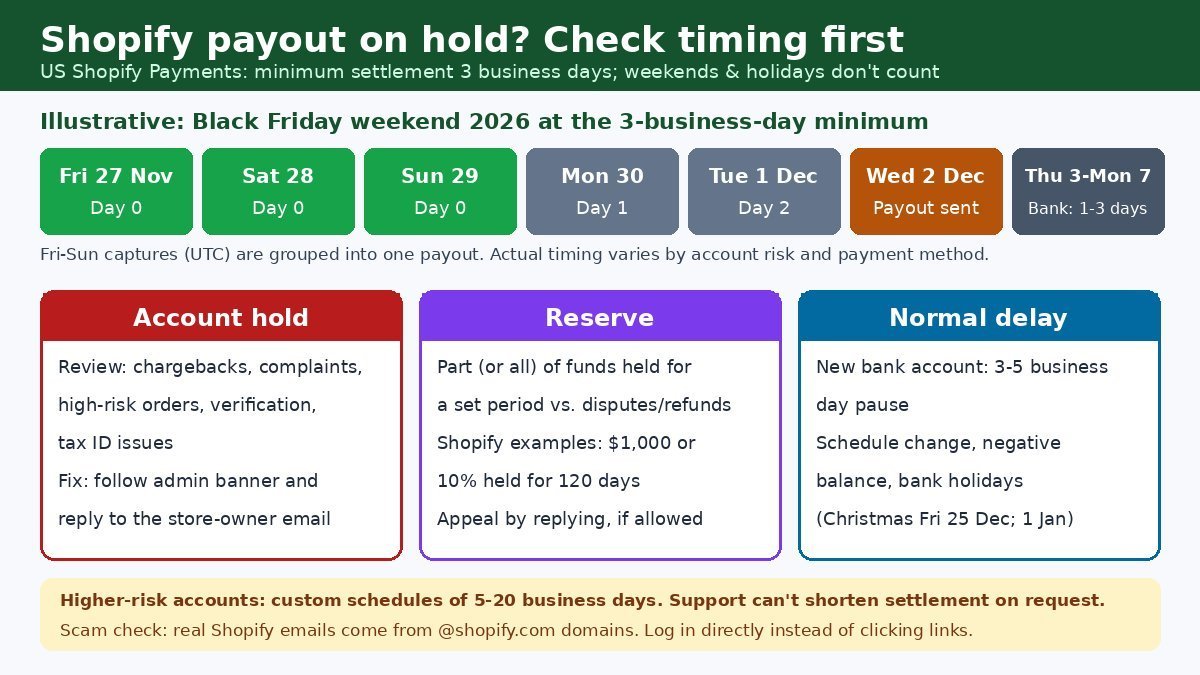
- Funds from payments captured on Friday, Saturday and Sunday (in UTC) are grouped together and sent as one payout.
- Only business days count. Weekends and holidays are skipped.
Shopify’s own example: with a 3-business-day settlement time, an order captured on Friday is paid out on Wednesday. Weekend orders are also treated as day 0, so they land in the same Wednesday payout. Applied to this year’s calendar, Black Friday (Friday, November 27, 2026) and weekend sales would be processed on Wednesday, December 2, for a store on the minimum settlement time. After that, Shopify says banks can take another 1-3 business days to show the money.
Payouts aren’t processed on weekends or public holidays. The Federal Reserve’s 2026 holiday schedule shows Thanksgiving on November 26 and Christmas Day on Friday, December 25, 2026. New Year’s Day on Friday, January 1, 2027, is the next one.
Custom payout schedules for higher-risk accounts
Some accounts are placed on a custom payout schedule. According to Shopify, accounts it considers higher risk can face extended payout periods of 5 to 20 business days. Settlement times are reviewed automatically, and Shopify says its support team can’t shorten them on request. A sudden jump in sales volume is one of the risk signals Shopify mentions, so a store with a breakout Black Friday may see its timing change.
Shopify Payout Statuses: What Each One Means
Go to Finance > Payouts in your Shopify admin (or Finance in the Shopify app). Shopify’s missing payouts guide defines the statuses:
| Status | What it means | What to do |
|---|---|---|
| Pending | Funds are captured but not yet in a scheduled payout. Dates shown are estimates. | Check each pending transaction’s payout date under Finance > Payouts > Pending. |
| Scheduled | The payout is batched and will be sent shortly. | Usually nothing. Wait for it to change to Deposited. |
| Deposited | Shopify has sent it to your bank. | Allow 1-3 business days, then give your bank the bank reference (Trace ID). |
| Failed | Your bank rejected it, often due to wrong details or a currency mismatch. | Fix your bank details using the admin prompt. Future payouts may stop until you do. |
| Reserve | Money held for a set period to cover possible disputes or refunds. | Read the reserve email for its terms, end date and whether you can appeal. |
Shopify Reserves: When Only Part of Your Money Is Held
A reserve is different from a full account hold. Shopify’s reserves page describes it as a temporary hold on part (sometimes all) of your Shopify Payments transactions for a set period, to cover chargebacks and refunds. Reserves generally don’t stop you from taking payments unless Shopify tells you otherwise.
There are two types:
- Fixed amount: A set sum is held for a set time. Shopify’s example is $1,000 for 120 days.
- Percentage-based: A share of each sale is held. In Shopify’s example, 10% is held for 120 days and the other 90% is paid out as normal.
Shopify names these risk signals: long billing cycles (such as annual subscriptions), high chargeback or refund rates, long delivery times (pre-orders, custom orders, events), and big sudden jumps in volume. On the Payouts page, your total balance is your Pending amount plus your Reserve amount. Only the pending part is available for upcoming payouts.
Before a reserve ends, Shopify reviews the account and may lift, keep, reduce or increase it. To appeal, reply to the reserve email within the timeframe it gives. Some reserves can’t be appealed. If the email lists requirements instead, the reserve is removed automatically once you meet them. When the reserve ends, the released funds can take several business days to reach a payout. See our guides to the Etsy payment reserve and PayPal holding funds if you also sell on those platforms.
How to Get a Shopify Payout Hold Released
Shopify says the quickest way to resolve a hold is to provide the information it asks for and reply directly to its email.:
- Check the admin banner and seller health. These show store-specific instructions.
- Find the email. It goes to the store owner address (Settings > Users and permissions > Store owner). Check spam too.
- Make sure the store owner handles it. Only the store owner can see Shopify Payments account details and resolve a hold. Staff accounts may only see a generic prompt.
- Send exactly what’s requested. This might be ID, business documents, tax ID details or answers to a high-value goods questionnaire.
- Keep fulfilling orders. You can usually keep working on your store and customers can usually still check out during a hold. You just won’t be paid for those orders until the hold is resolved. In some cases the store can’t take new orders, and the banner or email will tell you.
- Creditor holds work differently. If a payment processor gets a legal notice from a creditor, Shopify can’t lift the hold. The processor removes it only after the creditor sends a release.
Beware of Fake “Payout on Hold” Emails
Shopify’s phishing guidance says its emails come from official domains such as @shopify.com, @email.shopify.com and @em.shopify.com. Messages from Gmail, Yahoo or similar free services aren’t from Shopify. Instead of clicking a link in an urgent email, log in to your admin directly and check for a banner there. Forward suspicious messages to phishing@shopify.com. Never share your two-step authentication codes. If you sell elsewhere too, our guide to Facebook Marketplace scams for sellers covers similar tricks.
FAQ
How long does Shopify hold your money?
There’s no single answer. Normal US settlement takes at least 3 business days, plus 1-3 days at the bank. Custom schedules for higher-risk accounts can run 5-20 business days. Shopify’s reserve examples use 120 days. An account hold lasts until you provide what’s requested.
Can Shopify Support release my payout faster?
Support can explain your account status. But Shopify says settlement times are reviewed automatically and support can’t shorten them on request.
Why is my Shopify payout lower than expected?
Common reasons are refunds, chargebacks and dispute fees, processing fees, adjustments, currency conversion, negative balances and reserved funds. Export the payout’s transactions to CSV to see amount, fee and net for each line.
Does a payout hold mean my store is shut down?
Not usually. Shopify says you can keep using your store during a Shopify Payments hold, and checkout usually keeps working. The exception will be stated in your admin banner or email.
Disclaimer: This article is general information based on Shopify’s public help pages as of November 28, 2026, and isn’t financial or legal advice. Shopify’s policies vary by country and account and can change. Always follow the instructions in your own Shopify admin. While payouts are delayed, a cash buffer helps. See how much emergency fund you need.