
If you just wrapped up a long Thanksgiving-weekend shift and found your Instacart cashout not working, the cause is usually something simple: the money is not “available” yet, your account needs a quick identity check, or your debit card is not eligible for instant transfers. This guide walks through each common cause, how to fix it, and when your earnings will arrive anyway if you cannot cash out today.
Quick answer: Instacart Instant Cashout only moves earnings that are already available, so tips stay locked for about 2 hours after delivery and a small balance may not meet the minimum. If the Cashout button is grey or missing, open your payout settings to complete any identity (selfie) check, confirm your debit card is valid and supports instant transfers, and update or reinstall the Shopper app. If nothing works, your earnings still arrive by free weekly direct deposit.
How Instacart Instant Cashout Is Supposed to Work
According to Instacart’s official shopper earnings page, U.S. full-service shoppers have three ways to get paid:
- Instant Cashout: you can cash out batch earnings “within minutes after a delivery” and your full earnings, including the tip, 2 hours after delivery, for a small fee.
- Free auto-payouts: with the Shopper Rewards Card powered by Branch, earnings are paid automatically to your Shopper Rewards account after every batch at no cost.
- Weekly direct deposit: free payments arrive between Wednesday and Friday for work done the prior week (Monday to Sunday).
The same page explains why tips take longer: customers can’t decrease a tip after 2 hours, though they can increase it for up to 14 days. That 2-hour window is the single most common reason shoppers think cashout is broken when it is actually working as designed.
Why Is My Instacart Cashout Not Working? Common Causes
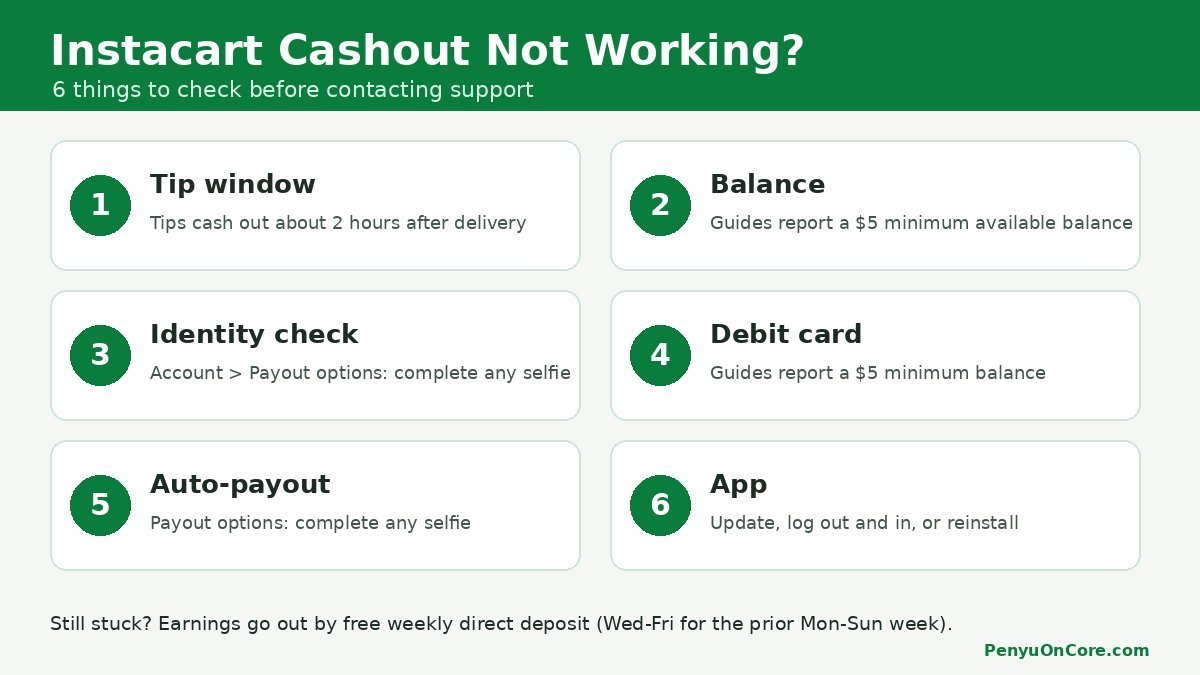
Instacart’s detailed cashout rules live in the in-app Help Center, which requires a shopper login. The table below combines what Instacart says publicly with requirements that shopper guides such as Ridester report from the app. Always confirm the current rules on the Earnings screen in your own Shopper app.
| Possible cause | What it means | What to try |
|---|---|---|
| Tip still pending | Tips become cashable about 2 hours after delivery (Instacart). | Wait out the window, then refresh Earnings. |
| Balance below the minimum | Guides report a $5 minimum available balance. | Finish another batch or wait for tips to clear. |
| New shopper | Guides report you need about five completed deliveries first. | Use weekly direct deposit until the option unlocks. |
| Identity check required | The button can turn grey until you verify. | Open Account > Payout options and complete any selfie prompt. |
| Card not eligible | Instant transfers need a valid, eligible debit card. | Remove and re-add the card, or link a different debit card. |
| Auto-payout already on | Earnings already went to your Shopper Rewards account. | Check Transaction History and the Shopper Rewards app. |
| App or outage glitch | Cashout can fail temporarily on Instacart’s side. | Update the app, log out and in, then contact support. |
1. Your tip has not cleared yet
Batch pay becomes available soon after delivery, but the tip portion does not. If your batch pay alone is small, the amount you can actually cash out may be lower than the total you see on the batch summary. Waiting 2 hours after drop-off usually fixes this.
2. Your available balance is too low
Shopper guides citing Instacart’s in-app help consistently report a $5 minimum available balance for Instant Cashout. Pending tips do not count toward it, so a short batch with a big tip can leave you just under the line until the tip clears.
3. You are a new shopper
Third-party guides report that new shoppers must complete roughly five deliveries before Instant Cashout unlocks, and that a multi-order batch may count as one delivery. Until then, your pay arrives by weekly direct deposit.
4. Instacart wants to verify your identity
Many shoppers on Reddit’s r/InstacartShoppers report that a greyed-out or missing Cashout button returned after they opened Account > Payout options and completed a selfie verification. This is shopper-reported rather than an official statement, but it is quick and harmless to try first.
5. Your debit card is the problem
Instant transfers go to a linked debit card, so an expired, cancelled or ineligible card blocks the payout. Credit cards will not work, and shoppers report that some credit-builder or prepaid cards are rejected even if they look like debit cards. Removing the card and adding it again, or linking a standard bank debit card, often fixes the error.
Did the Shopper Rewards Card Change Instacart Cashout?
Yes, for many U.S. shoppers. In June 2025 Instacart announced the Shopper Rewards Card, a Mastercard business debit card from fintech company Branch with banking services by Lead Bank, rolling out in two phases starting October 2025 and April 2026. Key points from that announcement:
- With auto-payout on, earnings are deposited to your Shopper Rewards account after every batch for free.
- Once the card is available to you, an Instant Cashout to a different bank account costs $1.50, a change also reported by PYMNTS.
- Weekly direct deposits to your own bank account stay free.
- Instacart says most cashouts take a few minutes but “some may be subject to delays,” and it may add a fee for Shopper Rewards Card payouts in future, with notice.
So if your earnings seem to vanish without an Instant Cashout, check whether auto-payout already sent them to your Shopper Rewards account. And if the fee looks higher than you remember, the card rollout is the likely reason. Always read the fee shown on the confirmation screen before you tap Confirm.
How to Fix Instacart Cashout Not Working: Step by Step
- Check the timing. If you delivered less than 2 hours ago, wait for the tip window to pass.
- Check your available balance on the Earnings tab, not the batch total.
- Open Account > Payout options and complete any identity or selfie prompt.
- Review your linked card. Make sure it is a current debit card, then remove and re-add it if needed.
- Look at Transaction History to confirm the money was not already cashed out or auto-paid.
- Update the Shopper app, log out and back in, or reinstall it.
- Contact Instacart support through the Help section of the Shopper app if the button stays grey for more than a day.
Similar rules apply on other gig apps. If you also deliver for other platforms, see our guides to DoorDash Fast Pay not working and Uber Instant Pay not working.
When Will You Get Paid If You Cannot Cash Out?
Your money is not lost. Earnings you don’t cash out roll into the free weekly direct deposit, which Instacart says arrives between Wednesday and Friday for the prior Monday-to-Sunday week. For work done from Monday 23 November to Sunday 29 November 2026, that means a deposit expected between Wednesday 2 December and Friday 4 December 2026, depending on your bank.
Watch Out for Cashout Scams
Busy holiday weeks bring more fake “Instacart support” texts and calls. A scammer who claims they can “unlock” your cashout may ask for the verification code Instacart texts you, then use it to change your payout card. Never share that code, and only contact support from inside the Shopper app. The U.S. Cybersecurity and Infrastructure Security Agency has a clear guide to recognizing and reporting phishing, and you can report scams to the FTC at ReportFraud.ftc.gov. Our guide to fake delivery texts covers more warning signs.
One more reminder: cashing out early does not change your taxes. The IRS Gig Economy Tax Center says gig income must be reported even if you don’t receive a 1099 form. Our 1099-NEC threshold guide explains the reporting forms.
FAQ
Why is my Instacart Cashout button grey?
Usually because your available balance is below the minimum, a tip is still in its 2-hour window, or the app needs you to verify your identity. Shoppers commonly report that opening Payout options triggers the selfie check and restores the button.
How long does Instacart Instant Cashout take?
Instacart says most cashouts take a few minutes, but some can be delayed, and your bank’s processing can add time.
Can I cancel an Instacart cashout?
Shopper guides citing Instacart’s help center say a cashout cannot be cancelled after you request it, so check the card and amount before confirming.
Is Instacart weekly pay free?
Yes. Weekly direct deposit to your bank account is free, and auto-payouts to the Shopper Rewards Card are free for eligible U.S. shoppers.
This article is for general information only and is not financial or tax advice. Instacart’s fees and eligibility rules can change, so check the Shopper app for the terms that apply to your account.