
Short answer: To stake CORE, move your CORE to a self-custody EVM wallet such as MetaMask, open the official Core staking dApp, connect your wallet, pick a validator, choose CORE and enter at least 1 CORE, then confirm the transaction. CORE staking has no lock-up, so you can undelegate at any time. Rewards are distributed once a day at 00:00 UTC, and you claim them manually from My Staking.
This guide covers each step, how to compare validators, when rewards actually start, the rules for unstaking, and fixes for the errors people run into most. All rules below were checked against Core’s official documentation in November 2026. Want the theory first? Read our explainer on Core DAO and Satoshi Plus. This page is the hands-on version.
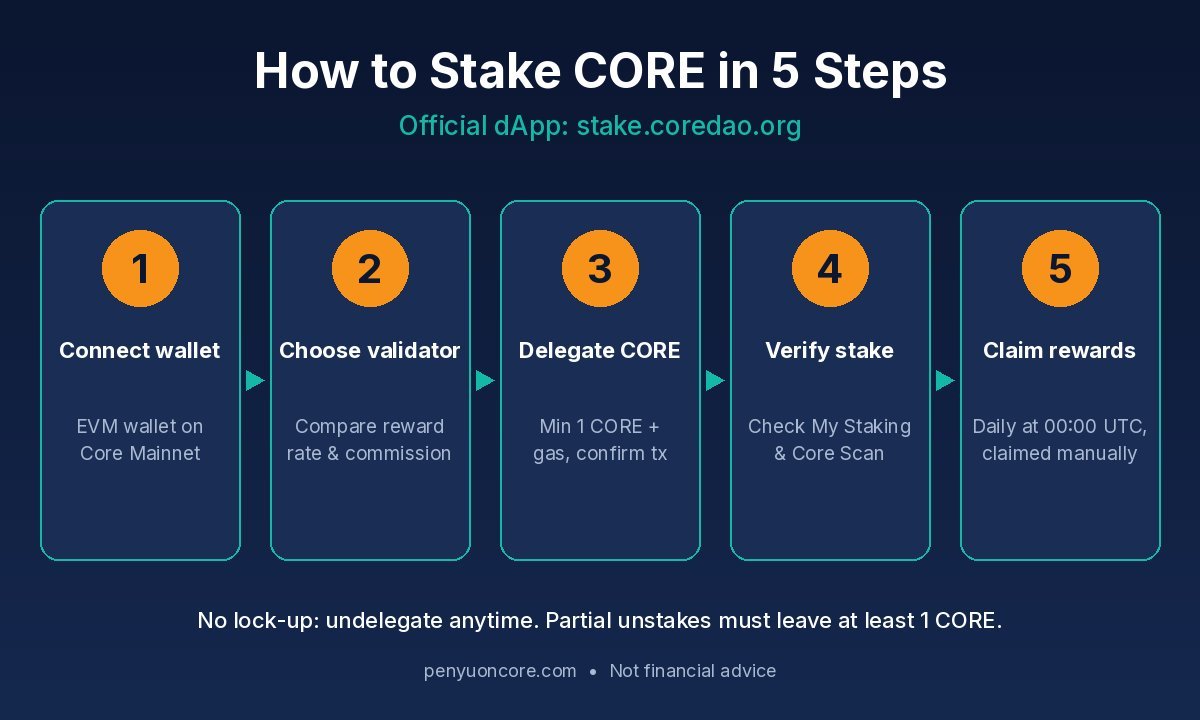
The CORE staking flow on stake.coredao.org, from connecting a wallet to claiming rewards.
What Staking CORE Actually Means
On Core, staking CORE means delegating your tokens to a validator. It is the Delegated Proof of Stake part of Core’s consensus. According to Core’s staking overview, delegated CORE counts as a vote toward a validator’s hybrid score. In each round, the validators with the highest scores are elected to produce blocks.
If your validator is elected and does its job, you get a share of its CORE rewards, minus its commission. Rewards come from block rewards and part of the network’s transaction fees. They are sent to the same Core address you delegated from.
Before You Start: What You Need
- A self-custody EVM wallet. MetaMask, Coinbase Wallet, a WalletConnect wallet, or a Ledger. Core’s official staking guide says you cannot stake on the dApp directly from an exchange account. You need to withdraw to your own wallet first.
- Core Mainnet added to that wallet (chain ID 1116). Follow our guide on adding Core to MetaMask.
- At least 1 CORE to stake, plus a little extra CORE for gas. If your funds are on another chain, see how to bridge to Core. You will then need to swap for CORE on a DEX.
- A bookmark of the real dApp:
stake.coredao.org. Type the address yourself. Don’t click links in DMs or ads.
How to Stake CORE: Step by Step
Step 1: Connect your wallet
Go to stake.coredao.org and click Connect Wallet (top right). Pick your wallet and approve the connection. Check that the wallet is on Core Mainnet. Once you’re connected, the site shows your balance.
Step 2: Choose a validator
Open the validator list. Validators are ranked by hybrid score. Core’s CORE staking docs point to two numbers to compare:
- CORE Reward Rate: the annualized rate the dApp currently shows for that validator. It changes over time and is not guaranteed.
- Commission: the cut the validator takes from your rewards. Lower commission means you keep more.
Validator data refreshes daily at 00:00 UTC when a new round starts. Click a validator’s name to see its total delegated CORE, its number of delegators, and its commission.
Step 3: Delegate CORE
On the validator’s page, click Delegate (some versions say Stake) and choose CORE rather than BTC. Enter the amount and check the commission. Then click Confirm Delegation and approve the transaction in your wallet.
Step 4: Verify your stake
Hover over your wallet address and open My Staking. Your amount should appear under CORE Delegated. You can also open Transaction Records to see the delegation event, or look up the transaction on Core Scan.
CORE Staking Rules at a Glance
| Rule | What Core’s docs say |
|---|---|
| Minimum stake | 1 CORE, plus CORE for gas |
| Lock-up / unbonding | No lock-up. Core’s blog says unstaked CORE is available immediately |
| Reward eligibility | Your stake must be in place for a full round (00:00:00 to 23:59:59 UTC) |
| Reward payout | Distributed at the end of each daily round. Claimed manually |
| Switching validators | Allowed at any time. Does not interrupt that day’s CORE rewards |
| Partial unstake | You must undelegate at least 1 CORE and leave at least 1 CORE, or undelegate everything |
| Fees | No extra protocol fee. You pay network gas, and the validator takes commission from rewards |
| Slashing | Delegators’ principal stays safe, but you can miss rewards if your validator is penalized |
Sources: Core’s Dual Staking integration guide, the Delegator FAQs, and the stCORE design notes. Rules can change with network upgrades, so check the dApp before you act.
When Do Rewards Start?
Rewards don’t start the minute you delegate. Core’s Delegator FAQs explain that new delegations count toward the validator election in the next round. Claimable rewards then show up a round later. One round is one UTC day. So if you stake on a Monday afternoon (US time), expect to wait about two daily cycles before you see anything you can claim.
How to Claim Your Staking Rewards
- Open My Staking on the staking dApp.
- Click Claim and sign the transaction in your wallet.
- The rewards go to the address you delegated from. Past claims are listed under the Claim tab.
Two things to know. First, rewards are not sent automatically when you unstake. The integration guide notes that claiming is a separate action. Second, every claim costs gas, so claiming tiny amounts very often can cost more than it’s worth. If you want to compound, you can delegate claimed CORE again yourself.
How to Unstake or Switch Validators
To unstake: open My Staking, click the three dots next to the validator, choose Undelegate CORE, enter the amount, and confirm in your wallet. Core’s staking blog says there is no lock-up and no penalty. Unstaked CORE is available right away.
To switch validators: use the transfer option instead of unstaking and staking again. Core says moving CORE to another validator doesn’t interrupt that day’s rewards. Unstaking and re-delegating starts the round timing over.
Common Errors and Fixes
- “Undelegate amount is too small” or “remain amount is too small.” These messages come from Core’s staking contract. A partial unstake must be at least 1 CORE and must leave at least 1 CORE with that validator. Change the amount, or undelegate everything.
- Confirm button greyed out or “insufficient funds.” You need spare CORE for gas. Don’t stake your entire balance.
- Wallet won’t connect or shows the wrong balance. Your wallet is probably on the wrong network. Switch to Core Mainnet (chain ID 1116) and refresh.
- Rewards show zero. Your stake may not have finished a full UTC round yet. Wait for the next 00:00 UTC update.
- Rewards dropped suddenly. Your validator may have stopped producing blocks or been jailed. Your principal is safe, but you should consider switching to an active validator.
- Ledger rejects the transaction. Core’s Ledger guide says to update the firmware, open the Ethereum app on the device, and approve the transaction on the Ledger itself.
Risks to Understand
- Price risk. Rewards are paid in CORE, and the token’s price can fall faster than you earn. Our look at why Core tokens fell covers how that plays out.
- Variable rewards. Reward rates depend on validator performance, commission and total stake. Treat any number you see as a snapshot, not a promise.
- Phishing. Fake staking sites and “support” accounts are common. Only connect at stake.coredao.org, and never share your seed phrase.
- Smart contract and upgrade risk. Staking runs on system contracts that change through network upgrades. Check Core’s docs if something looks different.
Core also offers Dual Staking, which combines CORE with self-custodial BTC staking for higher-tier BTC rewards. Tier thresholds change, so check the current staking overview before you plan around them.
FAQ
Is there a minimum amount to stake CORE?
Yes. Core’s docs set a minimum of 1 CORE per delegation, and you’ll need a little more CORE for gas.
Is there an unbonding period for CORE?
Core’s documentation lists no lock-up period, and Core’s blog says unstaked CORE is available immediately. Check the dApp before you unstake in case the rules change.
Can I lose my CORE if a validator is slashed?
According to Core’s Delegator FAQs, delegators don’t lose their staked CORE. Penalties only affect daily rewards.
Can I stake CORE from an exchange?
Not on the official dApp. Core’s guide says to move CORE to a Web3 wallet first. Some exchanges run their own staking programs, but those come with their own terms and custody risk.
How much can I earn?
It varies. The dApp shows each validator’s current reward rate, and that rate changes daily. Nobody can promise a fixed return.
Bottom Line
Staking CORE is simple: connect a wallet at stake.coredao.org, pick a validator with a solid record and fair commission, delegate at least 1 CORE, and claim rewards yourself after the daily rounds. There is no lock-up, but rewards take about two rounds to appear. Always keep some CORE aside for gas.
Disclaimer: This article is for education only and is not financial or investment advice. Crypto staking carries risks, including price volatility, smart contract issues and loss of funds through phishing. Do your own research and confirm current rules in Core’s official documentation before staking.
Sources
- Core DAO Docs: Staking CORE Tokens Using EVM Wallets
- Core DAO Docs: Staking Overview
- Core DAO Docs: Delegator FAQs
- Core DAO Docs: Guide for Dual Staking Integration
- Core DAO Docs: Design of Liquid Staking (stCORE)
- Core DAO Docs: Using Ledger for Staking CORE
- Core DAO Blog: How to Stake CORE
- Core genesis contracts: CoreAgent.sol (GitHub)
- Core Staking dApp