
You’ve just landed on the Core blockchain, maybe with USDT in MetaMask or a fresh wallet you want to use for staking, and every transaction fails because you have no CORE. It’s one of the most common snags for new Core users. This guide covers the practical ways to get CORE for gas, and the network-selection mistakes that cost people money.
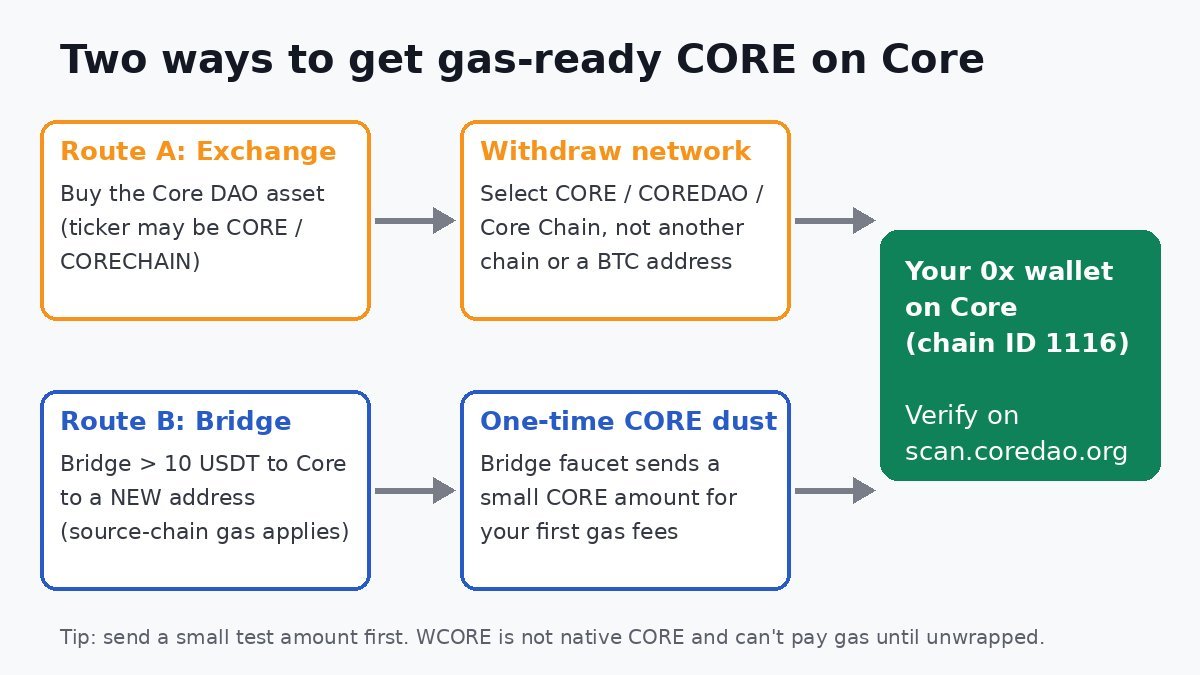
Quick answer: Every transaction on the Core network is paid for in native CORE, so you need a small CORE balance on Core (chain ID 1116) before you can do anything. The two easiest ways to get it are buying CORE on an exchange and withdrawing it on the Core network itself (not another chain), or bridging more than 10 USDT through the official Core Bridge to a new address, which triggers a one-time “dust” deposit of CORE for gas. Always send a small test withdrawal first and check it on Core Scan.
Why you need native CORE (and not something that looks like it)
Core’s official documentation says CORE serves as the gas token for all Core network transactions and smart contract operations. Swapping, bridging out, approving a token, staking: each one is paid for in CORE. Having USDT, WBTC or other tokens on Core doesn’t help if your CORE balance is zero.
Three things look like “CORE” but won’t pay your gas:
- WCORE (Wrapped CORE). This is an ERC-20 version of CORE that lives on Core (the official bridge resources page lists the WCORE contract). DeFi apps use it, but a wallet pays gas in the native coin, so WCORE has to be unwrapped back to native CORE first.
- A different token with the same ticker. Tickers aren’t unique. cVault.finance has an unrelated Ethereum ERC-20 token that also uses the ticker CORE (see it on Etherscan). If you buy “CORE” on a DEX or a small exchange, check the project name, not just the symbol.
- CORE on the wrong network. If an exchange offers more than one network for an asset, only the Core-network option delivers native, gas-ready CORE to your Core address.
Some exchanges also use a different ticker for the right asset. Coinbase, for example, lists Core as “CORECHAIN”. If you can’t find “CORE” on your exchange, search for “Core DAO” or “Core Chain” before you assume it isn’t listed.
Before you start: set up your wallet for Core
Core is EVM-compatible, so your Core address is the same 0x... address you use on Ethereum. Your wallet still needs the Core network added to show the balance. These are the official mainnet values from Core’s network configuration page:
- RPC URL:
https://rpc.coredao.org/ - Chain ID:
1116(0x45c) - Currency symbol:
CORE - Block explorer:
https://scan.coredao.org
If you haven’t done this yet, follow our step-by-step guide to adding Core to MetaMask, then come back here.
Method 1: Buy CORE on an exchange and withdraw on the Core network
This is the most direct route if you’re starting with dollars or pounds. Which exchanges list CORE, and whether you can trade it, depends on your country and changes over time, so check your exchange’s current listing and terms before you deposit any money.
Step-by-step
- Buy CORE on an exchange you already use and trust. Make sure it’s the Core DAO asset (see the ticker warnings above).
- Open the withdrawal screen and pick CORE.
- Choose the network carefully. Depending on the exchange, the right option may be labelled “CORE”, “COREDAO”, “Coredao” or “Core Chain”. Coinbase’s listing announcement (as reported by ChainCatcher) warned that the asset can only be sent over the Coredao network and that using another network could mean losing funds.
- Paste your 0x address, copied straight from your wallet. Never type it by hand.
- Check the fee and the minimum. Withdrawal fees and minimum amounts are set by each exchange, not by the Core network. They vary a lot between platforms and change often, and some exchanges pause CORE withdrawals during maintenance. Read the figures on your withdrawal screen rather than trusting any third-party list.
- Send a small test amount first, confirm it arrives, then send the rest.
How much CORE do you actually need?
For gas alone, not much. Core fees are usually small, but they depend on network activity and on what you’re doing (a contract interaction costs more than a simple transfer). A sensible approach is to keep a small buffer instead of a bare minimum, so a few transactions in a row (an approval and then a swap, for example) don’t leave you stuck. If you plan to stake CORE, budget for that separately from your gas buffer.
Method 2: Use the Core Bridge’s built-in gas faucet
If your money is already in stablecoins on another chain, you may not need to buy CORE separately. According to the FAQ on the official Core Bridge (powered by LayerZero), the “Core Faucet” automatically sends a small amount of CORE as “dust” to help new users cover their first gas fees. The bridge FAQ gives these conditions:
- You must bridge more than 10 USDT to Core.
- It’s a one-time bonus that happens automatically when bridging to a new address.
You still pay gas on the source chain (for example, ETH on Ethereum or BNB on BNB Chain) plus any bridge fees. The faucet only covers your starting gas on Core. Our full guide to bridging to Core walks through the bridge itself. Because the faucet only applies once per new address, don’t count on it if your wallet has already received a bridge transfer.
Comparing the options
| Route | Best for | What you pay | Main pitfall |
|---|---|---|---|
| Exchange withdrawal (Core network) | Starting from USD/GBP, or wanting more than a dust amount | Trading fee plus the exchange’s withdrawal fee | Picking the wrong network or wrong “CORE” asset |
| Core Bridge faucet | New addresses bridging stablecoins in | Source-chain gas plus bridge fees | One-time only, and requires bridging more than 10 USDT |
| Ask a friend / your other wallet | People who already hold CORE on Core elsewhere | A small Core gas fee | Sending from a wallet that also has no CORE for gas |
Common mistakes (and how to avoid them)
Sending BTC straight to your Core address
Core is Bitcoin-aligned, but your Core wallet is an EVM account with a 0x address. Native bitcoin uses completely different address formats. Don’t try to send BTC from an exchange or Bitcoin wallet to a 0x address. Bitcoin staking on Core works through a separate process and doesn’t involve sending BTC to your EVM address.
Withdrawing to an exchange deposit address on the wrong network
This also applies in reverse. When you send CORE to an exchange, use the deposit address and network that the exchange shows for CORE on Core. If an exchange doesn’t support the network you used, recovering the funds (if it’s possible at all) is up to that exchange.
Thinking the funds are “lost” when they’re just not visible
If a withdrawal shows as complete but your wallet shows nothing, check first that your wallet is switched to the Core network. Then paste your address or the transaction hash into Core Scan, the official mainnet explorer listed in the Core docs. If the explorer shows the CORE arrived, it’s a wallet display issue, not a lost transfer. If transactions you send afterwards hang, see our guide to fixing pending or failed Core transactions in MetaMask.
Falling for “gas top-up” scams
Nobody legitimate needs your seed phrase to send you gas. Ignore direct messages offering to “activate” your wallet or “unlock” a Core faucet in exchange for a fee or a signature. Use only the official bridge link and your own exchange account. Our crypto security guide covers the wider risks.
FAQ
Can I pay Core gas fees with USDT?
No. Core’s documentation describes CORE as the gas token for all transactions on the network, so you need native CORE in the wallet sending the transaction.
Is WCORE the same as CORE?
It represents the same value, but WCORE is an ERC-20 token contract on Core, while native CORE is what pays gas. You need to unwrap WCORE to use it for fees.
Which network should I select when withdrawing CORE from an exchange?
Select the Core network option, which may be labelled CORE, COREDAO, Coredao or Core Chain depending on the platform. It sends to the same 0x address you use in MetaMask on Core (chain ID 1116).
How do I qualify for the Core Bridge gas faucet?
According to the official bridge FAQ, you need to bridge more than 10 USDT to Core. It’s a one-time deposit that happens automatically when bridging to a new address.
How can I check whether my CORE arrived?
Search your wallet address or transaction hash on scan.coredao.org, Core’s official mainnet block explorer.
Disclaimer: This article is for educational purposes only and is not financial, investment or tax advice. Crypto assets are volatile and you can lose money. Exchange availability, fees and bridge features change; always check the official sources and your exchange’s current terms before you move funds.