
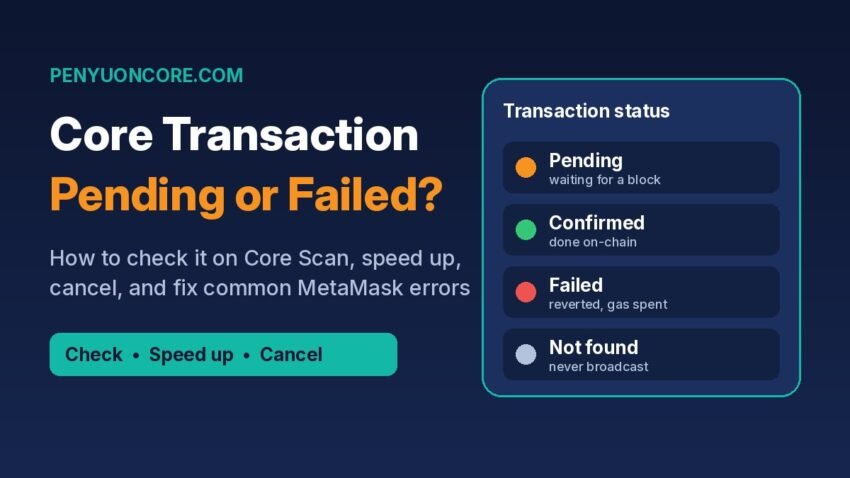
Quick answer: If a transaction on the Core blockchain is stuck as “pending” in MetaMask, first paste its hash into Core Scan to see whether the network ever received it. If it is pending on-chain, use MetaMask’s Speed up or Cancel option (both reuse the same nonce); if it doesn’t show up on the explorer at all, restart your browser, and only clear activity and nonce data as a last resort. Failed transactions usually come down to too little CORE for gas, a too-low gas price, or the smart contract itself rejecting the call.
This guide walks through how to tell which situation you’re in, what each common error means, and the fixes MetaMask and Core DAO themselves recommend. None of these fixes require sharing your seed phrase.
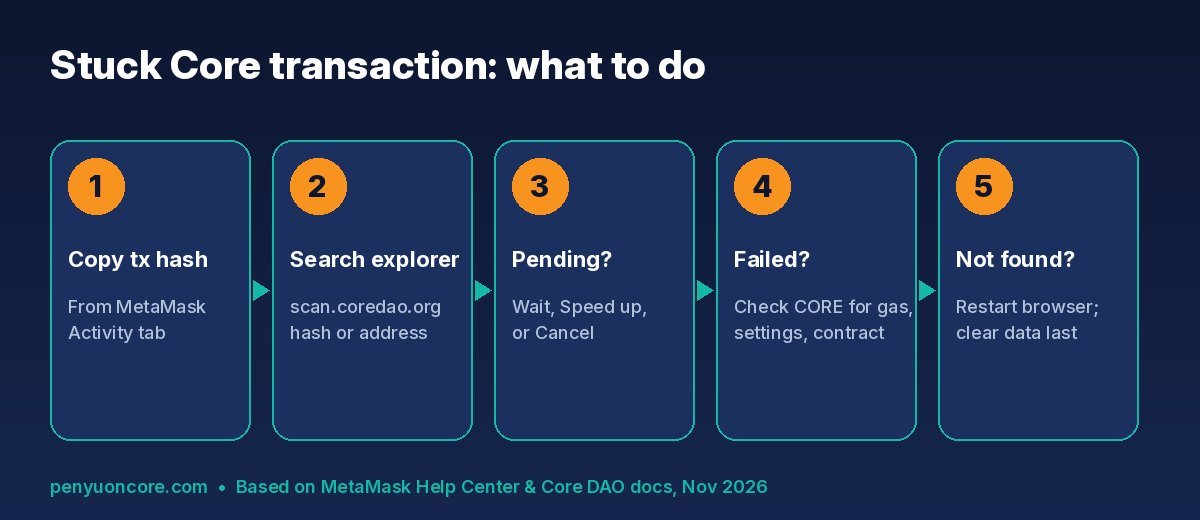
Step 1: Find out what actually happened on Core Scan
Core’s official explorer for mainnet is scan.coredao.org. Core DAO’s network configuration docs list it alongside the mainnet details: chain ID 1116 (0x45c), currency symbol CORE, and RPC URL https://rpc.coredao.org/.
- In MetaMask, open the Activity tab, click the stuck transaction, and copy the transaction hash (or use “View on block explorer”).
- Paste the hash into the search bar on Core Scan. You can also search your wallet address to see your full history.
- Read the status. Core DAO’s own Core Scan guide explains that transactions show as pending (waiting for validation), confirmed, or failed, and that failures are often caused by insufficient gas fees or other errors.
If you’re on the testnet, use the separate testnet explorer at scan.test2.btcs.network instead. Testnet tokens (tCORE2) are not real CORE.
Your result will put you in one of three buckets.
| What Core Scan shows | What it usually means | What to do |
|---|---|---|
| Confirmed / success | The transaction went through; MetaMask’s display is out of date | Restart the browser and unlock MetaMask; check the token is added to your wallet |
| Pending | The network has it but hasn’t included it yet, often because the gas price is too low or an earlier transaction is stuck | Wait, Speed up, or Cancel (Step 2) |
| Failed | It was included in a block but reverted; gas was still spent | Find the cause (Step 4) before retrying |
| Not found | The transaction is stuck locally and never reached the network | Restart the browser; clear activity and nonce data only as a last resort (Step 3) |
Step 2: Fixing a Core transaction pending on-chain
MetaMask’s help article on speeding up or cancelling a pending transaction says the first move is simple: close your browser completely, reopen it, and unlock MetaMask (on mobile, close and reopen the app). If it’s still pending after that, you have three options.
Option A: Wait
If the gas price was just a little low, the transaction may go through once demand drops. It costs nothing extra, but it blocks every later transaction from that account, since they are processed in nonce order.
Option B: Speed up
Click Speed up on the pending transaction. MetaMask resubmits the same transaction with a higher gas fee. Because it reuses the original nonce, MetaMask notes that you don’t pay gas twice. Only one version can ever confirm, though the replacement costs more than the original would have.
Option C: Cancel
Click Cancel while the transaction is still pending. A transaction that’s already confirmed can’t be reversed. If the built-in button fails, MetaMask describes a manual method: turn on custom nonce, send a 0-value transaction to your own address using the same nonce as the stuck one, and set a higher fee. If you have several stuck transactions, you have to start with the oldest. MetaMask’s example: you can’t cancel nonce 10 before nonce 9.
How much higher should the fee be? For networks using EIP-1559 fee fields, MetaMask suggests setting the gas limit about the same as or slightly above the original, raising the priority fee by at least 10%, and raising the max fee by at least 30%. Core has historically used legacy (single gas price) transactions (more on that below), so if your wallet shows one gas price field instead of separate max and priority fees, raise that gas price clearly above the original rather than by a token amount.
To find the nonce of the stuck transaction, open it on Core Scan or in MetaMask’s activity details. MetaMask’s guide to customizing a transaction nonce explains that every account’s nonce starts at 0 and goes up by 1 with each transaction.
Step 3: When the transaction isn’t on Core Scan at all
MetaMask’s error code guide explains that “Unable to locate this TxnHash” means the transaction is stuck locally and was never submitted to the blockchain. The recommended order is:
- Search your wallet address (not just the hash) on Core Scan to confirm nothing is pending.
- Restart your browser and unlock MetaMask again.
- If it still shows as pending, MetaMask’s “clear activity and nonce data” feature (called “Reset account” on mobile) wipes MetaMask’s local record of the transaction.
Be careful with step 3. MetaMask’s reset guide says to do it only if the transaction is not visible on the block explorer and, ideally, only when MetaMask Support suggests it. Back up your Secret Recovery Phrase first. Clearing activity doesn’t touch your funds, and your history stays visible on-chain. “Reset account” is also completely different from resetting the whole wallet, which returns MetaMask to a fresh install.
Step 4: Common Core transaction errors and what they mean
“Insufficient funds for gas” or Internal JSON-RPC error
Every transaction on Core, including token approvals, swaps, bridging and staking, pays gas in CORE. If you bridged USDT or another token over but hold no CORE, you can’t move it. For “Internal JSON-RPC error” on custom networks, MetaMask’s checklist is: confirm the network was added correctly, make sure you have enough of the network’s native token for gas, and update MetaMask. If you set Core up manually, double-check the details against our guide to adding Core to MetaMask.
“Transaction underpriced”
MetaMask says this means the gas price was set too low. Before trying again, check Core Scan to make sure you don’t have a queue of pending transactions building up. Then send again with a higher gas setting.
“Invalid chain ID” or “Missing chain ID”
This usually means the network entry is wrong. Core mainnet’s chain ID is 1116 and testnet2’s is 1114, per Core’s docs. Core also notes that the old testnet (chain ID 1115) is deprecated. Fix the entry in MetaMask’s network settings.
“Execution reverted” / exception thrown in contract
The transaction reached the chain, but the smart contract refused it, so the gas used is still charged. MetaMask notes this is a contract-side problem it can’t fix. Common user-side triggers include slippage that’s too tight on a swap, a missing or too-small token approval, or trying to claim or withdraw before something is available. Check the dApp’s docs before retrying.
A Core-specific gotcha: legacy transactions and MetaMask Mobile
In a May 2025 forum notice, Core DAO warned that a MetaMask Mobile update defaulted to EIP-1559 (type 0x2) transactions, which Core did not support at the time. As a result, transactions from MetaMask Mobile were likely to fail on Core dApps, especially Core Staking. Core’s advice then was to use the MetaMask browser extension instead. Core’s Theseus hardfork guidelines from 2025 likewise told developers to “always use --legacy” because Core uses legacy transactions.
The MetaMask GitHub issue Core linked to was closed in June 2025, and both apps keep changing. So treat this as a troubleshooting step rather than a permanent rule: if Core transactions keep failing on mobile but you have the CORE for gas and the right network settings, try the same action from the desktop extension.
Bridges and staking: extra places to check
If you bridged assets and they haven’t appeared, the source-chain transaction can be confirmed while the delivery on Core is still in progress. Core’s Core Scan guide suggests also checking the transaction on LayerZero’s explorer if funds don’t appear right away. Our guide to bridging to Core covers that flow in more detail. For staking, Core’s guide notes that Core Scan lets you track staking activity, but staking and unstaking themselves are done through the official Core staking site. See how to stake CORE.
Once things are working again, it’s worth checking the token approvals you granted while retrying failed swaps or bridges. Our walkthrough on how to revoke token approvals shows how.
FAQ
Will I lose my CORE if a transaction stays pending?
A pending transaction hasn’t executed, so the tokens haven’t moved. You can wait, speed it up, or cancel it. Once a transaction is confirmed or failed on-chain, the gas is spent and can’t be refunded.
Can Core DAO or MetaMask reverse a confirmed transaction?
No. MetaMask states that confirmed transactions can’t be reversed. Anyone who offers to “recover” or “unstick” funds in exchange for your seed phrase or an upfront fee is running a scam.
Is clearing activity and nonce data safe?
It doesn’t move or delete funds, but it wipes MetaMask’s local history and pending-transaction info. Use it only if the transaction isn’t on the explorer, and back up your Secret Recovery Phrase first.
Disclaimer: This article is for general educational purposes only and is not financial, investment, or technical support advice. Wallet interfaces and network rules change, so always check the official Core DAO and MetaMask documentation before acting.