

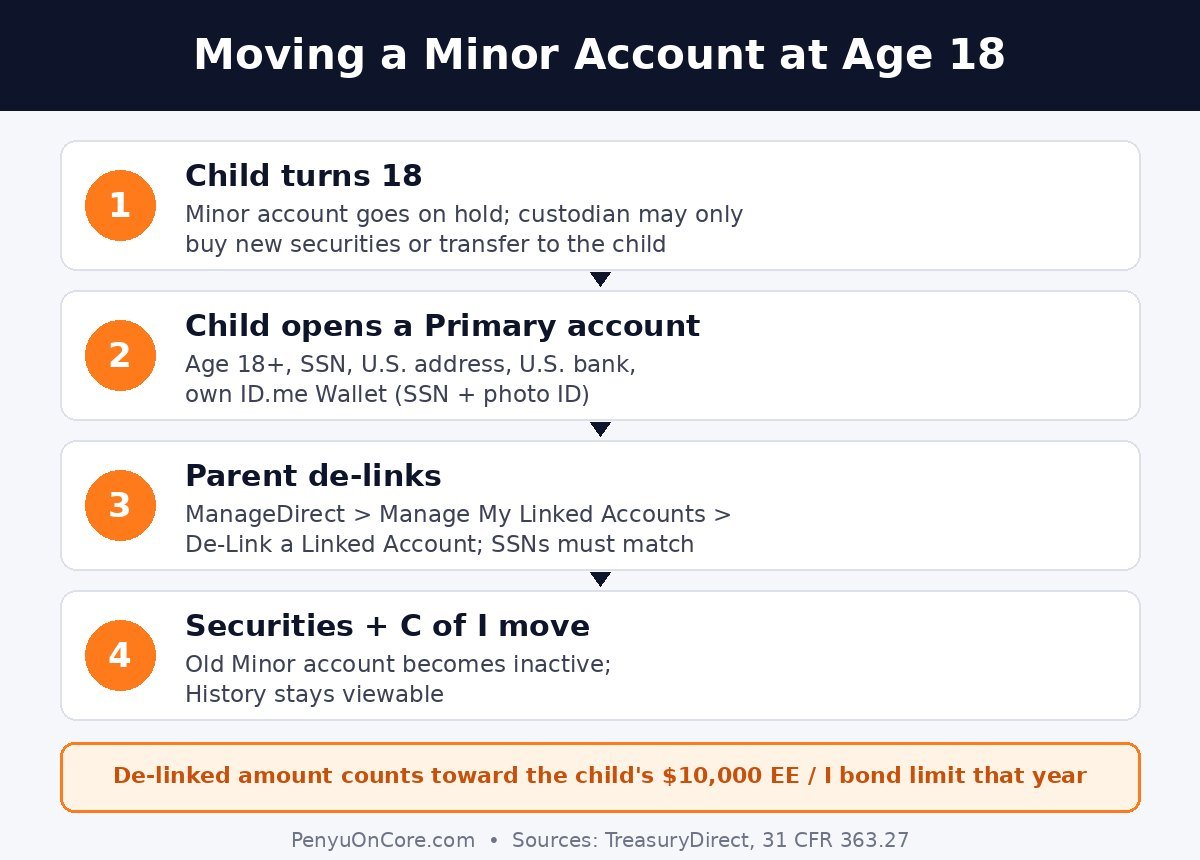
Short answer: A TreasuryDirect Minor account does not convert into an adult account when the child turns 18. The child has to open their own Primary TreasuryDirect account (and verify with ID.me), and then the parent who manages the Minor account de-links it, which moves the bonds, bills and any Zero-Percent C of I into the new account. Until that happens, the parent can only buy new securities or transfer existing ones to the child. Cashing the bonds out is not an option.
Below: what changes at 18, the exact de-link steps, the purchase-limit and tax details, and what to do if the parent can’t or won’t do the transfer.
What a TreasuryDirect Minor account actually is
Nobody under 18 can open their own TreasuryDirect account. The TreasuryDirect FAQ sets 18 as the minimum age for a Primary account. A parent, natural guardian, or person providing chief support can set up a Minor account for a child under 18 instead. It is a custodial account linked to the adult’s own Primary account, and only the custodian can get into it.
Before the child turns 18, the custodian can buy securities, redeem savings bonds, receive gift bonds and handle other transactions on the child’s behalf. If you’ve been sending I bonds to a child as presents, they most likely landed here (see our guide to the I bond gift box). The securities still belong to the child, though. Under 31 CFR 363.27, interest on bonds redeemed from a Minor account is reported to the minor’s name and Social Security number, and any Zero-Percent C of I in the account is the minor’s property.
What changes on the child’s 18th birthday
The federal rule is short. Once the minor turns 18, the custodian can do only two things in the Minor account (31 CFR 363.27(f)):
- Buy new securities in the account for the child.
- Transfer the securities to another account in the child’s name and SSN. That’s usually the child’s new Primary account, but it can also be another Minor linked account with the same or a different custodian.
The custodian can no longer redeem savings bonds in the account. TreasuryDirect’s FAQ says a custodian who keeps the account open after 18 is “restricted from performing nearly all transactions,” apart from buying securities for the child.
The switch to ID.me logins adds another step. TreasuryDirect’s ID.me FAQ says that when a child turns 18, “their account is temporarily put on hold.” The parent then has to deliver the Minor account to the new adult, and the new adult has to open their own TreasuryDirect account and verify their identity with ID.me to take control. Since 28 October 2026, ID.me has been the only way to log in to TreasuryDirect.
Before 18 vs. after 18 at a glance
| Action in the Minor account | Before age 18 | After age 18 |
|---|---|---|
| Buy new securities for the child | Yes | Yes |
| Redeem (cash) savings bonds | Yes, on the child’s behalf | No |
| Receive gift bonds | Yes | Not in the post-18 rule list |
| Transfer securities to an account in the child’s name and SSN | Yes, to another linked account in the child’s name | Yes, including the child’s own Primary account |
| De-link the whole account | No | Yes, once the child has a Primary account |
Based on 31 CFR 363.27(e)–(f) and the TreasuryDirect FAQ.
Step 1: The new adult opens their own TreasuryDirect account
The money can’t move until the child has an account to receive it. To open one, the FAQ says the person must be at least 18, have a valid SSN, a U.S. address of record and a U.S. bank account that accepts ACH debits and credits. They will also need to set up an ID.me Wallet. According to the ID.me FAQ, that means having an SSN and a government-issued photo ID ready, possibly taking a phone-camera photo, and spending about 5 to 10 minutes on verification.
Two practical points from the same FAQ. Each person needs their own ID.me Wallet and their own email address, so the parent and the child can’t share one. And if verification fails, TreasuryDirect agents can’t override it. The fix goes through ID.me support, which offers a live video call with a “Trusted Referee.”
Once the account is open, the child gives the parent their new TreasuryDirect account number. The parent needs it in the next step.
Step 2: The parent de-links the Minor account
TreasuryDirect’s “How Do I…?” help page lists the steps:
- Log in to your own Primary TreasuryDirect account.
- Open the ManageDirect tab.
- Under Manage My Linked Accounts, click De-Link a Linked Account.
- Select the Minor account and click Submit.
- On the De-Link Minor Account Request page, enter the former minor’s new Primary account number and submit.
- Review and submit again. A confirmation page appears.
One detail trips people up: the SSN shown on the request page must match the SSN on the former minor’s new account. If the Minor account was set up with the wrong SSN, fix that with TreasuryDirect before you start.
The TreasuryDirect user guide explains what happens next. The securities and Zero-Percent C of I move to the new Primary account, and the old Minor account becomes inactive. No more transactions are possible in it, but its transaction History stays available. You get a separate confirmation number for each security, starting with “X,” and for the C of I, starting with “V.” Print or save them.
Purchase limits: the de-linked amount counts this year
TreasuryDirect caps electronic purchases at $10,000 of EE bonds and $10,000 of I bonds per person per calendar year. According to the FAQ, when you de-link, the amount “is applied toward the child’s annual purchase limitation for each security type in the year that you’ve de-linked the securities.” The review screen in the user guide says the same: the purchase amount counts toward the recipient’s limit in the year the securities are delivered.
So if the new adult also plans to buy I bonds this year, the de-link counts against the same $10,000. If the Minor account holds a lot of bonds, ask TreasuryDirect before you de-link how they will treat the amount against the limit.
Taxes: de-linking isn’t a taxable event
The de-link review page says de-linking “is neither a taxable event for the Primary account holder nor for the former minor.” It also notes that the minor is responsible for any taxable amount reported on an IRS Form 1099. The parent has to pass along any tax forms the Minor account produced. Each linked account has its own online 1099, which you reach from the parent’s Primary account (more in our TreasuryDirect 1099 guide).
Once the bonds are in the new adult’s own account, they manage them like any other holder. They can cash a bond in full or redeem part of an I bond, subject to the usual savings bond rules.
What if the parent won’t or can’t de-link?
The regulation offers a backup route. Under 31 CFR 363.27(f), once the former minor has opened a Primary account, they can ask the Bureau of the Fiscal Service to transfer the securities, or de-link the account and move the Zero-Percent C of I, into their own account. TreasuryDirect’s customer service number on its FAQ page is 844-284-2676. Have the new account number handy when you call.
If the custodian has died, an estate is involved, or there’s a family dispute, call TreasuryDirect before doing anything. The online de-link flow is designed for a cooperating, living custodian.
FAQ
Does a TreasuryDirect Minor account close automatically at 18?
No. It stays linked to the parent’s account and is temporarily put on hold. The child has to open their own account, and the parent has to de-link, before the child can use the securities.
Can the parent cash out the bonds after the child turns 18?
No. After 18, the regulation lets the custodian only buy new securities or transfer existing ones to an account in the child’s name and SSN.
Does my child need ID.me?
Not while they’re a minor, because the parent manages the account through their own ID.me login. As an adult, they need their own ID.me Wallet to open and use their Primary account.
Is there a deadline to de-link?
The TreasuryDirect pages we reviewed don’t give one. Still, the new adult can’t redeem or manage the securities until they’re moved into their own account, so there’s no benefit in waiting.
Disclaimer: This article is general information, not financial, tax or legal advice. TreasuryDirect rules and procedures change, so check the official pages or contact TreasuryDirect for your situation.