
The Kajabi payout schedule depends on two separate settings: how often Kajabi Payments sends money to your bank (daily, weekly or monthly) and your account’s transaction delay (for example T+7 or T+2 business days). New Kajabi Payments accounts start on a monthly schedule with a T+7 delay, and faster options may unlock 1-2 business days after your first sale. After Kajabi sends a payout, your bank may take another 1-2 business days to post it.
This guide explains how those pieces fit together, why a payout can look “late” when it isn’t, what pauses payouts, and what Instant Payouts cost for US and UK creators. Everything below is based on Kajabi’s own Help Center pages, checked on 19 November 2026.
Kajabi Payout Schedule at a Glance
| Item | What Kajabi says |
|---|---|
| Payout frequency options | Daily, weekly or monthly (you can pick the day or date for weekly and monthly) |
| New account default | Monthly payouts with a T+7 transaction delay |
| When faster schedules may unlock | 1-2 business days after your first Kajabi Payments sale (not guaranteed) |
| Schedule change takes effect | 1-2 business days |
| Bank posting time | Often an extra 1-2 business days after Kajabi initiates the payout |
| New or changed bank account | Mandatory 7-day hold on all payouts |
| Instant Payouts | Optional, usually within 30 minutes; fee of 1.5% ($0.50 min) in the US, 1% (£0.50 min) in the UK |
Kajabi Payments is currently available to businesses registered in the United States, Canada, Australia, the UAE, the United Kingdom and select European countries, according to the Kajabi Payments payouts help article.
Payout Schedule vs. Transaction Delay
Most confusion about Kajabi payouts comes from mixing up these two ideas. Kajabi treats them as separate controls.
The payout schedule
The payout schedule is the cadence: how often Kajabi sends money to your bank account. Depending on your account, you may be able to choose daily, weekly or monthly payouts. For weekly or monthly payouts you can choose the day of the week or the date. Kajabi notes that the schedule does not change how quickly sales show up in your balance; it only controls when funds are paid out.
The transaction delay
The transaction delay is the waiting period between a customer paying you and that money becoming eligible for a payout. Kajabi writes it as “T+” a number of days, where T is the transaction date. Two details matter:
- It counts business days only. Kajabi says the T+2 and T+7 windows exclude weekends and bank holidays.
- It varies by account. Kajabi says the delay “varies per business”, and shorter delays may become available over time based on account history and eligibility.
Kajabi’s own example: with a T+2 delay on a daily schedule, the funds paid out each day come from sales made three business days earlier.
What Happens to a New Kajabi Payments Account
When you first onboard to Kajabi Payments, Kajabi sets the account to monthly payouts with a T+7 transaction delay “for regulatory and compliance purposes”. Additional payout schedules and shorter delays may appear 1-2 business days after your first sale through Kajabi Payments.
Whether daily or weekly payouts actually become available is not automatic. Kajabi says availability can vary by site based on factors including historical processing conduct, product offerings, business type and content.
Even after you switch to a faster schedule, your next payout may not include everything in your available balance. Kajabi warns it can take up to 7 business days or longer for all funds to become available, whatever schedule you pick. As simple arithmetic: seven business days after a Monday sale, with no holidays in between, is the Wednesday of the following week. Your bank may then take another day or two.
How to Read a Kajabi Payout Timeline
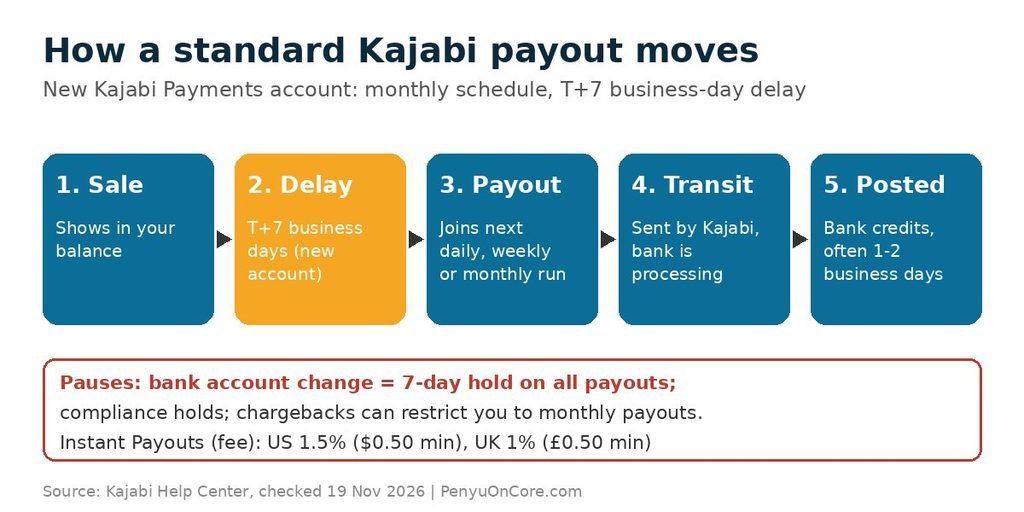
Here is the order of events for a standard (non-instant) payout:
- Sale: a customer pays through Kajabi Payments, and the transaction appears in your balance.
- Transaction delay: the funds wait for your T+ window (for example T+7 business days on a new account).
- Next scheduled payout: once the delay is met, the funds join the next payout on your daily, weekly or monthly schedule.
- In Transit: Kajabi has sent the payout and your bank is processing it. Kajabi says this status is expected and not a problem.
- Posted: your bank credits the money, often 1-2 business days after Kajabi initiates it.
Payments and payouts appear in your dashboard in the timezone set up on your site, which can make a payout look a day early or late if you are reading it from another timezone.
If you sell on several platforms, it helps to compare timelines. Our guides to the Teachable payout schedule and Stan Store payouts cover how other course and creator platforms handle the same problem.
Things That Pause or Slow Kajabi Payouts
Changing your bank account
According to Kajabi’s bank updates and payout timing article, updating your bank details starts a mandatory 7-day verification period. No payouts go out during that time, even if you are on a daily schedule. Your balance keeps building, and the first payout after the hold includes everything that built up. Kajabi’s payouts article adds that this hold applies to all payouts, including other currencies.
If verification fails, Kajabi emails you and shows a dashboard alert. Re-entering your details starts a new 7-day period. Kajabi suggests checking your routing and account numbers and confirming the account is a supported checking or savings account in a supported region.
Payout holds
Kajabi Payments may place a temporary hold for compliance or account verification reasons. You’ll see a dashboard alert and get an email explaining what to do. Funds keep accumulating, and payouts resume on your next scheduled date once the hold is resolved.
Monthly-only restrictions
Kajabi says your payout frequency may be restricted to monthly if your account is newly set up, or if a chargeback dispute was filed or lost. You can’t change the schedule yourself while the restriction is active. Kajabi says chargeback-related restrictions are reviewed over time, and you can ask Kajabi Payments support for a payout schedule review.
Failed payouts
A payout can fail because of invalid bank details, a closed or restricted account, or a bank rejecting the transfer. Kajabi emails you and marks the payout as failed on your Payouts page. Opening a new bank account to fix it triggers a fresh 7-day hold.
PayPal sales
Only transactions processed through Kajabi Payments are included in Kajabi payouts. Kajabi says PayPal transactions, and transactions after your payout schedule’s cutoff, are not included in that payout.
Kajabi Instant Payouts: Speed and Fees
Instant Payouts let the account owner or sub-owner withdraw the available balance on demand, any day of the week, including weekends and holidays. Kajabi says funds typically arrive within 30 minutes, though some banks or card providers take longer. Your regular schedule is not affected, and regular scheduled payouts have no extra fee.
| Region | Instant Payout fee | Currency |
|---|---|---|
| United States | 1.5% ($0.50 minimum) | USD |
| United Kingdom | 1% (£0.50 minimum) | GBP only |
Sources: Kajabi Payments fees: United States and Kajabi Payments fees: United Kingdom.
Some limits to know, from Kajabi’s Instant Payouts article:
- Instant Payouts only work in the default currency for your Kajabi Payments region. A UK-based account, for example, can only take instant payouts in GBP.
- Not every bank account supports instant transfers. If yours doesn’t, you can add and verify an eligible debit card.
- Daily limits apply and reset at midnight in your local timezone.
- Instant Payouts can’t be scheduled. You start each one by hand.
On a $1,000 instant payout, the US rate of 1.5% works out to $15. Whether that’s worth it depends on how urgently you need the cash. For routine income, the free standard schedule is usually the cheaper choice. For comparison, see how fees stack up on Lemon Squeezy or how the Gumroad payout schedule works.
How to Get Paid Faster on Kajabi
- Check your schedule after your first sale. Faster options may appear 1-2 business days after that sale. Kajabi’s article suggests switching to daily if it’s offered.
- Time your schedule changes. Kajabi recommends changing your schedule after your current payout has been initiated, to avoid delays.
- Avoid unnecessary bank changes. Every bank update triggers a 7-day hold, so make changes during a quiet period, not right before a launch payout.
- Reduce chargebacks. Disputes can lock you into monthly payouts. Clear refund policies and product descriptions help.
- Use Instant Payouts sparingly. They’re fast but carry a fee each time.
FAQ
How long does Kajabi take to pay out?
It depends on your transaction delay and schedule. New accounts start on monthly payouts with a T+7 business-day delay. Established accounts may get daily or weekly payouts and shorter delays. Banks can add 1-2 business days.
Does Kajabi have a minimum payout amount?
Kajabi’s payout help articles we reviewed don’t list a minimum for standard payouts. Instant Payouts have a minimum fee ($0.50 in the US, £0.50 in the UK) rather than a minimum amount.
Why is my Kajabi payout smaller than my balance?
Some transactions may not have cleared their transaction delay yet. They’ll be included in a later payout.
Why did my Kajabi payouts stop after I changed banks?
Kajabi applies a mandatory 7-day verification hold whenever you update bank details. Payouts resume automatically afterwards.
Disclaimer: This article is for general information only and is not financial, tax or legal advice. Kajabi’s payout terms, fees and availability can change and may differ by account, so always confirm the details in your Kajabi dashboard and the Kajabi Help Center.