
You made your first sale on Stan Store, but the purple Cash Out button is grayed out and the money sits under “Available Soon.” Most creators run into this, and it usually isn’t a problem with your account. Stan’s payouts follow a fixed sequence: Stripe settles the payment, you cash out by hand, and then your bank receives the transfer.
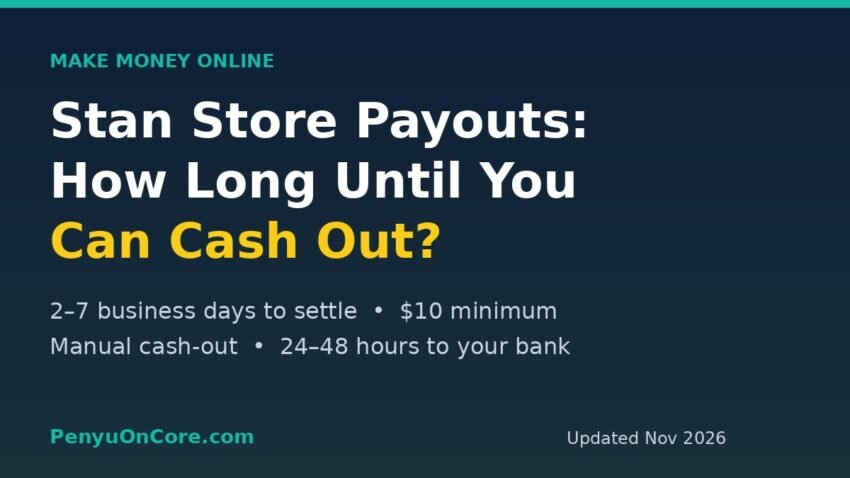
Short answer: On Stan Store, a Stripe card sale usually becomes available to cash out after about 2 business days, but it can take up to 7 business days (your very first sale can take 3–7). You need at least $10 USD available, you must cash out the full balance by hand, and the money should reach your bank 24–48 hours later. Affiliate commissions take longer (7–12 business days).
Below is the full timeline, the fees taken out along the way, and a few things that commonly slow payouts down. All figures come from Stan’s own help center and pricing pages, checked in November 2026.
How Stan Store payouts work, step by step
Most US creators connect Stripe when they set up Stan. Stan creates a Stripe Custom account for you, so you never log in at Stripe.com. Your balance and payouts live entirely in Stan’s Income tab. According to Stan’s help article on Stripe Custom accounts, the Income tab is effectively your Stripe dashboard.
The flow looks like this:
- A customer pays. The sale shows up under “Available Soon” while Stripe processes and verifies it.
- Stripe settles the payment. Once it settles, the money moves to “Available for Cash Out.”
- You click + Cash Out. Payouts don’t happen on their own. Stan confirms that you cannot set up automatic cash-outs, so you have to start each one yourself.
- The bank transfer arrives. Stan says the money should reach your bank within 24–48 hours.
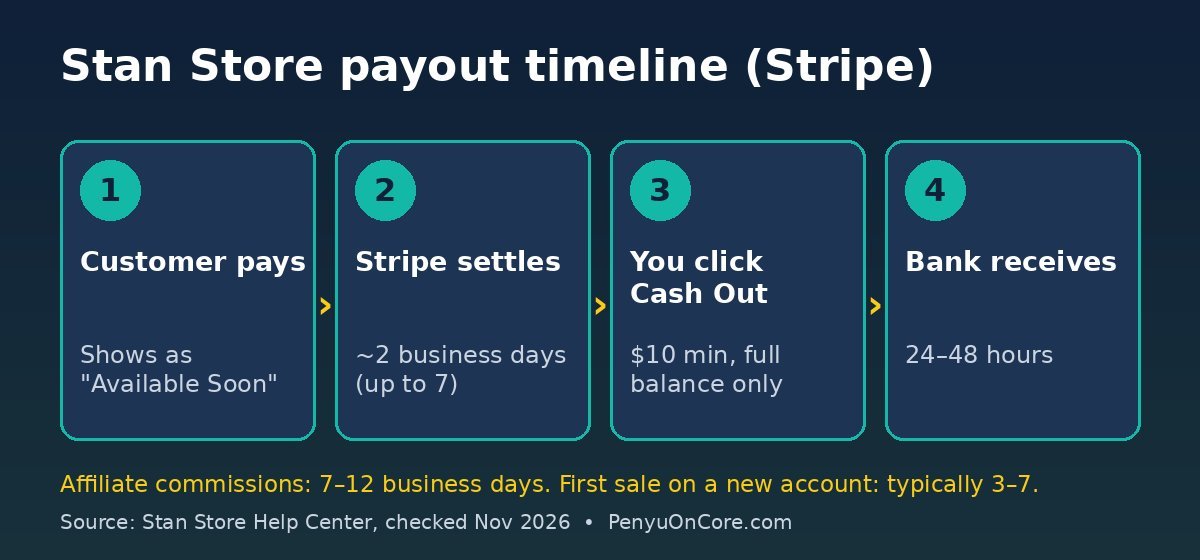
Stan Store payout timeline at a glance
These are the time frames Stan publishes in its How to Cash Out Inside Stan guide (last updated 10 November 2026):
| Type of income | Wait before you can cash out | After you click Cash Out |
|---|---|---|
| Sale, US-based creator (Stripe) | 2–7 business days (usually closer to 2) | 24–48 hours to your bank |
| Sale, international creator (Stripe) | Up to 7 business days | 24–48 hours to your bank |
| First-ever sale on a new Stripe Custom account | Typically 3–7 business days (one-time verification) | 24–48 hours to your bank |
| Affiliate commissions | 7–12 business days (7-business-day hold, then settlement) | 24–48 hours to your bank |
| Referral bonuses | Paid on a rolling basis every 3–5 business days | 24–48 hours to your bank |
To see when a specific order will be ready, open the Income tab, click the transaction and scroll down to Timeline. It shows an estimated availability date. Stan notes that weekends, holidays and Stripe’s own checks can move that date.
Can you speed it up?
Generally, no. In Why is My Account Balance Available Soon?, Stan says its team can’t speed up processing because the hold is part of Stripe’s fraud checks. The exception is Stripe Instant Payouts, covered below.
The $10 minimum and the “all or nothing” rule
Two rules in Stan’s cash-out guide catch new sellers off guard:
- Minimum $10 USD. Your Available for Cash Out balance has to be at least the equivalent of $10.
- No partial cash-outs. Each cash-out takes your whole available balance. You can’t leave some of it in Stan.
Stan also says that if you cancel your subscription while money is still processing or available, you can log back in later and cash it out.
What fees come out of a Stan payout?
Stan itself takes 0% of your sales. You pay a flat subscription instead: $29/month for Creator or $99/month for Creator Pro ($300 or $948 if billed yearly), according to Stan’s pricing page. Both plans come with a 14-day free trial, and there is no free plan. Payment processors still charge their usual fees. For US Stripe accounts, Stan’s transaction fee guide (updated 23 September 2026) lists:
- Standard card purchase: 2.9% + $0.30
- Customer in another country: +1.5%
- Afterpay / Klarna: 6.0% + $0.30 / 5.99% + $0.30
- Payout fee: 0.25% + $0.25 per payout, minimum $1 (plus 1% if the product is priced in a different currency from your Stripe account)
UK creators pay different Stripe rates. The same guide lists 1.5% + £0.20 per standard purchase and a payout fee of 0.25% + £0.25 (minimum £1).
A worked example (US creator)
Say you sell a $50 template to a US customer who pays by card:
- Stripe fee: 2.9% × $50 + $0.30 = $1.75, leaving $48.25.
- If that $48.25 is your whole balance when you cash out, the payout fee works out to 0.25% × $48.25 + $0.25 ≈ $0.37, which is below the minimum, so you pay $1.
The $1 minimum means small, frequent cash-outs cost you proportionally more. Cashing out $10 costs $1 (10%). Cashing out $1,000 costs 0.25% × $1,000 + $0.25 = $2.75 (0.275%). If you can afford to wait, letting your balance grow before cashing out keeps more of your money.
Refunds still cost you the Stripe fee
Stan’s fee guide also says that a refund returns the full amount the customer paid, while Stripe keeps its processing fee. In Stan’s example, a $50 sale with about $2 in fees leaves $48, but a refund still takes $50 out of your balance.
PayPal payouts work differently
If you also connect PayPal (Stan requires a PayPal Business account), PayPal sales go straight into your PayPal account. They count toward Total Revenue but don’t appear in your Stan account balance, per Stan’s PayPal setup guide. PayPal’s own fees apply (Stan lists 3.49% plus a fixed fee that depends on the currency), and you withdraw those funds under PayPal’s rules, not Stan’s cash-out button.
Stripe Instant Payouts: who qualifies
Stan’s Instant Payouts guide says eligible creators can get their money right after a sale. The feature is US-only, and you have to meet all three requirements:
- Your Stan account has been active for at least 30 days.
- The bank account or card on your Stripe Custom account is “Instant Eligible.”
- You’ve already cashed out at least $2,000 USD the regular way.
Even then, Stripe decides who gets access and can deny it. Once it’s enabled, the toggle appears under Settings > Payments. Stripe may charge a fee for instant payouts, so check the fee shown before you turn it on.
Why a Stan payout can take longer than expected
- It’s your first sale. New Stripe Custom accounts go through a one-time verification step.
- Weekends and holidays. The time frames are in business days.
- Affiliate income. It’s held for 7 business days so the creator can issue refunds. Affiliates also need to connect Stripe or PayPal within 180 days of a sale, or the commission may not become available automatically.
- Closed bank account. A payout sent to a closed account comes back to your Stan balance only after the bank returns it, so update your bank details before you cash out again.
If none of these explain the delay, Stan’s help center tells creators to email support at friends@stanwith.me.
Taxes: will Stan send you a 1099-K?
For Stripe sales, Stan’s 1099-K help page says Stripe issues the form if you had more than $20,000 across more than 200 transactions (for 2025). You can download it under Settings > Payments. This matches the federal threshold the IRS says the One, Big, Beautiful Bill retroactively reinstated. Some states have lower thresholds. Not receiving a form doesn’t make your income tax-free. For a closer look at how this works for digital sellers, see our guide to Gumroad and Form 1099-K.
How Stan compares with other creator platforms
Stan’s mix of a flat subscription and manual cash-outs is different from platforms that take a percentage of each sale and pay out on a schedule. If you’re comparing options, see our breakdowns of the Gumroad payout schedule, Ko-fi fees and Payhip’s Free vs Plus vs Pro plans. At low sales volumes, a $29 monthly subscription can cost more than a percentage fee would.
FAQ
How long does Stan Store take to pay out?
Usually about 2 business days for a sale to become available (up to 7), then 24–48 hours for the bank transfer after you click Cash Out.
What is the minimum cash-out on Stan Store?
$10 USD (or the equivalent), and you must cash out your entire available balance at once.
Does Stan pay out automatically?
No. Stan says automatic cash-outs aren’t available, so you need to click + Cash Out in the Income tab.
Can I cash out from Stripe.com instead?
Not with a Stripe Custom account. Stan says you have to cash out inside Stan. Creators in Stan’s limited experiment that lets you connect an existing Stripe account manage payouts in Stripe instead.
Disclaimer: This article is for general information only and isn’t tax or financial advice. Stan, Stripe and PayPal can change their terms, fees and time frames at any time, so check the linked official pages before you rely on them. For tax questions, talk to a qualified tax professional.