
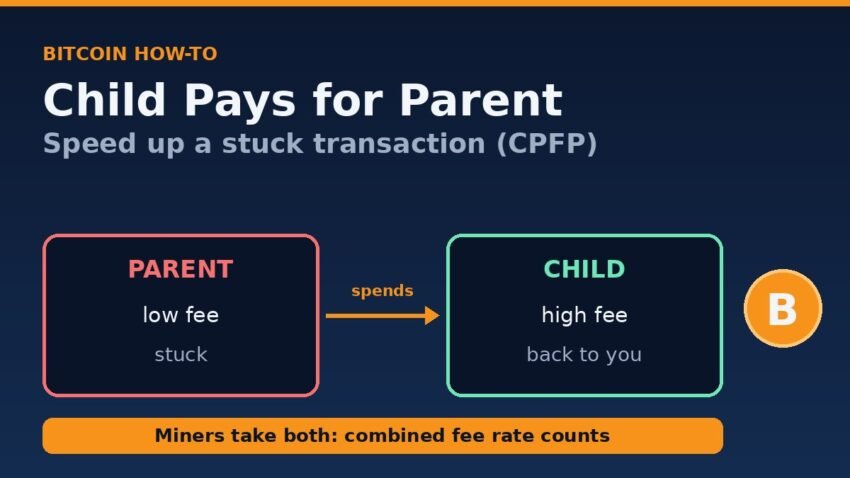
Child pays for parent (CPFP) is the way to speed up a stuck bitcoin transaction when you can’t, or don’t want to, replace it. You spend one of the stuck transaction’s outputs in a new “child” transaction and give that child a high fee. Miners can only collect the child’s fee if they also mine the parent, so they judge the two together, and both can confirm in the same block.
This guide covers who can use CPFP, how to work out the child’s fee without overpaying, and the exact steps in Electrum, Sparrow and Bitcoin Core. We also tested the process on a private Bitcoin Core 32.1 regtest network, and the real numbers are below.
How child pays for parent works
An unconfirmed transaction creates outputs that already exist, even before they’re mined. Bitcoin lets you spend those outputs straight away. The catch is that a transaction spending an unconfirmed output can’t be mined until its parent is mined, either in an earlier block or earlier in the same block.
So a miner looking at your child has to take the parent too, and it compares the combined fee of both with their combined size. Bitcoin Core now builds blocks this way by design. The Bitcoin Core 31.0 release notes explain that the new “cluster mempool” orders transactions by the feerate at which they’re expected to be mined, counting the whole set, or “chunk”, that would go in together, “e.g., a parent and its child”.
Can you use CPFP? Check these conditions first
CPFP only works if you control at least one output of the stuck transaction. The Electrum FAQ says a CPFP “can be done by the recipient of the funds, or by the sender, if the transaction has a change output.” In practice:
- You’re receiving the payment: the output paying you is yours, so you can spend it.
- You sent it and got change back: the change output is yours, so you can spend that instead.
- You sent your whole balance with no change: you have no output to spend. Your options are RBF (if the transaction allows it) or asking the recipient to do CPFP.
The parent also has to still be in the mempool of the nodes you broadcast to. If explorers can’t find it any more, read our guide on a bitcoin transaction dropped from mempool first. A child of a transaction nobody holds has nothing to attach to.
CPFP vs RBF at a glance
| Question | CPFP (child pays for parent) | RBF (replace-by-fee) |
|---|---|---|
| Who can do it? | Anyone who controls an output: the recipient, or the sender through change | The sender only, because the inputs must be re-signed |
| What happens to the original? | It stays and is mined together with the child | It is replaced by a new version with a higher fee |
| Extra block space | Yes, the child adds its own size | Usually none, the new version replaces the old one |
| Typical cost | Higher, you pay for the parent’s shortfall plus the child | Lower, you only pay the difference in fee |
If you are the sender and your wallet offers “Increase fee” (RBF), that is normally the cheaper fix. CPFP is the tool for recipients, and for senders whose wallet can’t replace the transaction.
How much fee does the child pay for the parent?
The target is a rate for the parent and child together, not a rate for the child alone. Use this formula:
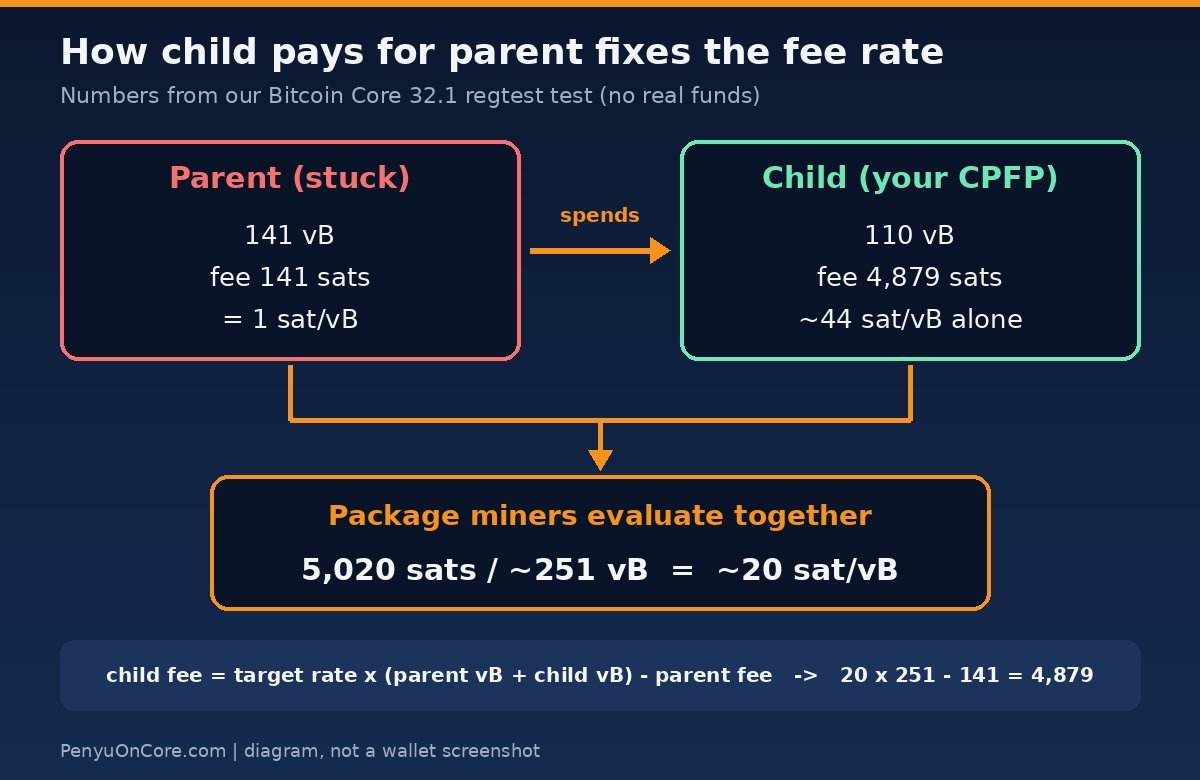
child fee = target rate × (parent vsize + child vsize) − parent fee
To use it:
- Look up the parent’s size (in vbytes) and the fee it paid. Any block explorer shows both on the transaction page.
- Pick a target rate in sat/vB from a fee estimator such as mempool.space.
- Estimate the child’s size. A simple one-input, one-output native SegWit spend came to 110 vB in our test.
- Do the sum and round up a little.
If the parent already has other unconfirmed parents or children, they count too, which raises the fee you need. Keep the child small, with one input and one output back to yourself.
What our regtest test showed
We ran Bitcoin Core 32.1 in regtest mode, a private test network with no real money. Wallet A sent 0.5 BTC to wallet B at 1 sat/vB, so the parent was 141 vB and paid 141 sats. Wallet B then spent that unconfirmed output back to itself with sendall, asking for 20 sat/vB.
- The child was 110 vB and paid 4,879 sats, about 44 sat/vB on its own.
- That is exactly the formula’s answer: 20 × (141 + 110) − 141 = 4,879.
getmempoolclustergrouped parent and child into one chunk with a total fee of 5,020 sats, about 20 sat/vB for the pair.- The next block we mined contained both transactions.
This matches a change listed in the Bitcoin Core 26.0 release notes: when the wallet has to spend unconfirmed outputs, it “will add fees to ensure that the new transaction with its ancestors will achieve a mining score equal to the feerate requested by the user.” In other words, Bitcoin Core does the CPFP maths for you. Regtest blocks are never full, so this shows the fee maths, not real-world confirmation speed.
How to do child pays for parent in popular wallets
Electrum
- Open the History tab and right-click the unconfirmed transaction.
- Choose Child pays for parent.
- Set the fee and click OK.
- Click Sign, then Broadcast.
These steps follow the official Electrum FAQ, which also covers the RBF “Increase Fee” option for replaceable transactions.
Sparrow Wallet
- Go to Transactions and right-click the unconfirmed transaction.
- Choose Increase Effective Fee (CPFP). The Send tab opens with a payment back to a fresh receive address in your wallet.
- Set the fee rate, then create, sign and broadcast the transaction.
The Sparrow FAQ describes CPFP as spending the outputs of the transaction at a higher fee rate. We confirmed the menu label in Sparrow’s source code, which also shows the wallet may add another of your coins if the stuck output is too small to cover the fee. If the option says there are no spendable outputs, check that the output isn’t frozen and that spending unconfirmed coins is allowed.
Bitcoin Core
Bitcoin Core has no one-click CPFP button. The simplest route is the console (Window → Console in the GUI, or bitcoin-cli). Spend the stuck output back to a new address of your own:
sendall '["YOUR_NEW_ADDRESS"]' null "unset" 20 '{"inputs":[{"txid":"PARENT_TXID","vout":0}]}'
Replace 20 with your target sat/vB and vout with the output number that belongs to you. Running listunspent 0 lists unconfirmed outputs with their txid and vout. Keep the explicit inputs list. Without it, sendall would sweep every coin in the wallet. In our test, a normal send without picking inputs returned “Insufficient funds”, because Bitcoin Core treats incoming unconfirmed coins from someone else as unsafe and won’t spend them unless you select them yourself.
In the graphical wallet, you can turn on Enable coin control features under Settings → Options → Wallet to pick inputs by hand. The same page has the Spend unconfirmed change option for sender-side CPFP.
When CPFP won’t work
- The output is tiny. If the coin you would spend is worth less than the fee needed, CPFP isn’t worth it.
- The cluster is full. Since Bitcoin Core 31.0, a group of linked unconfirmed transactions is limited by default to 64 transactions and 101 kvB, and the release notes state that “nothing is allowed to bypass the cluster count limit.” This mostly affects big batch payouts.
- The parent has been dropped. You’ll have to rebroadcast it first, or wait for the sender’s wallet to resend it.
- Your wallet can’t pick coins. Many simple mobile wallets don’t let you choose an unconfirmed input. Import the wallet into Electrum or Sparrow, or ask the sender to bump it. Never type your seed phrase into a website that offers to “accelerate” your transaction. Our crypto security guide explains why.
One useful change: since Bitcoin Core 31.0, one-parent-one-child packages can be relayed even when the parent pays less than the node’s minimum relay fee, even zero. That helps a very cheap parent reach miners together with its child. Older nodes may still reject it, though.
If you’d rather not manage fees and coins at all, our comparison of a bitcoin ETF vs buying bitcoin covers the trade-offs of not holding your own keys.
FAQ
Is child pays for parent safe?
Yes, if you send the child back to an address in your own wallet. You only lose the fee. The risk comes from scam “accelerator” sites that ask for your seed phrase or private keys.
Can the sender use CPFP?
Yes, if the transaction has a change output going back to the sender’s wallet. Without change, only the recipient can do it.
How long does CPFP take to work?
Nobody can promise a time. If the combined rate beats what miners are currently taking, the pair usually goes into one of the next blocks. If fees rise further, you can add another child.
Does CPFP cost more than RBF?
Usually, yes. With CPFP you pay for two transactions’ worth of block space and cover the parent’s shortfall. RBF only pays the difference on a single transaction.
Disclaimer: This article is for educational purposes only and is not financial advice. Wallet menus change between versions, so check your wallet’s current documentation, and test with a small amount when you can.