
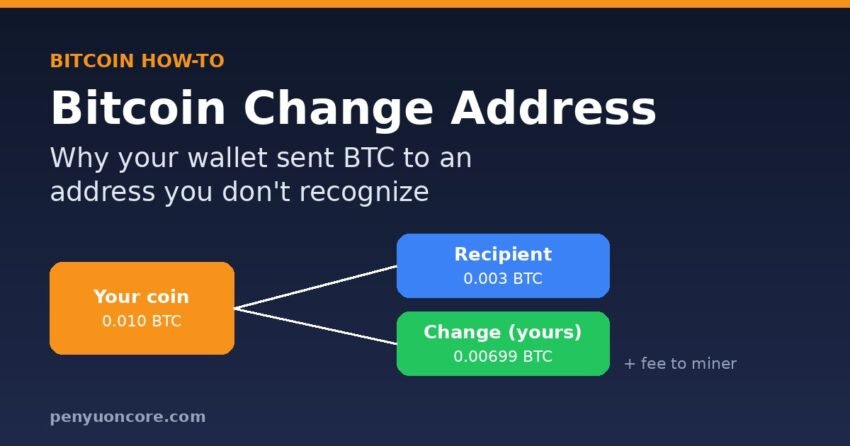
If you sent part of your BTC and then saw a block explorer showing the rest going to an address you don’t recognise, you are almost certainly looking at a Bitcoin change address. Bitcoin has to spend each coin in full, so your wallet sends the leftover back to a brand-new address that it controls. The money is still yours, and it should show in your wallet balance.
This guide covers why change addresses exist, how to confirm that the “unknown” output really belongs to you, and the rare cases where it doesn’t. It also covers the one situation where change addresses can actually trip you up: restoring a wallet from its seed phrase.
What is a Bitcoin change address?
Your wallet does not hold one balance the way a bank account does. It holds a set of separate coins called unspent transaction outputs, or UTXOs. The Bitcoin developer guide explains that a UTXO can only be spent once, so the full value of every input you use has to go somewhere: to the recipient, back to you, or to the miner as the fee. “Few people will have UTXOs that exactly match the amount they want to pay, so most transactions include a change output.”
Think of paying for a $7 item with a $20 bill. You can’t tear off $7. You hand over the whole bill and get $13 back. On-chain, the “$13” is the change output. Wallets usually send it to a new address rather than the one you paid from, and the developer guide recommends exactly that, for privacy reasons.
A simple example
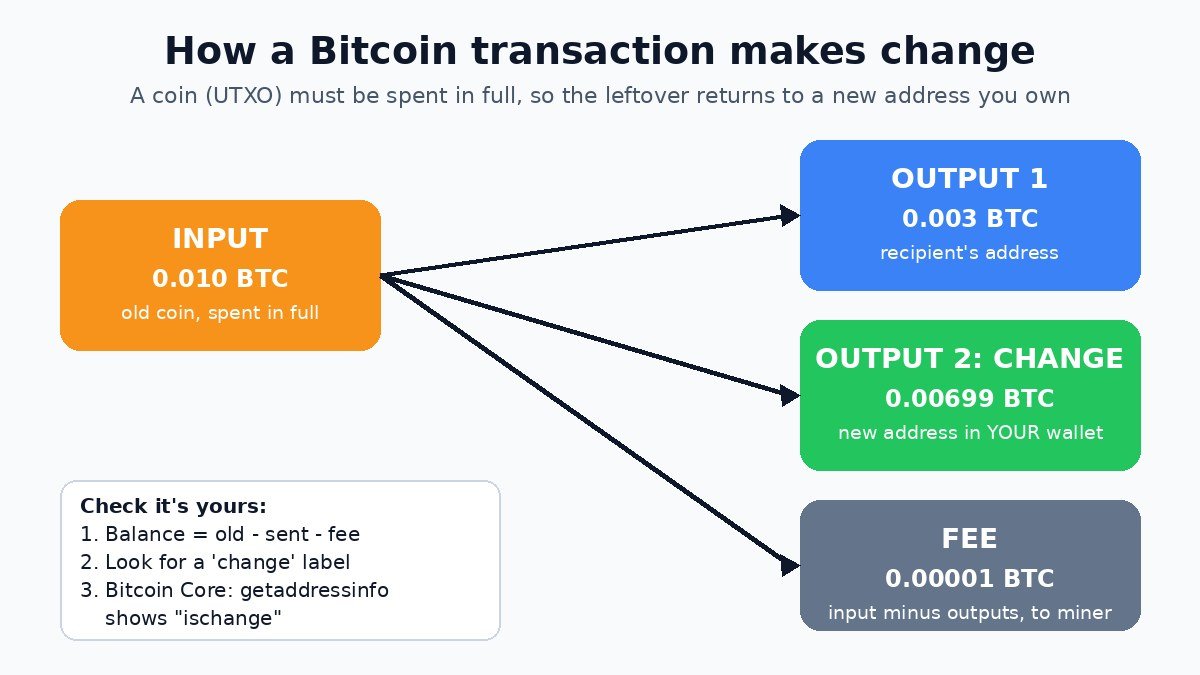
Say your wallet holds a single 0.010 BTC coin and you send 0.003 BTC to a friend. The transaction has one input and two outputs:
| Part | Amount | Where it goes |
|---|---|---|
| Input | 0.010 BTC | Your old coin, spent in full |
| Output 1 | 0.003 BTC | Your friend’s address |
| Output 2 (change) | 0.00699 BTC | A new address in your own wallet |
| Fee | 0.00001 BTC | The miner (input minus outputs) |
Note that the fee isn’t a separate line in the transaction. It’s whatever is left after the outputs are added up. That’s why wallets build the change output for you: if the change output were missing, the whole leftover amount would go to the miner as the fee.
Why your wallet uses a new address for change
Most modern wallets are hierarchical deterministic (HD) wallets, so one seed phrase generates every address. BIP44 splits those addresses into two chains: an external chain (index 0) for receiving addresses you share with other people, and an internal chain (index 1) for addresses that are “not meant to be visible outside of the wallet” and are used for change. In a derivation path, the change level is the second-to-last number. For example, m/44'/0'/0'/1/0 is the first change address of the first account.
The reason is privacy. If change went back to the address you paid from, anyone looking at the blockchain could easily tell which output was the payment and which was your remaining balance. In a Bitcoin Stack Exchange answer about this exact confusion, Bitcoin Core developer Pieter Wuille explains that the new address makes it “non-obvious to the rest of the world which is which”. He also notes that block explorers “do not know your wallet”, so they show a lower-level view that can look alarming.
There’s a limit to this privacy, though. Trezor’s guide notes that wallets return change to an address of the same format as the one you sent from. So if you pay a different address type, an observer can often guess which output is change. If you’ve had trouble sending to newer address formats, see our guide to the “bc1p address not supported” error.
How to check that the unknown address is your change
Follow these steps before you assume anything has gone wrong:
- Open the transaction in your wallet, not only in an explorer. Your wallet knows which addresses it owns, and most wallets show the net amount that left your balance (payment plus fee) rather than every output.
- Check that the balance adds up. Your new balance should be roughly your old balance minus the amount you sent and the fee. If it is, the “unknown” output is your change.
- Look for a change label. Many desktop wallets show change addresses in a separate list or colour on their Addresses tab. Trezor says Trezor Suite automatically generates change addresses and sends the remaining funds to a newly generated change address in your wallet.
- If you run Bitcoin Core, run
getaddressinfo <address>. According to the Bitcoin Core RPC docs, the output includes"ismine"(whether the address is yours) and"ischange"(whether it was used for a change output). - Compare amounts on an explorer. On a public explorer such as mempool.space, the payment output should match exactly what you typed in. The other output is usually the remainder.
When there is no change output at all
If you used “send max” or “send all”, or your coins happened to match the amount plus fee almost exactly, the transaction may have only one output. In that case nothing comes back to you. That’s normal too.
When the unknown output is not change
The checks above settle the question nearly every time. If your balance really did drop by more than you sent plus the fee, consider these possibilities:
- A service or co-signer fee. Some wallet setups add a fee output. For example, Electrum’s two-factor wallets pay fees to the co-signing service. Check your wallet’s documentation for any built-in fees.
- A wrong or swapped destination. Clipboard malware can replace a copied address with an attacker’s address. Always check the first and last several characters of the address on your hardware wallet’s screen before you confirm.
- A compromised seed or device. If transactions you never made are leaving your wallet, assume the seed is exposed. Move whatever remains to a new wallet with a new seed, created on a clean device.
Confirmed Bitcoin transactions can’t be reversed, so the fix is to stop any further loss, not to wait for the money to come back.
Change addresses and restoring a wallet
Change addresses cause real trouble in one situation: restoring from a seed phrase in different software. Wallets scan for used addresses until they reach a run of unused ones, called the gap limit. BIP44 sets it at 20. The Electrum FAQ uses the same default and warns that addresses beyond the gap limit “will not automatically be recovered from the seed”.
So if a restored wallet shows a lower balance than expected, the coins may sit on change addresses (or on a different derivation path or address type) that the new software hasn’t scanned. Before you panic, check that you picked the same address type and derivation path as the original wallet, and increase the gap limit if your software allows it. You don’t need to move any coins to do these checks.
Change outputs and stuck transactions
A change output is also useful when a payment is stuck. Because the change belongs to you, you can spend it in a new, higher-fee transaction that pulls the parent through. This is called child pays for parent, and Electrum’s FAQ notes that the sender can do it “if the transaction has a change output”. Our step-by-step child pays for parent guide walks through it. If your transaction has disappeared instead, read what to do when a Bitcoin transaction is dropped from the mempool.
Do change addresses matter for taxes?
Sending change back to yourself is not a payment to anyone. The IRS virtual currency FAQ (Q38) says a transfer from a wallet, address or account belonging to you to another one that also belongs to you is a non-taxable event. The IRS notes that these FAQs generally apply to transactions completed before 1 January 2025. The payment part of the transaction can still be a taxable disposal. So keep records of what you sent, and check current IRS or HMRC guidance, or ask a tax professional, for your own situation.
FAQ
Is a Bitcoin change address the same as my receiving address?
No. Both come from the same seed, but change addresses sit on the wallet’s internal chain and receiving addresses sit on the external chain. You normally never share a change address.
Can I turn off change addresses?
Some wallets have a setting for it. Electrum, for example, has a “use change addresses” option that is on by default. With it off, change goes back to the address you paid from. That makes your transactions easier to trace, and the Bitcoin developer guide recommends using new addresses for change.
Why does my wallet show a lower balance on the explorer?
An explorer usually shows one address, while your wallet adds up every address it owns, including change addresses. Trust your wallet’s total, and use the explorer to look at a single transaction.
Will my change be lost if I restore my seed in another wallet?
No. The coins stay on the blockchain. You may just need to choose the correct address type and derivation path, or raise the gap limit, so the new wallet finds them.
Disclaimer: This article is for general educational purposes only and is not financial, tax or legal advice. Always verify addresses and settings in your own wallet’s official documentation before you send funds.