

You hit “Confirm,” a script runs, or a test fires off a transaction, and back comes a short, confusing message: max fee per gas less than block base fee. It looks scary, but it is one of the easiest gas errors to understand and fix.
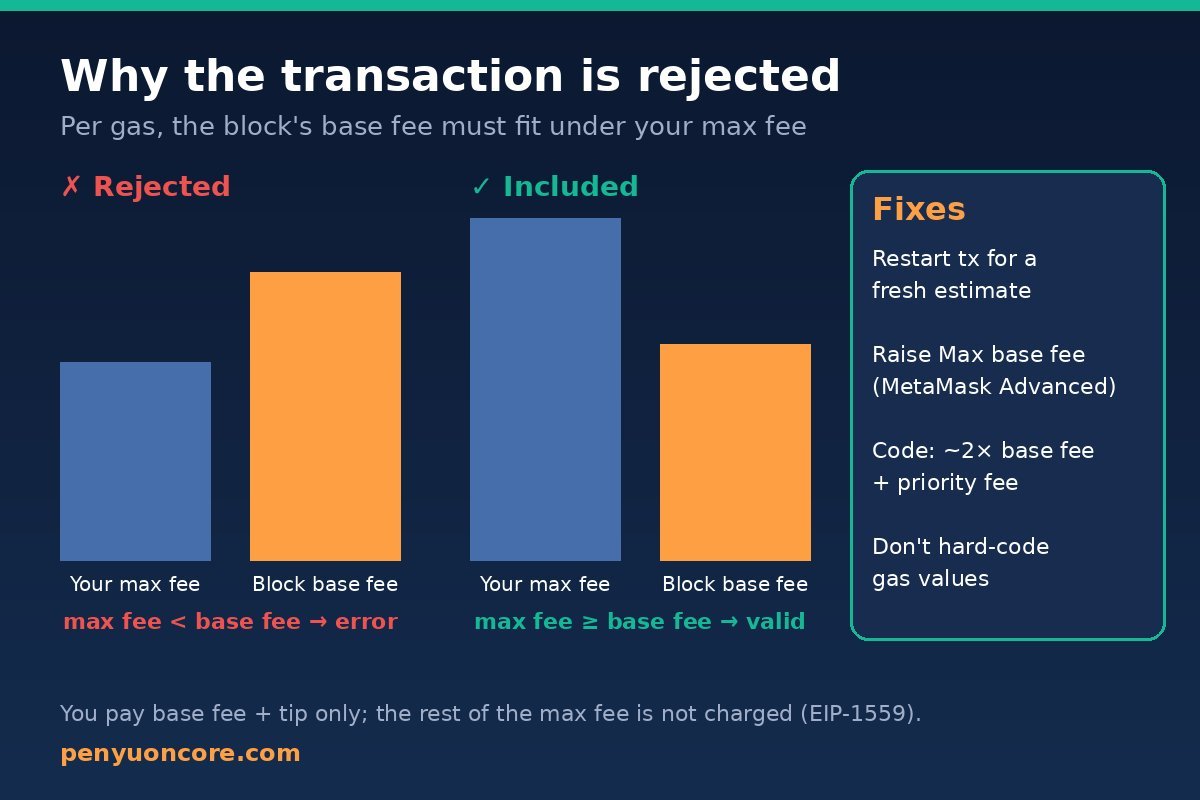
Quick answer: This error means the max fee per gas on your transaction is lower than the current block’s base fee, so the network won’t include it. To fix it, resend with a higher max fee. In MetaMask that’s the “Max base fee” field under Advanced. In code, take the latest base fee, give it plenty of headroom (for example 2× base fee plus your priority fee), and don’t hard-code a gas price.
What the Error Actually Means
Since EIP-1559, Ethereum and many EVM chains split the gas price into two parts:
- Base fee – set by the protocol for each block and burned. It goes up when blocks are busier than the target and down when they are quieter.
- Priority fee (tip) – an extra amount that goes to the block producer to put your transaction first.
Your transaction doesn’t pay a fixed price. Instead, it sets two ceilings: maxPriorityFeePerGas (the most you’ll tip) and maxFeePerGas (the most you’ll pay per gas in total). The EIP-1559 reference code has a hard rule, assert transaction.max_fee_per_gas >= block.base_fee_per_gas. If your ceiling is below the base fee, the transaction is not valid for that block.
The exact wording comes from go-ethereum (Geth), which most EVM chains are built on. Its core/error.go defines ErrFeeCapTooLow as “max fee per gas less than block base fee”, returned “if the transaction fee cap is less than the base fee of the block.” The full message often adds the numbers, like maxFeePerGas: X, baseFee: Y. Compare those two values and you have the diagnosis.
The good news: you only pay the base fee plus your tip, never your full max fee. The EIP-1559 spec computes the effective price as priority_fee + base_fee and refunds the difference. MetaMask’s gas guide also says the gap between max fee and (base fee + priority fee) is “refunded.” So raising the max fee only gives you headroom. It doesn’t make you overpay.
Why the Base Fee “Moved” Past Your Max Fee
Under EIP-1559 the base fee can change by up to 1/8 (12.5%) from one block to the next. The spec sets BASE_FEE_MAX_CHANGE_DENOMINATOR = 8, and MetaMask describes the same 12.5% step. A few busy blocks in a row add up fast. Simple math: 1.1256 ≈ 2.03, so six full blocks in a row can roughly double the base fee.
The usual causes:
- A stale estimate. A wallet or script read the fee, then waited (you left the confirm screen open, or a batch job queued) while the base fee rose.
- No headroom. Code that sets
maxFeePerGasto exactly the current base fee oreth_gasPricefails as soon as the next block is a little busier. - Hard-coded gas values. A fixed
maxFeePerGascopied from an old tutorial or a different chain. - A manual “Low” setting. Choosing a very low custom max fee in a wallet during a busy period.
- Local test networks and forks. A Hardhat or Anvil fork can start with a base fee very different from what your tests expect.
How to Fix It in MetaMask
MetaMask usually sets fees for you, so this error in a wallet often means a custom setting is too low or the fee went stale. Per MetaMask’s customize gas settings guide:
- Reject the stuck or failed request and start the transaction again so MetaMask fetches fresh fee data.
- On the confirmation screen, click the pencil icon next to the network fee.
- Pick Market or Aggressive instead of Low. Or open Advanced and raise Max base fee well above the current base fee. Leave the gas limit alone unless you know it’s wrong.
- If you saved a low custom setting as the default, change it. MetaMask notes that advanced gas settings are saved per network.
- Confirm promptly. Don’t leave the confirmation window open for long while the network is busy.
If an older transaction is already stuck as pending with a low fee, you’ll need to replace or cancel it with the same nonce. Our guide on “replacement transaction underpriced” explains the rules. And if a higher fee means your balance can’t cover it, see how to fix “insufficient funds for gas”.
How to Fix It in Code (ethers.js, viem, Hardhat, Foundry)
Developers see this error far more often, usually from eth_sendRawTransaction, eth_estimateGas or eth_call. In Geth’s state transition code, the fee-cap check runs while a transaction is executed, and that includes simulations. So a simulation that passes an explicit, too-low maxFeePerGas can fail with this message before anything is broadcast.
1. Let the library estimate, or add headroom yourself
- ethers.js v6:
provider.getFeeData()setsmaxFeePerGas = baseFeePerGas × 2 + maxPriorityFeePerGas. When the node doesn’t suggest a priority fee, it uses 1 gwei (see the source). - viem:
estimateFeesPerGasmultiplies the base fee by abaseFeeMultiplierthat defaults to 1.2, and a chain config can override it (source). If your transactions sit in a queue before they’re sent, a 20% buffer may be too thin, so consider raising it.
The safe pattern is the same in any language. Read the latest base fee right before signing, then set maxFeePerGas to a comfortable multiple of it plus your tip. Because of the refund, the extra headroom costs nothing if the base fee stays flat.
2. Don’t mix up legacy and EIP-1559 fields
Setting maxPriorityFeePerGas higher than maxFeePerGas causes a different Geth error (“max priority fee per gas higher than max fee per gas”). Keep max fee ≥ priority fee, and make sure max fee is also ≥ base fee.
3. Check local forks and test networks
- Hardhat: the Hardhat Network reference documents the
initialBaseFeePerGasconfig option and thehardhat_setNextBlockBaseFeePerGasRPC method for controlling the base fee in tests. - Foundry:
cast base-feeshows a block’s base fee, and Anvil accepts--block-base-fee-per-gasto set it locally.
Quick Diagnosis Table
| Where you see it | Most likely cause | Fix |
|---|---|---|
| MetaMask confirmation | Low/custom max base fee or stale estimate | Restart the transaction, choose Market/Aggressive or raise Max base fee |
| Script or bot (ethers, viem, web3) | maxFeePerGas set to exactly the current fee, or hard-coded | Fetch base fee just before signing; use ~2× base fee + tip |
| eth_estimateGas / eth_call | Explicit fee fields below the block’s base fee | Omit fee fields in the simulation or pass realistic values |
| Hardhat / Anvil fork tests | Forked base fee higher than your test’s fixed value | Set the base fee in config or derive fees from the latest block |
Does This Happen on Core?
Core is EVM-compatible and accepts the same transaction formats. A query of Core’s public RPC (rpc.coredao.org) on November 15, 2026 showed the latest blocks reporting a baseFeePerGas of 0, and eth_gasPrice suggested 60 gwei. With a zero base fee, any valid max fee clears the base-fee check. So if you get this exact error while you think you’re on Core, first make sure your wallet or script is really connected to Core (chain ID 1116) and not to Ethereum or a layer 2. Our guide to adding Core to MetaMask lists the correct network settings. Network parameters can change, so check the current values yourself before relying on them.
If your Core transaction is simply slow rather than rejected, see what to do when a Core transaction is pending in MetaMask.
FAQ
Did I lose money when I got this error?
Usually not. A transaction rejected for this reason isn’t included in a block, so it doesn’t spend gas. If it went through later, you paid the base fee plus tip at that time.
Will a higher max fee make me overpay?
No. Under EIP-1559 you pay the block’s base fee plus your priority fee, up to your max fee. The rest of the max fee is not charged.
Is this the same as “transaction underpriced”?
Not quite. “Underpriced” errors usually come from a node’s mempool rules, such as the minimum bump needed to replace a pending transaction. This error is specifically about your fee cap being under the block’s base fee.
How much headroom should I add?
There’s no official number. ethers.js v6 uses 2× the base fee plus the tip, and viem defaults to a 1.2× multiplier. Pick a buffer based on how long your transaction might wait before it’s included.
Bottom Line
“Max fee per gas less than block base fee” just means your fee ceiling was too low for the current block. Refresh the estimate, raise the max fee with sensible headroom (it’s refunded if unused), and stop hard-coding gas values. Most of the time, that’s all it takes.
Disclaimer: This article is for educational purposes only and is not financial, investment or tax advice. Always double-check network, address and fee details before signing any transaction.