
You can buy I bonds in a trust by opening a separate TreasuryDirect entity account registered to the trust, with one trustee acting as the account manager. That trust account gets its own $10,000-per-calendar-year I bond limit, even when a revocable trust uses the grantor’s Social Security Number, according to TreasuryDirect. Below is the full process, the exact registration wording TreasuryDirect expects, and the catches most people only find after they apply.
Everything here was checked against TreasuryDirect’s own pages and forms in November 2026. Treasury changes its procedures from time to time, so check the linked official pages before you act.
Can you hold I bonds in a trust? The short answer
Yes. TreasuryDirect lists “Trust” as one of its entity registration types, next to corporations, LLCs, partnerships, sole proprietorships and estates (see TreasuryDirect User Guide 292, “Learn More About Entity Accounts”). The trust account is a completely separate login from your personal account. It isn’t a linked sub-account like a minor account.
Since 1 January 2025, I bonds are sold only electronically, so a TreasuryDirect trust account is now the only way to buy new I bonds that the trust owns.
How the $10,000 limit works for I bonds in a trust
TreasuryDirect counts savings bond purchase limits by taxpayer ID. Its “How much can I spend/own?” page says each SSN or EIN can buy up to $10,000 in electronic I bonds (and another $10,000 in electronic EE bonds) every calendar year. The same page then adds the line that matters for trusts:
“If you have an individual account and an entity account in TreasuryDirect that use the same Social Security Number, you can purchase up to the limits in each of the 2 accounts.”
In practice:
- Revocable living trust using the grantor’s SSN: per TreasuryDirect, the trust account can buy up to $10,000 of I bonds a year on top of the grantor’s personal $10,000.
- Trust with its own EIN (common for irrevocable trusts): the EIN has its own separate $10,000 limit.
- One registration per account: each entity account can hold only one registration, so every trust needs its own account.
Some third-party guides say a trust that uses the grantor’s SSN shares the grantor’s limit. TreasuryDirect’s own wording says the opposite, so go by the official page, and keep a screenshot of it in case the rule changes.
At the time of writing, I bonds issued from 1 November 2026 to 30 April 2027 earn a composite rate of 5.51%, including a 1.40% fixed rate. The rate resets every May 1 and November 1.
Step-by-step: open a TreasuryDirect trust account
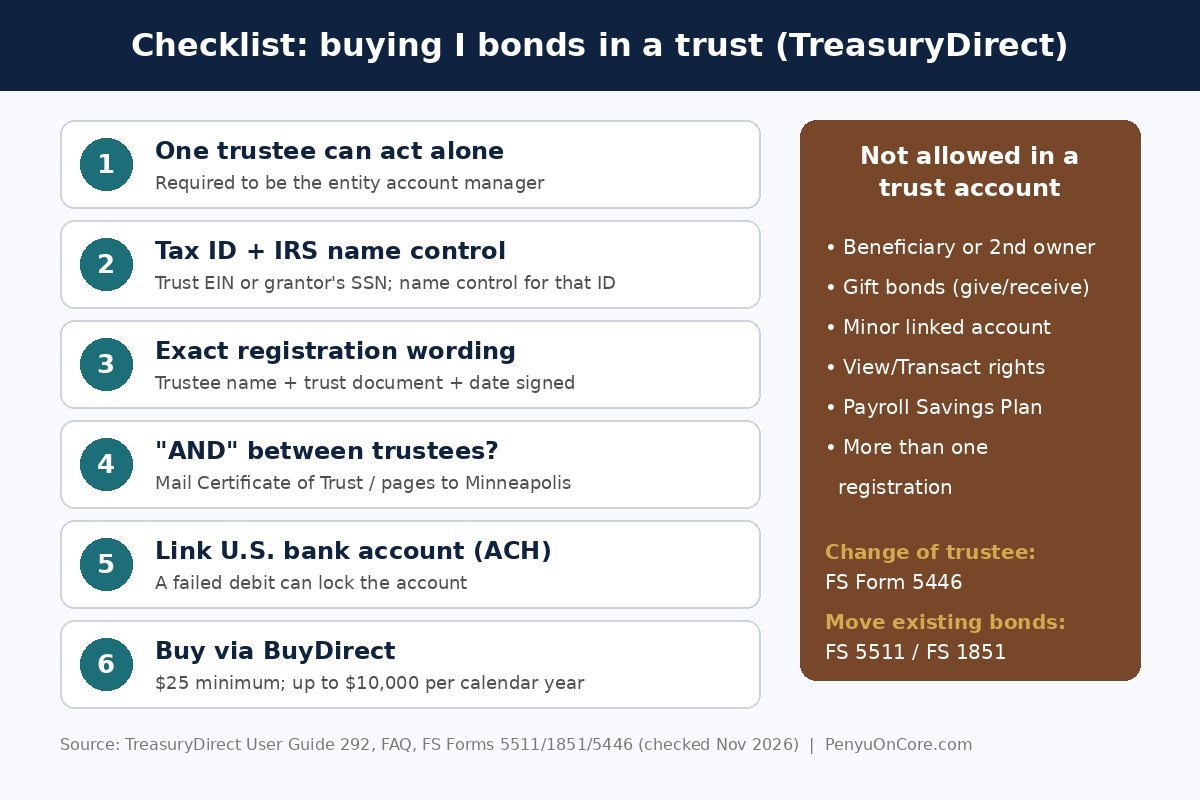
1. Confirm one trustee can act alone
An entity account must be opened and run by a single entity account manager who “can legally act alone.” TreasuryDirect states plainly that if no single person can act alone, you can’t open an entity account. Read the trustee powers section of your trust document before you start.
2. Gather what the application asks for
The TreasuryDirect FAQ lists what you need:
- The trust’s EIN, or the grantor’s SSN
- The trust’s IRS name control (usually the first four characters of the name the IRS has on file for that tax ID)
- A U.S. bank routing and account number that accepts ACH debits and credits
- An email address and a U.S. address of record
The account manager must be 18 or older and have a valid SSN.
3. Write the registration exactly right
This is where most applications go wrong. Under 31 CFR Part 363 and the User Guide, the registration has to identify:
- the document that created the trust (for example, a trust agreement or declaration of trust),
- the date it was signed,
- the name of a trustee who can act alone (if the trustees are individuals, the account manager must be named), and
- anything else needed to tell this trust apart from any other.
TreasuryDirect’s own examples include “John Doe, Trustee under Declaration of Trust dated January 1, 2001” and “John Doe or Sarah Jones, Trustees under Agreement with Jane Doe dated January 1, 2001.” Approved abbreviations such as CO-TR (co-trustee) are allowed because space is limited.
4. Watch out for “AND” between trustee names
If your trust’s legal name joins co-trustees with “AND,” TreasuryDirect will ask for a Certificate (Summary) of Trust, or the relevant trust pages, showing that either trustee can act independently. Those pages are the name and date page, the trustee page(s), the signature page(s) and any amendments that limit trustee authority, mailed to Treasury Retail Securities Services, PO Box 214, Minneapolis, MN 55480-0214. If your document says “or,” you usually skip this step.
5. Link the bank account and buy
Once the account is open, buy through BuyDirect like you would in a personal account. The minimum is $25, and above that any amount to the penny. Double-check the bank details first. A failed ACH debit is one of the quickest ways to get the account locked (and unlocking it takes time).
What a trust account can’t do
User Guide 292 lists the entity account restrictions. A trust account cannot:
- name a second owner or a beneficiary on its bonds (the trust document already decides who inherits),
- buy or receive gift bonds, so the I bond gift box strategy doesn’t work here,
- open a minor linked account,
- grant View or Transact rights to another person, or
- be funded through a Payroll Savings Plan.
Moving I bonds you already own into a trust
Existing bonds go in by transfer (electronic) or reissue (paper), not by a new purchase. One thing to plan for: the TreasuryDirect FAQ says the purchase amount of securities you transfer counts toward the recipient’s annual purchase limit in the year they’re delivered. If you transfer electronic I bonds into the trust account, they may use up some or all of the trust’s $10,000 for that year, so time big transfers with that in mind and confirm with TreasuryDirect (844-284-2676) first.
- Electronic bonds in your personal account: open the trust account, then submit FS Form 5511 (TreasuryDirect Transfer Request). Each savings bond moves in full, because bonds can’t be split. You sign in front of a certifying officer at a financial institution, usually with a Medallion or signature-guarantee stamp. The form says notary certification is not acceptable.
- Paper bonds: send the unsigned bonds with FS Form 1851. Treasury reissues EE and I bonds into the trust’s TreasuryDirect account only in electronic form.
Tax catch: Form 5511’s Tax Liability Notice warns that moving bonds into a trust can make you report all the deferred interest at that point. The exception is when the grantor trust rules treat you as the owner of that part of the trust, which is typical for a revocable trust you can take back. In that case you can keep deferring the interest until you cash the bonds or they mature. You’ll certify which situation applies on the form. If the trust is irrevocable, talk to a tax professional before you transfer anything.
When the trustee changes or dies
Only the entity account manager can transact in the account. To switch to a co-trustee or successor trustee, the current and/or new manager completes FS Form 5446 and attaches legal evidence such as a copy of the trust, a resignation letter or a death certificate. TreasuryDirect doesn’t return documents, so send copies only. Name a successor trustee in the trust document now, so whoever takes over isn’t stuck later.
Tax reporting follows the taxpayer ID on the account, so the 1099-INT for redeemed trust bonds is issued to the trust’s EIN or the grantor’s SSN. Our TreasuryDirect 1099 guide shows where to find it.
Is it worth buying I bonds in a trust?
For many households the main appeal is an extra $10,000 a year of inflation-linked, state-tax-free savings, plus bonds that pass under the trust’s terms rather than through probate. The trade-offs are paperwork, the one-manager rule, and a 12-month lockup: you can’t cash an I bond in its first year, and cashing before five years costs the last three months of interest. If you only want a payable-on-death arrangement, it’s simpler to add a beneficiary to your personal TreasuryDirect account.
FAQ
Does a revocable trust need its own EIN to buy I bonds?
No. TreasuryDirect accepts the trust’s EIN or the grantor’s SSN for a trust account. Whether your trust needs an EIN for tax purposes is a separate IRS question for your tax adviser.
Can my spouse and I each buy I bonds in our joint trust?
The trust gets one entity account and one registration. That account’s $10,000 limit is on top of each spouse’s own personal $10,000 limit.
Can I open the trust account if both trustees must sign together?
No. TreasuryDirect requires one account manager who can legally act alone. If your trust requires joint action, an entity account isn’t available.
Can the trust cash I bonds early?
Yes, on the same terms as anyone else: after 12 months, with a three-month interest penalty before year five. Our guide to partial redemption of I bonds explains how to cash only part of a bond.
Disclaimer: This article is for general education only and is not financial, legal or tax advice. Trust and tax rules depend on your documents and circumstances. Consult a qualified professional before acting.