
Short answer: To stake Bitcoin on Core, open the official Core staking site, connect an EVM wallet such as MetaMask (for your CORE rewards), pick an active validator, choose BTC, connect a supported Bitcoin wallet like Xverse or Unisat, and lock at least 0.01 BTC for at least 5 days. Your BTC never leaves the Bitcoin blockchain: it sits in a time-locked output you control, and after the lock expires you must click Redeem to make it spendable again.
Below: each step, the checks to do before signing, claiming rewards, redeeming, and common fixes. All rules were checked against Core’s official BTC staking guide in November 2026. For the theory, see our Core DAO and Satoshi Plus explainer.
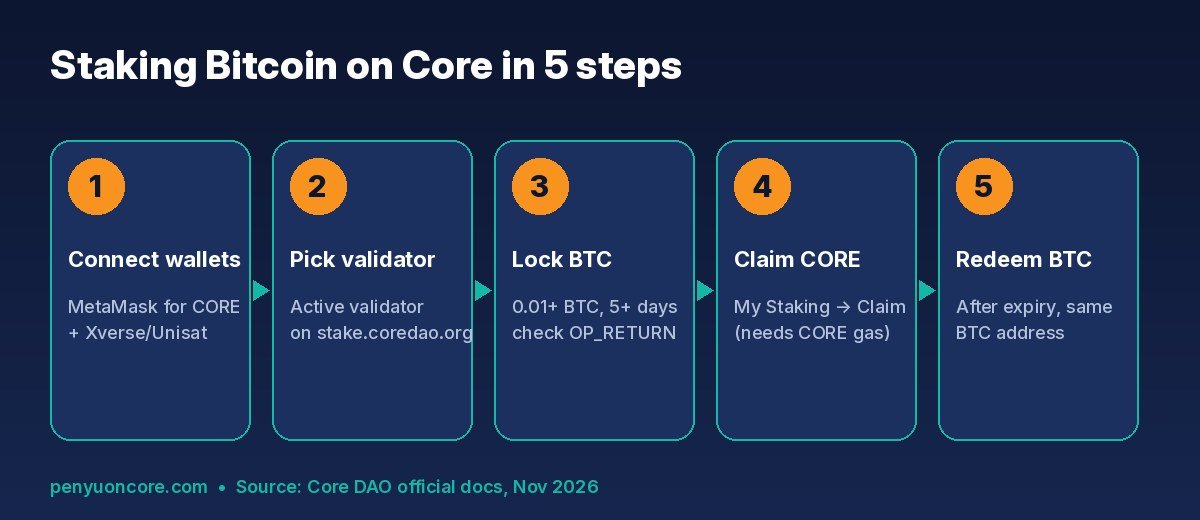
The Bitcoin staking flow on stake.coredao.org, from connecting wallets to redeeming your BTC.
How Bitcoin Staking on Core Works (in Plain English)
Core’s BTC staking does not send your bitcoin to a bridge, exchange or smart contract. Instead, you sign a normal Bitcoin transaction that uses CLTV (CheckLockTimeVerify), a native Bitcoin feature that makes an output unspendable until a set date. According to Core’s documentation on how BTC staking works, the transaction must include two things:
- A timelocked output holding the BTC you are staking.
- An OP_RETURN output containing the Core validator you are delegating to and the Core address that should receive your CORE rewards.
Core’s relayers detect valid staking transactions and register them on Core. Rewards are paid in CORE, not BTC, and Core’s BTC staking FAQ says that even if a validator or the Core chain went down, you could still redeem your BTC on the Bitcoin network once the timelock expires.
Before You Start: What You Need
A supported Bitcoin wallet (desktop)
Core’s guide lists browser extensions such as Xverse, Unisat and OKX Wallet, and tells you to check stake.coredao.org for the current list. You need the desktop browser extension. Mobile and most hardware wallets are not supported; the guide mentions Element Wallet (mobile) and limited Ledger versions as exceptions, while the FAQ says hardware wallets are unsupported, so check the site. Supported address types are Legacy (1…), Nested SegWit (3…), Native SegWit (bc1q…) and Taproot (bc1p…).
A Core wallet address for rewards
CORE rewards go to whichever Core (EVM) wallet you connect. If you have not set one up, follow our guide to add Core to MetaMask. You will also need a little CORE in that wallet to pay gas when you claim rewards.
Enough BTC for the stake plus fees
You pay normal Bitcoin network fees twice: once to stake and once to redeem. Core’s guide warns that if you stake for less than a month, you should have at least 0.05 BTC, because fees during congestion could cost more than the rewards you earn.
Core BTC Staking Rules at a Glance
| Rule | Official staking website | Direct script (advanced) |
|---|---|---|
| Minimum BTC | 0.01 BTC (excluding fees) | No minimum |
| Minimum lock time | 5 days | No lockup requirement (docs recommend 24 hours) |
| Reward token | CORE | CORE |
| Rewards eligibility | After a full round (00:00 to 23:59:59 UTC) | After a full round (00:00 to 23:59:59 UTC) |
| Unlocking | Manual Redeem after expiry | Manual redeem script after expiry |
Source: Core’s BTC staking FAQ. This guide covers the website method.
How to Stake Bitcoin on Core: Step by Step
Step 1: Connect your Core wallet
Go to stake.coredao.org (type it yourself; never use a link from a DM or ad). Click Validators in the header, then Connect Wallet, and approve the connection in MetaMask or your chosen Core wallet.
Step 2: Choose an active validator
Scroll the validator list and click the name of an active validator to open its details page. Core’s docs suggest comparing uptime, commission and reputation, not just today’s reward rate.
Step 3: Click Stake, select BTC and connect your Bitcoin wallet
On the validator page, click Stake, choose BTC, then pick your Bitcoin wallet (for example Unisat or Xverse) and approve the connection.
Step 4: Enter the amount, lock time and fee speed
Enter the amount (0.01 BTC minimum on the website) and set the lock time. The default is about one month ahead. Then choose a fee priority. Your BTC is inaccessible until that date, so Core suggests starting with a shorter lock.
Step 5: Verify before you sign
Before approving in your Bitcoin wallet:
- Check for an OP_RETURN output. There may be two or three outputs, but the official guide says at least one must be OP_RETURN. If it is missing, abort.
- Use “Verify the BTC Staking Address”. This button opens an independent check so you are not blind-signing.
- Expect a new-looking address. The staking address shown in your wallet prompt can differ from your usual BTC address. Core says it is derived from your own wallet keys.
Step 6: Confirm and track the transaction
Core says recognition takes roughly six Bitcoin confirmations (about an hour), and staking becomes active from the next round at 00:00 UTC. Check it under your wallet menu, then My Staking and the BTC records tab.
How to Claim Your CORE Rewards
Rewards are not sent automatically. Per Core’s redeem and claim guide, open My Staking, click Claim next to BTC Staking Rewards and sign the transaction in MetaMask. You need a little CORE in that wallet for gas.
Optional: Dual Staking to boost BTC rewards
If you also stake CORE from the same Core address, you may qualify for a higher BTC reward tier. Core’s Dual Staking docs describe tiers based on how much CORE you stake per BTC; thresholds can change, so check the calculator on the staking site. If you add CORE after your BTC is already staked, Core says to wait until the next 00:00 UTC and then claim rewards once to activate the new tier. Our how to stake CORE guide covers the CORE side.
How to Redeem Your BTC After the Timelock Expires
When the lock date passes, your BTC does not return to your normal balance on its own. It stays idle in the staking address until you redeem it:
- Open My Staking and click the BTC column.
- Find the validator row showing Expired under Redeem Time and click Redeem.
- Connect the same Bitcoin wallet address you used to stake.
- Set the receiving address (it can be different from the staking address), choose a fee speed and click Create Transaction.
- Sign in your Bitcoin wallet and confirm the BTC arrives.
If you only want to switch validators, Core’s docs say you can redelegate without redeeming. Be aware that changing the validator for BTC staking interrupts staking and loses that day’s rewards.
Common Problems and Fixes
My staked BTC is not showing in my wallet
Core says some wallets do not display timelocked BTC yet, and confirmations can take hours when the network is busy. Check My Staking on the staking site, or search the staking address on mempool.space.
My staking transaction is stuck or unconfirmed
Low fees cause delays, sometimes of days. Core’s docs suggest competitive fees, Replace-By-Fee (RBF) to bump the fee, or a transaction accelerator.
The Redeem button does nothing
Make sure the lock has actually expired and that you connected the same BTC address that created the stake. Core’s FAQ suggests clearing your browser cache and retrying, then asking on the Core Dev Forum if it still fails.
My stake is not appearing on Core
Paste your transaction hash into the BTC staking transaction decoder on Core Scan (linked from the official guide) to check its status, OP_RETURN output and validator.
Risks to Understand
- Liquidity risk: your BTC is frozen until the lock date, whatever happens to prices.
- Reward risk: rewards are paid in CORE, and their value can fall. Reward rates change daily and are not guaranteed.
- Fee risk: on small or short stakes, Bitcoin fees can wipe out the rewards.
- Phishing risk: fake staking sites target this exact flow. Always verify the URL and the OP_RETURN output, and see our crypto security guide.
- Tax: staking rewards may be taxable where you live; check with a tax professional.
FAQ
Does my Bitcoin leave my wallet when I stake on Core?
No. It is locked in a Bitcoin timelock output tied to your keys, not bridged or held by a third party.
What is the minimum to stake BTC on Core?
On the official website it is 0.01 BTC (plus fees) with a 5-day minimum lock. The command-line script has no minimum, but it is meant for technical users.
When do I start earning?
After the transaction confirms and a full staking round (00:00 to 23:59:59 UTC) completes. Rewards can then be claimed daily.
Can I unstake early?
No. The timelock is enforced by Bitcoin itself, so you cannot spend the BTC before the date you chose.
Bottom Line
Connect both wallets, pick an active validator, lock at least 0.01 BTC, verify the OP_RETURN output before signing, claim CORE from My Staking, and redeem your BTC manually once the lock expires. Start small and short.
Disclaimer: This article is for educational purposes only and is not financial, tax or investment advice. Crypto assets are volatile and you can lose money. Do your own research and consider speaking to a qualified professional before staking.