
Quick answer: You add a beneficiary in TreasuryDirect by editing the registration of each security, not by filling in one beneficiary field for the whole account. Log in (through ID.me since 28 October 2026), go to ManageDirect > Edit a registration, pick the bonds or bills, and choose (or create) a registration that names you with a payable-on-death (POD) beneficiary. Each registration names one individual, and you can edit up to 50 securities at a time.
This guide walks through the steps, the rules from Treasury’s regulations, the cases where the edit won’t work (Gift Box bonds, entity accounts, converted paper bonds with a co-owner) and what your beneficiary actually has to do after you die.
Why a TreasuryDirect beneficiary matters
TreasuryDirect holdings follow federal rules (31 CFR Part 363), not your will. Under 31 CFR 363.20, a security registered to you with a beneficiary “becomes the property of the surviving beneficiary, despite any attempted testamentary disposition or any applicable local law to the contrary.” If a security is in your name alone, it goes to your estate instead.
That difference can be expensive. TreasuryDirect’s death of a savings bond owner page says that if an estate holds Treasury securities (including savings bonds) worth more than $100,000 in redemption value at the date of death, a court must administer the estate. A named beneficiary or surviving co-owner takes the bond directly, and it does not become part of the estate.
The three registration types
The regulation allows three forms of registration for individual accounts. Here is how they compare:
| Registration | Example format | During your lifetime | When you die |
|---|---|---|---|
| Single owner | John Doe | You control everything | Goes to your estate |
| Owner with beneficiary | John Doe POD Jane Doe | Beneficiary has no ownership rights; you can change or remove them without consent | Belongs to the surviving beneficiary |
| Primary owner with secondary owner | John Doe with Joseph Doe | Secondary owner has no view/transact rights unless you grant them; you can remove them | Belongs to the survivor |
The formats come from 31 CFR 363.20, which also requires a first name, last name and a valid taxpayer identification number (usually a Social Security number) for every person named. If the beneficiary dies before you, the security goes back to your estate, so review your registrations after any death in the family.
How to add a beneficiary in TreasuryDirect, step by step
These steps follow TreasuryDirect’s official “How Do I…?” help page.
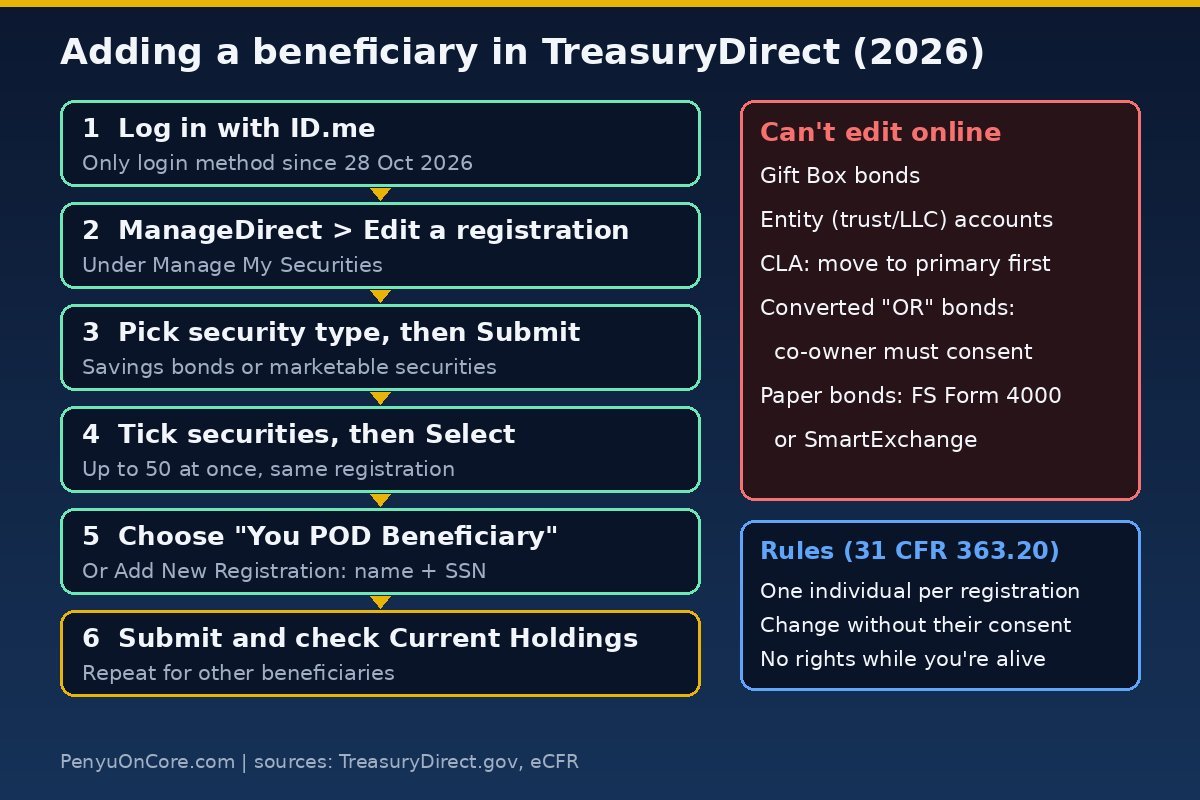
Step 1: Log in with ID.me
According to TreasuryDirect’s ID.me FAQ, ID.me became available on 13 September 2026 and became the only way to log in on 28 October 2026. If you never linked your account, your holdings are still safe, but you need to finish the ID.me setup before you can edit anything. Each person needs their own ID.me Wallet and their own email address. Spouses can’t share one.
Step 2: Open the registration editor
- From your primary TreasuryDirect account, click the ManageDirect tab.
- Under Manage My Securities, click Edit a registration.
- Choose the security type (for example, savings bonds or Treasury bills) and click Submit.
Step 3: Select the securities
On the Summary page, tick the securities you want to change and click Select. TreasuryDirect lets you move up to 50 securities to the same registration in one pass.
Step 4: Choose or create the beneficiary registration
On the Detail page, open the drop-down and pick the registration that names your beneficiary. If it doesn’t exist yet, click Add New Registration, choose the Beneficiary type, enter yourself as the first-named registrant and the beneficiary’s name and SSN as the second. TreasuryDirect then sends you back to the Detail page with the new registration in the list. You can also build registrations ahead of time under ManageDirect > Update my Registration List.
Step 5: Submit and check
Click Submit. Then open Current Holdings and confirm each security shows the POD registration. Securities you buy later can use the same registration, but you have to pick it at purchase or edit the security afterwards.
Splitting holdings between several beneficiaries
The regulation describes the owner-with-beneficiary form as you plus “another individual,” so each security carries one beneficiary, and there are no percentage splits or contingent beneficiaries. To divide holdings, give different securities different registrations. For example, you might register some bonds “you POD Child A” and others “you POD Child B.” If a beneficiary dies first, that security reverts to your estate until you change it.
The beneficiary has to be an individual. Entity accounts (trusts, companies and the like) can’t name a secondary owner or beneficiary at all, because every security in an entity account carries the entity’s name.
When you can’t edit the registration online
- Gift Box bonds. TreasuryDirect says you can’t edit savings bonds held in your Gift Box. The registration is set when you buy the gift. If you’re still holding a gift bond, see our guide to the I bond Gift Box.
- Conversion Linked Account (CLA) securities. You have to move these to your primary account or another linked account first.
- Converted paper bonds with a co-owner (“OR”). These become “restricted securities.” You can’t change the registration until the other co-owner consents. The consent goes through FS Form 5446, or a death certificate is needed if the co-owner has died.
- Paper bonds you still hold. FS Form 4000 (Revised April 2026) lets the owner add, change or remove a beneficiary through SmartExchange or by requesting a reissue. Reissued EE and I bonds come back electronic, in TreasuryDirect. Converting is often simpler. Our guide to converting paper savings bonds to electronic covers it. As of 19 November 2026, the TreasuryDirect homepage warns that paper-to-electronic conversions can take nine months or longer.
Beneficiary vs. secondary owner: which one?
Choose a beneficiary if you want the person to inherit but have no say while you’re alive. If you grant it, they can get View rights to a marketable security, and only view rights. Choose a secondary owner if you want someone to be able to help run the holding. You can give a secondary owner View/Transact rights, which let them transfer the security and change maturity or interest payment destinations from their own TreasuryDirect account. You can revoke those rights or remove the secondary owner at any time. On your death, the security goes to the survivor under either option.
What your beneficiary does after you die
Under 31 CFR 363.20, the beneficiary has to provide proof of the owner’s death. If they already have a TreasuryDirect account, the security is transferred into it. If not, they can open one. For savings bonds there’s a third route: they can request redemption and give ACH (direct deposit) instructions for the payment. For electronic holdings, TreasuryDirect’s death-of-owner page tells survivors to contact TreasuryDirect, which will put a hold on the account and explain the next steps.
Without a surviving beneficiary or co-owner, the estate usually uses FS Form 5394. It covers estates that have been through probate and closed, or estates settled under a state small-estate procedure, and it needs certified death certificates for every deceased registrant. TreasuryDirect’s homepage currently warns that mail requests are delayed. That’s one more reason to set the POD registration while you can still do it online in minutes.
If you’re tidying up your account anyway, also check your linked bank. Our guide to changing your TreasuryDirect bank account covers the 2026 process.
FAQ
Does my beneficiary need a TreasuryDirect account to be named?
No. You need their full name and taxpayer ID number (SSN). They only need an account, or a redemption request for savings bonds, when they claim after your death.
Can I name a trust as beneficiary?
Not in an individual registration. The beneficiary must be an individual, and entity accounts can’t name beneficiaries. A trust would need its own entity account or another estate-planning route.
Do I need my beneficiary’s consent to change or remove them?
No. 31 CFR 363.20 says the owner can remove or change the beneficiary without the beneficiary’s consent.
Can I add a beneficiary to Treasury bills and notes, not just I bonds?
Yes. TreasuryDirect says both electronic savings bonds and Treasury marketable securities can be registered with a beneficiary. Pick the security type in Step 2.
Does adding a beneficiary affect my taxes?
Adding a POD beneficiary doesn’t change who owns the security while you’re alive. For tax questions after a death, TreasuryDirect points to IRS Publications 550, 17 and 559, or a tax adviser.
Disclaimer: This article is general information, not financial, legal or tax advice. TreasuryDirect rules and screens can change, so check the linked official pages or a qualified professional before acting.